








在 javascript 中,fetch api 本身不直接提供请求数据预转换的内置选项,但可以通过封装函数或自定义 fetch 拦截器来实现。核心做法是:在发起请求前,将原始数据(如对象)序列化为特定格式(如 json 字符串、url 编码表单等),并设置正确的 content-type 头。这样,服务器就能接收到符合预期的数据格式。

如何将对象转换为 JSON 字符串并发送?
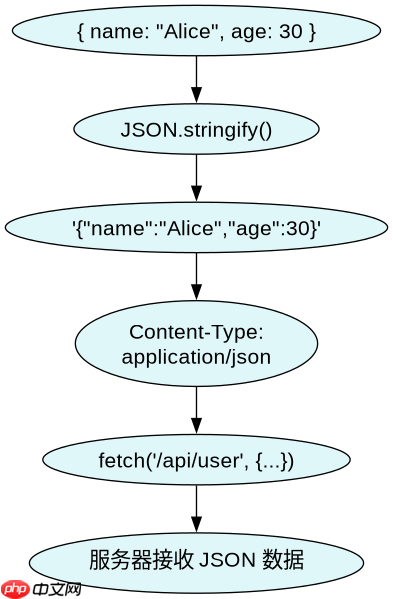
要将 JavaScript 对象转换为 JSON 字符串并发送,需使用 JSON.stringify() 方法对数据进行序列化,并在 fetch 调用中显式设置 headers 中的 Content-Type 为 application/json。这确保了服务器端能正确解析 JSON 格式的请求体。
const data = { name: "Alice", age: 30 };

fetch('/api/user', {
  method: 'POST',
  headers: {
    'Content-Type': 'application/json'
  },
  body: JSON.stringify(data)
})
.then(response => response.json())
.then(result => console.log(result));
上述代码将 data 对象转换为 JSON 字符串 '{"name":"Alice","age":30}',并通过 POST 请求发送到 /api/user 端点。服务器收到后,可根据 Content-Type 自动反序列化该 JSON 数据。
立即学习“Java免费学习笔记(深入)”;

使用Atmosphere构建通过WebSocket、SSE、gRPC、WebTransport、MCP、A2A和AG-UI流传输的JVM代理网关,并带有治理钩子。
如何将对象转换为 URL 编码表单数据?
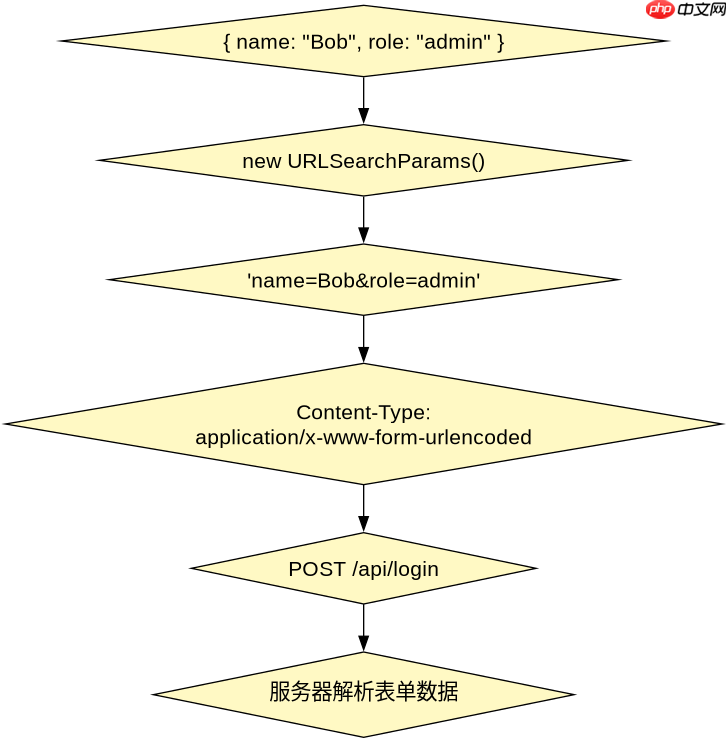
若需将对象转换为 URL 编码的表单数据(如 application/x-www-form-urlencoded),可使用 URLSearchParams 类。它会自动处理键值对的编码和拼接,适合传统表单提交场景。
const data = { name: "Bob", role: "admin" };
const params = new URLSearchParams(data);

fetch('/api/login', {
  method: 'POST',
  headers: {
    'Content-Type': 'application/x-www-form-urlencoded'
  },
  body: params.toString()
})
.then(response => response.text())
.then(result => console.log(result));
此代码将 data 对象转换为 'name=Bob&role=admin' 格式的字符串,并通过 POST 请求发送。服务器端通常使用框架(如 Express 的 body-parser)自动解析此类表单数据。
当请求体包含嵌套对象时,JSON 序列化会如何处理?
当请求体包含嵌套对象时,JSON.stringify() 会递归地将整个结构序列化为合法的 JSON 字符串,保留层级关系。例如,嵌套对象会被转换为内嵌的 JSON 对象,确保数据结构完整传递到服务器。
const complexData = {
  user: {
    name: "Charlie",
    preferences: { theme: "dark", lang: "en" }
  }
};

fetch('/api/settings', {
  method: 'PUT',
  headers: { 'Content-Type': 'application/json' },
  body: JSON.stringify(complexData)
});
执行后,请求体变为:'{"user":{"name":"Charlie","preferences":{"theme":"dark","lang":"en"}}}'。
服务器端可通过 JSON 解析库还原出完整的嵌套结构,无需额外预处理。


















