








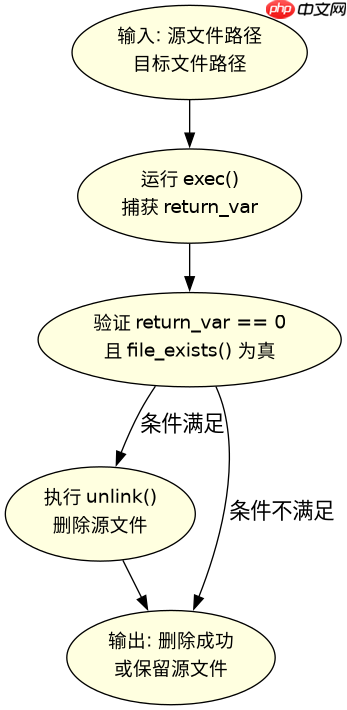
在php中实现转码后自动删除源文件,核心做法是在调用转码函数(如ffmpeg)的进程结束后,立即执行`unlink()`函数。具体操作是:先获取转码命令的执行结果,确认返回状态码为0(表示成功),再传入原文件路径进行删除;若转码失败或发生异常,则跳过删除步骤以保留原始数据。

exec()执行FFmpeg时如何判断成功并触发删除
当使用exec()或shell_exec()调用外部工具进行视频转码时,必须检查返回值以确定操作是否成功。只有当命令执行成功且输出文件存在时,才应调用unlink()删除源文件。如果直接删除而不检查结果,一旦转码中途失败,源文件将永久丢失。
$src = 'input.mp4';
$dst = 'output.mp4';
$cmd = sprintf('ffmpeg -i %s %s 2>&1', escapeshellarg($src), escapeshellarg($dst));
$return_var = 0;
$output = array();
exec($cmd, $output, $return_var);

if ($return_var === 0 && file_exists($dst)) {
    if (unlink($src)) {
        echo "Source deleted successfully.";
    } else {
        echo "Failed to delete source file.";
    }
} else {
    echo "Transcoding failed or output missing. Source kept.";
}
使用proc_open()处理大文件转码时的资源清理策略
对于大型媒体文件,推荐使用proc_open()以便实时监控进度和捕获更详细的错误信息。在这种模式下,同样需要在进程完全退出且状态码正常后,再执行文件删除逻辑。这种方式能更好地处理超时或中断情况,确保只有在转码真正完成后才移除源文件。

立即学习“PHP免费学习笔记(深入)”;

$descriptors = array(
    0 => array("pipe", "r"),
    1 => array("pipe", "w"),
    2 => array("pipe", "w")
);
$pipes = array();
$process = proc_open('ffmpeg -i input.mp4 output.mp4', $descriptors, $pipes);

if (is_resource($process)) {
    fclose($pipes[0]);
    $stdout = stream_get_contents($pipes[1]);
    $stderr = stream_get_contents($pipes[2]);
    fclose($pipes[1]);
    fclose($pipes[2]);
    $status = proc_close($process);

    if ($status === 0 && file_exists('output.mp4')) {
        unlink('input.mp4');
        echo "Process completed and source removed.";
    } else {
        echo "Process failed. Source retained.";
    }
}
转码成功后unlink()返回布尔值false的可能原因
即使转码成功,unlink()仍可能因权限不足、文件被占用或路径错误而返回false。此时应通过error_get_last()获取具体错误信息,避免静默失败导致的数据不一致。建议在删除前再次检查文件是否存在,并使用chmod()调整权限以确保可写性。



















