在 linux 中通过源码编译 nginx 开启 rewrite 模块,需要在执行 ./configure 时添加 --with-http_rewrite_module 参数。该模块默认通常已启用,但显式指定可确保功能生效,从而支持基于正则表达式的 url 重写和重定向。

如何验证当前 Nginx 是否包含 rewrite 模块
要确认编译后的 Nginx 二进制文件是否包含 rewrite 模块,可以使用 -V 参数(大写)运行 Nginx 命令。这会输出详细的配置信息,包括所有已编译的模块列表。如果输出中包含 --with-http_rewrite_module,则说明模块已存在。

nginx -V
假设你已经在 /usr/local/nginx/sbin/nginx 安装了 Nginx,运行上述命令后,你会看到类似如下的输出片段:
nginx version: nginx/1.24.0
built by gcc 11.3.0 (Ubuntu 11.3.0-1ubuntu1~22.04.1)
... configure arguments: --prefix=/etc/nginx --sbin-path=/usr/sbin/nginx --modules-path=/usr/lib64/nginx/modules --conf-path=/etc/nginx/nginx.conf --error-log-path=/var/log/nginx/error.log --http-log-path=/var/log/nginx/access.log --pid-path=/var/run/nginx.pid --lock-path=/var/run/nginx.lock --user=nginx --group=nginx --with-http_ssl_module --with-http_v2_module --with-http_realip_module --with-http_addition_module --with-http_sub_module --with-http_gunzip_module --with-http_gzip_static_module --with-http_random_index_module --with-http_secure_link_module --with-http_stub_status_module --with-http_auth_request_module --with-http_xslt_module=dynamic --with-http_image_filter_module=dynamic --with-http_geoip_module=dynamic --with-threads --with-stream --with-stream_ssl_module --with-stream_ssl_preread_module --with-stream_realip_module --with-stream_geoip_module=dynamic --with-http_slice_module --with-mail --with-mail_ssl_module --with-compat --with-file-aio --with-http_rewrite_module
检查输出中的 configure arguments 部分,寻找 --with-http_rewrite_module。如果找到,说明模块已编译进 Nginx。如果没有找到,可能需要重新编译。

如何重新编译 Nginx 以包含 rewrite 模块
如果验证发现缺少 rewrite 模块,或者你想确保它被正确编译,需要重新执行 ./configure 并添加相应的参数。首先,进入 Nginx 源码目录,然后运行 make clean 清理之前的构建产物,接着再次运行 ./configure 并加上 --with-http_rewrite_module。最后,执行 make 和 make install 完成编译和安装。
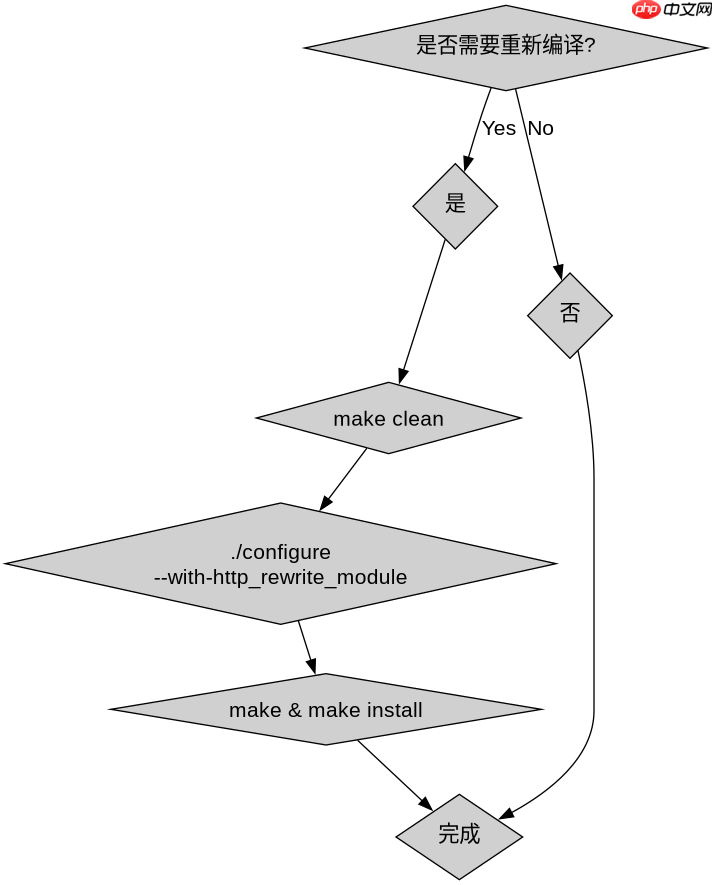
# 进入 Nginx 源码目录
cd /path/to/nginx-source

# 清理之前的构建
make clean

# 配置并启用 rewrite 模块
./configure --prefix=/etc/nginx --sbin-path=/usr/sbin/nginx --with-http_rewrite_module

# 编译
make

# 安装
sudo make install
注意:在重新编译前,请备份当前的 Nginx 配置文件和数据,以免丢失。此外,确保你的系统上已经安装了必要的依赖库,如 PCRE、Zlib 和 OpenSSL,因为 rewrite 模块依赖于 PCRE 库来处理正则表达式。
使用 rewrite 模块进行 URL 重写的具体示例
一旦 rewrite 模块被启用,你可以在 Nginx 配置文件中定义重写规则。例如,将旧版 URL 重定向到新版 URL,或者根据用户代理进行重定向。以下是一个简单的示例,展示如何将所有请求从 /old-page 重定向到 /new-page。
server {
    listen 80;
    server_name example.com;

    location /old-page {
        rewrite ^/old-page$ /new-page permanent;
    }

    location / {
        try_files $uri $uri/ =404;
    }
}
在这个配置中,rewrite 指令使用了正则表达式 ^/old-page$ 来匹配特定的 URI。当用户访问 /old-page 时,Nginx 会返回一个 301 永久重定向响应,将用户引导至 /new-page。permanent 关键字指定了重定向类型为 301。如果需要临时重定向,可以使用 redirect 关键字,这将返回 302 状态码。