在 linux 中为 nginx 添加自定义模块,核心做法是重新编译 nginx 源码并启用该模块。你需要下载与当前运行版本一致的 nginx 源码包,解压后使用 ./configure 命令,通过 --add-module 参数指定自定义模块的绝对路径,然后执行 make 和 make install。注意不要执行 make clean,否则会导致已编译的模块丢失。

如何正确配置编译参数以包含新模块
配置阶段的关键在于保留原有的编译选项并追加新模块的路径。你必须先查看现有 Nginx 的编译参数,确保新编译的版本与旧版本兼容,特别是 OpenSSL、PCRE 等依赖库的路径必须一致。使用 --add-module 指向模块源码目录即可,Nginx 会在构建时自动将该模块链接到主程序中。
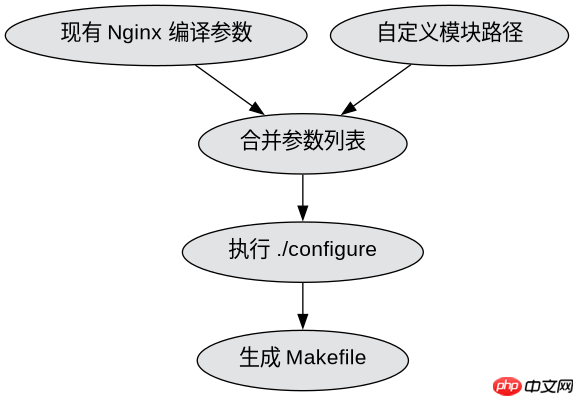

cd /usr/local/src/nginx-1.24.0
./configure --prefix=/etc/nginx \
--sbin-path=/usr/sbin/nginx \
--modules-path=/usr/lib64/nginx/modules \
--conf-path=/etc/nginx/nginx.conf \
--error-log-path=/var/log/nginx/error.log \
--http-log-path=/var/log/nginx/access.log \
--pid-path=/var/run/nginx.pid \
--lock-path=/var/run/nginx.lock \
--user=nginx \
--group=nginx \
--with-http_ssl_module \
--with-http_v2_module \
--with-http_realip_module \
--with-http_addition_module \
--with-http_sub_module \
--with-http_dav_module \
--with-http_flv_module \
--with-http_mp4_module \
--with-http_gunzip_module \
--with-http_gzip_static_module \
--with-http_random_index_module \
--with-http_secure_link_module \
--with-http_stub_status_module \
--with-http_auth_request_module \
--with-http_xslt_module=dynamic \
--with-http_image_filter_module=dynamic \
--with-http_geoip_module=dynamic \
--with-threads \
--with-stream \
--with-stream_ssl_module \
--with-stream_ssl_preread_module \
--with-stream_realip_module \
--with-stream_geoip_module=dynamic \
--with-http_slice_module \
--with-mail \
--with-mail_ssl_module \
--with-file-aio \
--with-ipv6 \
--add-module=/path/to/your/custom/module
make
make install
编译完成后如何验证模块是否生效
编译安装完成后,需要验证模块是否成功加载。最直接的方法是检查 Nginx 的二进制文件是否包含了新模块的信息,或者查看 Nginx 的错误日志确认启动时没有报错。如果模块是动态加载的(ngx_http_module` 类型通常静态编译),则需要在配置文件中使用 <code>load_module 指令加载对应的 .so 文件。对于大多数自定义 C 语言模块,通常是静态编译进 nginx 二进制文件的,因此直接重启服务并检查功能即可。

# 查看编译后的 nginx 二进制文件信息
/usr/sbin/nginx -V
# 输出中应包含 --add-module=/path/to/your/custom/module

# 测试配置文件语法
/usr/sbin/nginx -t

# 重启 Nginx 服务
systemctl restart nginx

# 检查错误日志是否有模块加载失败的信息
tail -f /var/log/nginx/error.log
如果自定义模块依赖第三方库怎么办
当自定义模块依赖如 LuaJIT、OpenSSL 或其他 C 库时,必须在 ./configure 阶段明确指定这些库的路径。例如,如果模块依赖特定的 OpenSSL 版本,需使用 --with-openssl=/path/to/openssl。若模块本身需要编译第三方库,应在模块源码目录下先完成第三方库的编译,并将生成的头文件和库文件路径添加到 Nginx 的编译环境中,或通过模块自身的 Makefile 处理依赖。确保所有依赖项在编译 Nginx 时均可访问,否则会导致编译失败或运行时找不到符号。