








php 无法直接将视频流转成 mp4,因为 php 是服务器端脚本语言,不具备实时处理音视频编码的能力。正确的做法是利用 ffmpeg 命令行工具在服务器上执行转码操作,通过 php 的 exec() 或 shell_exec() 函数调用系统命令,将输入的视频文件(如 avi、mkv 等)转换为 mp4 格式。

如何调用 FFmpeg 进行转码
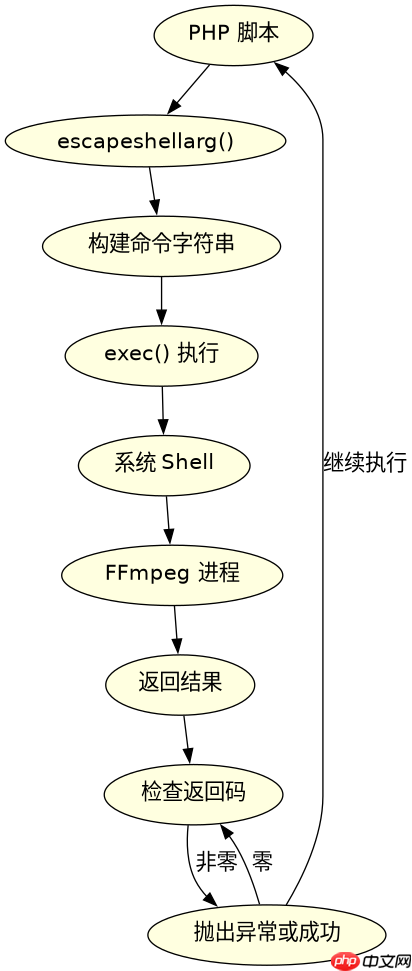
使用 exec() 函数执行 FFmpeg 命令是最常见的实现方式。你需要构建一个包含输入路径和输出路径的命令字符串,并捕获标准错误输出以处理可能的报错信息。例如,调用 ffmpeg -i input.avi output.mp4 即可完成基础转码。
function convertToMp4($inputPath, $outputPath) {
    $command = sprintf('ffmpeg -i %s %s 2>&1', escapeshellarg($inputPath), escapeshellarg($outputPath));
    $output = array();
    $returnCode = 0;
    exec($command, $output, $returnCode);

    if ($returnCode !== 0) {
        throw new Exception('FFmpeg execution failed: ' . implode("\n", $output));
    }
    return true;
}

// 使用示例
try {
    convertToMp4('/path/to/input.avi', '/path/to/output.mp4');
    echo "Conversion successful.";
} catch (Exception $e) {
    echo "Error: " . $e->getMessage();
}
上述代码首先对文件路径进行安全转义以防止命令注入,然后执行转换。如果返回码不为零,则抛出异常并附带 FFmpeg 输出的错误日志。成功时返回布尔值 true。
立即学习“PHP免费学习笔记(深入)”;

如何处理大文件的异步转码
对于大体积视频文件,同步执行会导致请求超时。解决方案是使用队列机制或后台进程。这里展示一种简单的后台启动方式,利用 Linux 的 nohup 命令让 FFmpeg 在后台运行,不随 PHP 进程结束而终止。

function asyncConvertToMp4($inputPath, $outputPath, $logFile) {
    $command = sprintf(
        'nohup ffmpeg -i %s %s > %s 2>&1 &',
        escapeshellarg($inputPath),
        escapeshellarg($outputPath),
        escapeshellarg($logFile)
    );
    // 执行后台命令
    exec($command, $output, $returnCode);

    if ($returnCode !== 0) {
        throw new Exception('Failed to start background process.');
    }
    return 'Process started. Check log: ' . $logFile;
}

// 使用示例
echo asyncConvertToMp4('/path/to/large.mkv', '/path/to/large.mp4', '/var/log/ffmpeg.log');
此方法将 FFmpeg 的输出重定向到日志文件,并通过 & 符号使其在后台运行。PHP 脚本立即返回,不会阻塞。你可以定期检查日志文件或轮询状态来监控进度。
转码完成后如何验证文件有效性
转码结束后,必须验证生成的 MP4 文件是否完整且可播放。可以通过检查文件大小是否大于零,以及使用 FFprobe 提取媒体信息来确认。以下代码演示了如何验证输出文件。
function verifyMp4($filePath) {
    if (!file_exists($filePath)) {
        return false;
    }

    $size = filesize($filePath);
    if ($size <= 0) {
        return false;
    }

    // 使用 ffprobe 验证
    $command = sprintf(
        'ffprobe -v error -select_streams v:0 -show_entries stream=codec_name,width,height -of default=noprint_wrappers=1:nokey=1 %s 2>&1',
        escapeshellarg($filePath)
    );
    $output = array();
    exec($command, $output, $returnCode);

    if ($returnCode !== 0 || empty($output[0])) {
        return false;
    }

    return true;
}

// 验证刚才转换的文件
if (verifyMp4('/path/to/output.mp4')) {
    echo "File is valid.";
} else {
    echo "File is invalid or corrupted.";
}
该函数首先检查文件是否存在且大小正常,然后调用 ffprobe 尝试获取视频流的编码名称和分辨率。如果 ffprobe 成功返回数据,则认为文件有效。这种方法比单纯检查文件存在性更可靠。


















