








apt-get 遇到 EOL 仓库返回什么错误
直接回答:当软件源已停止维护时,apt-get update 会报错并拒绝下载索引。解决办法是修改 /etc/apt/sources.list,将域名从 archive.ubuntu.com 替换为 old-releases.ubuntu.com。

deb http://old-releases.ubuntu.com/ubuntu/ focal main restricted universe multiverse
deb http://old-releases.ubuntu.com/ubuntu/ focal-updates main restricted universe multiverse
deb http://old-releases.ubuntu.com/ubuntu/ focal-security main restricted universe multiverse
运行 sudo apt-get update 后,系统能正常拉取补丁索引。注意 focal 对应 Ubuntu 20.04,其他版本需替换为对应的代号。
unattended-upgrades 在 EOL 环境下如何配置
直接回答:自动更新服务在 EOL 后会因无法连接仓库而失败。需要修改配置文件 /etc/apt/apt.conf.d/50unattended-upgrades,指定旧版仓库地址。
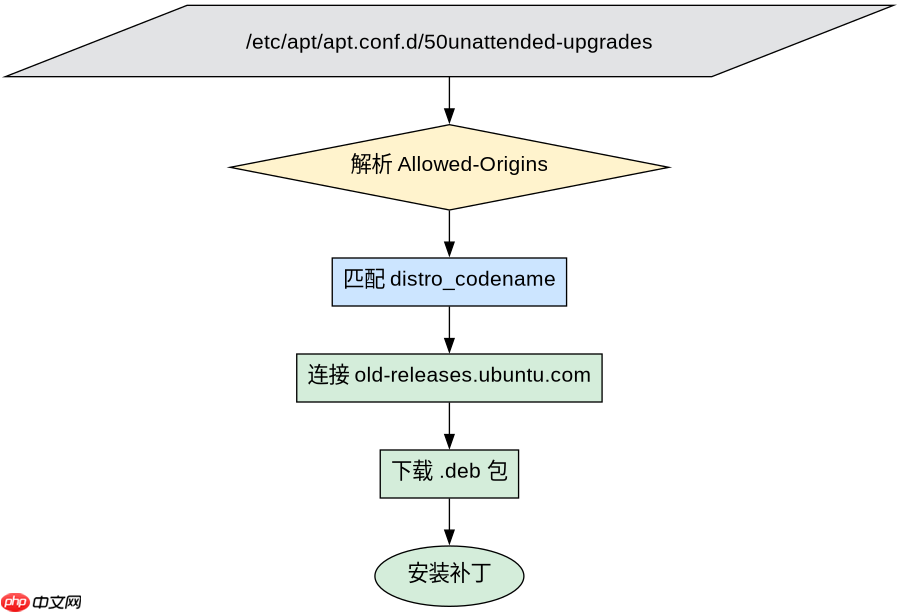
Unattended-Upgrade::Allowed-Origins {
    "${distro_id}:${distro_codename}";
    "${distro_id}:${distro_codename}-security";
};
Unattended-Upgrade::Mail "admin@example.com";
Unattended-Upgrade::MailOnlyOnError "true";
该配置确保系统在重启后仍能尝试应用安全补丁。若仓库完全不可用,需结合手动脚本进行监控。
基于 sources.list 中 main 组件的具体问题
直接回答:在旧版仓库中,main 组件包含官方支持的核心包。即使停止支持,这些包的二进制文件仍保留在 old-releases 服务器上,但不再提供新的漏洞修复。开发者应优先检查依赖项是否仍在 main 中,避免使用已移除的第三方组件。

















