








宝塔面板目前最高仅支持到 php 8.3,无法直接升级到 8.5.12。要使用这个版本,必须通过源码编译安装并配置 nginx 或 apache 指向新版本的 php-fpm。

如何手动编译安装 PHP 8.5.12
在 Linux 服务器上,通过下载源码包、配置编译选项、编译和安装来部署 PHP 8.5.12。需要确保系统安装了必要的依赖库,如 gcc、make、libxml2-dev 等。
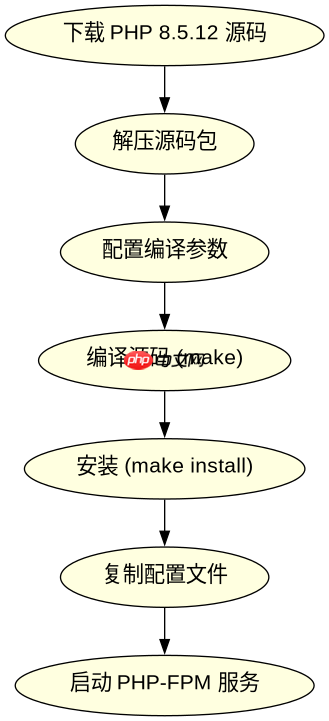
cd /tmp
wget https://www.php.net/distributions/php-8.5.12.tar.gz
tar -zxvf php-8.5.12.tar.gz
cd php-8.5.12
./configure --prefix=/usr/local/php85 --with-config-file-path=/usr/local/php85/etc --enable-fpm --with-openssl --with-mysqli --with-pdo-mysql --with-zlib --with-curl --with-gd --with-jpeg --with-png --with-freetype --with-xmlrpc --with-xsl --with-zip --with-mhash --with-mbstring --with-iconv --with-gettext --with-ldap --with-ldap-sasl --with-snmp --with-sockets --with-imap --with-imap-ssl --with-kerberos --with-readline --with-pspell --with-recode --with-tidy --with-enchant --with-bz2 --with-fpm-user=www --with-fpm-group=www
make -j$(nproc)
make install
上述命令将 PHP 8.5.12 安装到 /usr/local/php85 目录,并启用 FPM 模式。编译完成后,需要复制配置文件并启动服务。
立即学习“PHP免费学习笔记(深入)”;

如何配置 Nginx 指向新的 PHP 版本
修改 Nginx 站点配置文件,将 fastcgi_pass 指向新安装的 PHP-FPM 监听地址。通常 PHP-FPM 默认监听 127.0.0.1:9000 或 Unix Socket。如果使用了默认的端口,只需确保 Nginx 配置的 fastcgi_pass 与之匹配即可。

# /etc/nginx/sites-available/example.com
server {
    listen 80;
    server_name example.com;
    root /var/www/html;
    index index.php index.html;

    location / {
        try_files $uri $uri/ =404;
    }

    location ~ \.php$ {
        include snippets/fastcgi-php.conf;
        fastcgi_pass 127.0.0.1:9000; # 确保此端口与 PHP-FPM 监听端口一致
        fastcgi_param SCRIPT_FILENAME $document_root$fastcgi_script_name;
        include fastcgi_params;
    }
}
修改配置后,重启 Nginx 和 PHP-FPM 服务以生效。可以使用 systemctl restart nginx 和 systemctl restart php85-fpm(假设服务名为 php85-fpm)来重启服务。验证是否生效的方法是创建一个包含 <?php phpinfo(); ?> 的 PHP 文件,访问该文件查看 PHP 版本是否为 8.5.12。
如何验证 PHP 8.5.12 是否真正生效
创建一个简单的 PHP 脚本,例如 info.php,内容为 <?php phpinfo(); ?>。通过浏览器访问该文件,检查输出内容中的 "PHP Version" 字段。如果显示为 8.5.12,则说明升级成功。此外,还可以检查命令行中运行 php -v 是否也返回 8.5.12 版本,以确保全局环境也已更新。



















