





在本教程中,我们将向您展示如何在数据网格(datagrid)页脚显示摘要信息行。
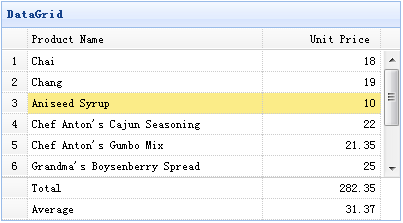
为了显示页脚行,您应该设置 showFooter 属性为 true,然后准备定义在数据网格(datagrid)数据中的页脚行。以下是示例数据:
{"total":1,"rows":[{"id":1,"name":"Chai","price":18.00}],"footer":[{"name":"Total","price":18.00}]}
创建数据网格(DataGrid)
	<table id="tt" title="DataGrid" class="easyui-datagrid" style="width:400px;height:250px"
			url="data/datagrid17_data.json"
			fitColumns="true" rownumbers="true" showFooter="true">
		<thead>
			<tr>
				<th field="name" width="80">Product Name</th>
				<th field="price" width="40" align="right">Unit Price</th>
			</tr>
		</thead>
	</table>
页脚行和显示数据行一样,所以您可以在页脚显示不止一个摘要信息。
下载 jQuery EasyUI 实例
jeasyui-datagrid-datagrid17.zip


