




数据网格(datagrid)经常需要合并一些单元格。本教程将向您展示如何在数据网格(datagrid)中合并单元格。
为了合并数据网格(datagrid)单元格,只需简单地调用 'mergeCells' 方法,并传入合并信息参数,告诉数据网格(datagrid)如何合并单元格。在所有合并的单元格中,除了第一个单元格,其它单元格在合并后被隐藏。
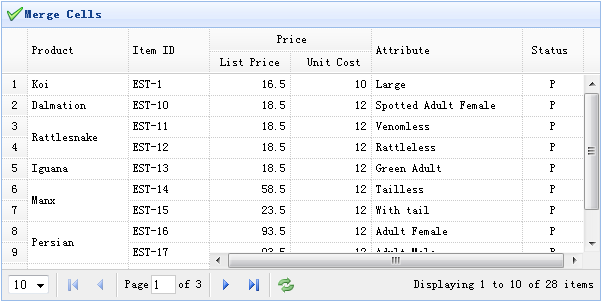
创建数据网格(DataGrid)
	<table id="tt" title="Merge Cells" style="width:550px;height:250px"
			url="data/datagrid_data.json"
			singleSelect="true" iconCls="icon-save" rownumbers="true"
			idField="itemid" pagination="true">
		<thead frozen="true">
			<tr>
				<th field="productid" width="80" formatter="formatProduct">Product ID</th>
				<th field="itemid" width="100">Item ID</th>
			</tr>
		</thead>
		<thead>
			<tr>
				<th colspan="2">Price</th>
				<th rowspan="2" field="attr1" width="150">Attribute</th>
				<th rowspan="2" field="status" width="60" align="center">Stauts</th>
			</tr>
			<tr>
				<th field="listprice" width="80" align="right">List Price</th>
				<th field="unitcost" width="80" align="right">Unit Cost</th>
			</tr>
		</thead>
	</table>
合并单元格
当数据加载之后,我们合并数据网格(datagrid)中的一些单元格,所以放置下面的代码在 onLoadSuccess 回调函数中。
	$('#tt').datagrid({
		onLoadSuccess:function(){
			var merges = [{
				index:2,
				rowspan:2
			},{
				index:5,
				rowspan:2
			},{
				index:7,
				rowspan:2
			}];
			for(var i=0; i<merges.length; i++)
				$('#tt').datagrid('mergeCells',{
					index:merges[i].index,
					field:'productid',
					rowspan:merges[i].rowspan
				});
		}
	});
下载 jQuery EasyUI 实例
jeasyui-datagrid-datagrid13.zip


