
手册目录
jQuery EasyUI 教程
jEasyUI 拖放
jEasyUI 菜单与按钮
jEasyUI 布局
jEasyUI 数据网格
jEasyUI 树形菜单
jEasyUI 参考手册
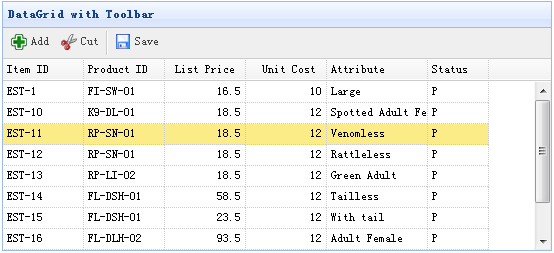
本实例演示如何添加工具栏(toolbar)到数据网格(datagrid)。
	<table id="tt" class="easyui-datagrid" style="width:600px;height:250px"
			url="data/datagrid_data.json"
			title="DataGrid with Toolbar" iconCls="icon-save"
			toolbar="#tb">
		<thead>
			<tr>
				<th field="itemid" width="80">Item ID</th>
				<th field="productid" width="80">Product ID</th>
				<th field="listprice" width="80" align="right">List Price</th>
				<th field="unitcost" width="80" align="right">Unit Cost</th>
				<th field="attr1" width="150">Attribute</th>
				<th field="status" width="60" align="center">Stauts</th>
			</tr>
		</thead>
	</table>
	<div id="tb">
		<a href="#" class="easyui-linkbutton" iconCls="icon-add" plain="true" onclick="javascript:alert('Add')">Add</a>
		<a href="#" class="easyui-linkbutton" iconCls="icon-cut" plain="true" onclick="javascript:alert('Cut')">Cut</a>
		<a href="#" class="easyui-linkbutton" iconCls="icon-save" plain="true" onclick="javascript:alert('Save')">Save</a>
	</div>
我们不需要写任何的 javascript 代码,只需通过 'toolbar' 属性附加工具栏(toolbar)到数据网格(datagrid)。
jeasyui-datagrid-datagrid4.zip
科技资讯


24小时阅读榜
1
2
3
4
5
6
7
8
9
10
精品课程

共5课时 | 18.1万人学习

共49课时 | 82.7万人学习

共29课时 | 65.3万人学习

共25课时 | 41.5万人学习

共43课时 | 77.1万人学习



