




查找方法:1、利用“:not()”和“[attribute]”选择器,语法“$("元素:not([attribute])")”;2、利用not()方法和“[attribute]”选择器,语法“$(元素).not([attribute])”。

本教程操作环境:windows7系统、jquery1.10.2版本、Dell G3电脑。
在jquery中,想要查找含某个属性的元素,需要使用属性选择器[attribute]。
而查找不含某个属性的元素,就需要组合一个否定选择器“:not()”或 not()方法。
语法:

jQuery 1.12.4
下载
jQuery 1.12.4是jQuery 1.x系列的最后一个正式稳定版本,由jQuery团队于2016年发布。该版本主要面向需要兼容旧版浏览器环境的网站和Web应用,尤其适用于仍需支持Internet Explorer 6、Internet Explorer 7、Internet Explorer 8等老旧浏览器的项目。
:not([attribute])
not([attribute])
示例:
<!DOCTYPE html>
<html>
	<head>
		<meta charset="utf-8">
		<script src="js/jquery-1.10.2.min.js"></script>
		<script type="text/javascript">
			$(document).ready(function() {
				$("li:not([id])").css("background-color", "#B2E0FF");
				$("li").not("[class]").css("background-color", "#ff0307");
			});
		</script>

	</head>
	<body>
		<html>
			<body>
				<div id="choose">
					Who is your favourite:
					<ul>
						<li id="li1">Goofy</li>
						<li id="li2" class="li">Mickey</li>
						<li class="li">Pluto</li>
					</ul>
				</div>
			</body>
		</html>


	</body>
</html>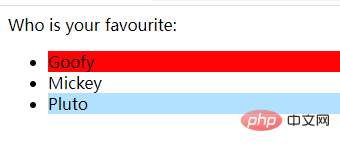
相关教程推荐:jQuery视频教程












