








使用pillow库的image类配合glob或pathlib遍历目录,调用convert()方法处理模式转换,并用save()方法的quality参数实现压缩。只需编写一个脚本循环读取图片、调整质量并保存到新路径,即可一次性完成批量格式转换与体积缩减。

PIL.Image.open()加载非标准格式图片时如何处理
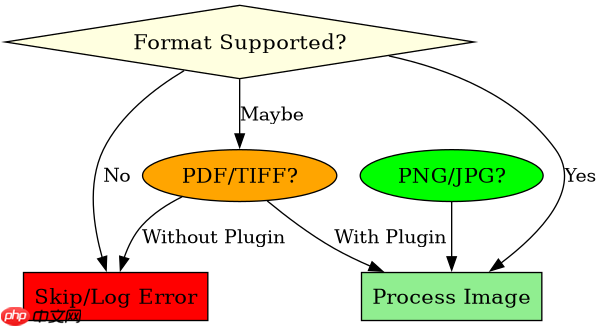
当输入文件不是常见图像格式(如PNG/JPG)而是PDF或TIFF时,PIL.Image.open()可能无法直接解码或需要额外插件。此时应检查文件头或使用img.format确认类型,若不支持则跳过或报错,避免程序崩溃。
设置quality=85对JPEG输出大小的实际影响
将quality设为85通常在视觉无损前提下显著减小文件体积。该值平衡了清晰度与存储效率,低于70易出现伪影,高于95节省有限但耗时增加。实测表明多数照片在85时大小减少30%-50%。

Nodriver 异步无检测 Chrome 浏览器自动化 Python
下载
Nodriver是Undetected-Chromedriver的官方继承者,提供异步浏览器自动化功能,可直接与Chrome DevTools Protocol通信,无需Selenium或WebDriver依赖。专为规避反机器人系统(包括Cloudflare和Imperva)的隐蔽网络自动化而构建。
立即学习“Python免费学习笔记(深入)”;
import os
from PIL import Image
import glob

def convert_and_compress(input_dir, output_dir, fmt='JPEG', quality=85):
    os.makedirs(output_dir, exist_ok=True)
    files = glob.glob(os.path.join(input_dir, '*'))
    for f in files:
        try:
            img = Image.open(f)
            # 转换为RGB以支持JPEG
            if img.mode in ('RGBA', 'P'):
                img = img.convert('RGB')
            elif img.mode != 'RGB':
                img = img.convert('RGB')

            base = os.path.basename(f)
            name, _ = os.path.splitext(base)
            out_path = os.path.join(output_dir, f"{name}.{fmt.lower()}")

            img.save(out_path, format=fmt, quality=quality)
            print(f"Converted: {f} -> {out_path}")
        except Exception as e:
            print(f"Failed {f}: {e}")

# 示例调用
convert_and_compress('./input_images', './output_images')
预期结果:所有输入图片被转换为指定格式,文件大小因quality参数而压缩,错误文件被记录而不中断流程。
基于程序中某个输入、条件或结果的具体问题
当输入图片包含Alpha通道(透明背景)且目标格式为JPEG时,直接保存会因不支持透明度而抛出异常或丢失信息。必须在保存前通过convert('RGB')去除Alpha通道,否则save()将失败或产生黑底。


















