通过 document.getelementbyid 获取下拉框元素后,直接访问其 options 属性即可得到所有选项。该属性返回一个 htmloptionscollection 对象,支持按索引或名称进行遍历和筛选。
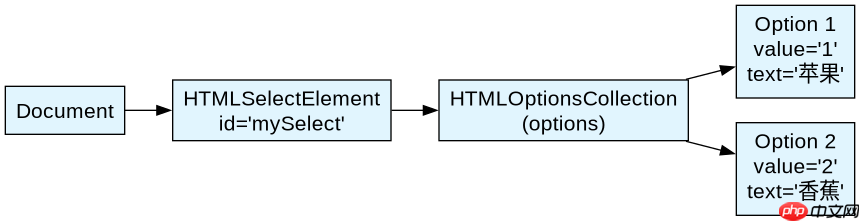
如何获取下拉框中所有选项的文本内容
使用 for 循环遍历 options 集合,读取每个元素的 text 属性。这种方式能获取用户可见的显示文本,适用于需要展示列表内容的场景。
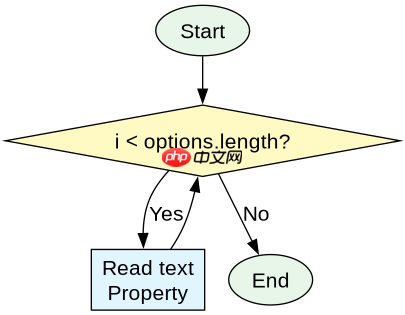
<select id="mySelect">
  <option value="1">苹果</option>
  <option value="2">香蕉</option>
</select>

<script>
const select = document.getElementById('mySelect');
for (let i = 0; i < select.options.length; i++) {
  console.log(select.options[i].text);
}
</script>
如何根据值查找并选中特定选项
利用 findIndex 方法在 options 集合中查找匹配 value 的项。找到后修改 selectedIndex 属性即可完成选中操作,这是处理表单提交或回显数据的常用手段。

Mailgun 用于邮件投递和域名操作的 JavaScript SDK
下载
一个围绕官方 Mailgun JavaScript SDK 构建的 ASE 技能,用于从 Node.js 发送电子邮件和管理 Mailgun API 工作流。它适用于需要事务性消息传递、域名感知电子邮件操作、事件处理以及与 Mailgun 平台直接集成的代理任务。
立即学习“Java免费学习笔记(深入)”;

<select id="mySelect">
  <option value="1">苹果</option>
  <option value="2">香蕉</option>
</select>

<script>
const select = document.getElementById('mySelect');
const targetValue = '2';
const index = Array.from(select.options).findIndex(opt => opt.value === targetValue);
if (index !== -1) {
  select.selectedIndex = index;
}
</script>
当选项值为空字符串时查询结果是什么
如果选项的 value 为空字符串,上述基于值的查找逻辑依然有效。但需注意,若未指定 value 属性,浏览器默认将 text 作为 value,此时需调整比较逻辑以匹配实际行为。