








在 java 单元测试中,使用 xmlunit 比较 xml 结果的核心做法是构建 diff 对象并调用 assertxpathevaluatesto 或检查 comparisonresult。具体而言,你需要将期望的 xml 字符串和实际的 xml 字符串传入 xmlunit.comparexml(),然后利用 xpath 定位关键节点进行断言,或者遍历差异列表来验证结构一致性。这样做可以忽略无关的空白字符和属性顺序,确保测试关注的是数据内容而非格式细节。

如何忽略空白和属性顺序进行精确比较
要忽略空白和属性顺序,应配置 DiffBuilder 使用 ignoreWhitespace() 和 ignoreAttributeOrder()。通过这种方式,即使两个 XML 文档在视觉排版或属性排列上不同,只要逻辑内容一致,比较就会通过。这适用于大多数 API 响应测试,因为序列化器可能不保证输出顺序。
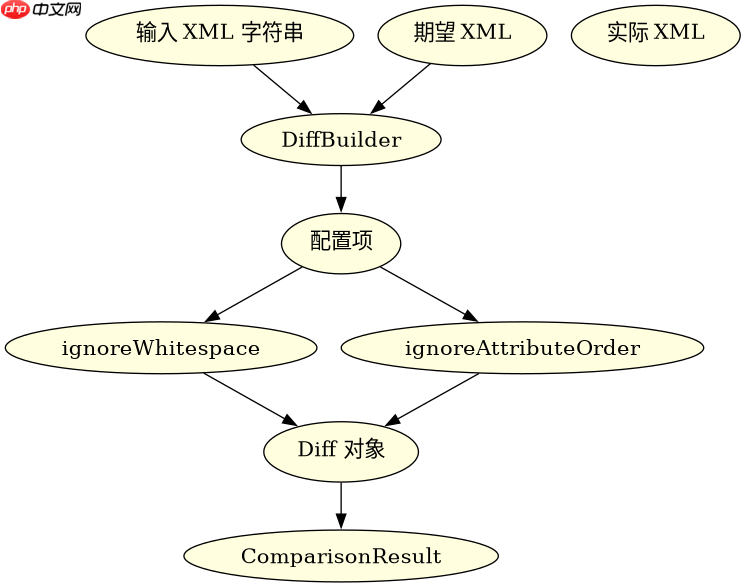
import org.xmlunit.builder.DiffBuilder;
import org.xmlunit.builder.Input;
import org.xmlunit.diff.ComparisonResult;

public class XmlComparisonTest {
    public static void main(String[] args) {
        String expected = "<root attr=\"b\"><item>Value</item></root>";
        String actual = "<root attr=\"a\">\n  <item>Value</item>\n</root>";

        Diff diff = DiffBuilder.compare(Input.fromString(expected))
                .withTest(Input.fromString(actual))
                .ignoreWhitespace()
                .ignoreAttributeOrder()
                .build();

        ComparisonResult result = diff.check();
        System.out.println("Is Identical: " + result.isIdentical());
    }
}
如何使用 XPath 验证特定节点的值
当只需要验证 XML 中的特定部分时,使用 assertXpathEvaluatesTo 是最直接的方法。它允许你指定一个 XPath 表达式和一个期望的字符串值,如果实际 XML 在该路径下的文本内容与期望值匹配,测试即通过。这种方法比全量比较更轻量,且能明确指出哪个节点出了问题。

FilePond 是一个 JavaScript 文件上传库,支持通过拖拽、粘贴和 API 方式处理文件、目录、URL 和 Data URI。它包含内置的图像优化功能、异步分块上传功能,并提供了适用于 React、Vue、Angular 和 Svelte 的适配器。
立即学习“Java免费学习笔记(深入)”;

import org.xmlunit.assertj.XmlAssert;

public class XPathVerificationTest {
    public static void main(String[] args) {
        String xml = "<user><name>Alice</name></user>";

        // 使用 XMLUnit 的 AssertJ 风格断言
        XmlAssert.assertThat(xml)
                .hasXPath("/user/name")
                .and()
                .hasXPath("/user/name", "Alice");

        System.out.println("XPath verification passed.");
    }
}
当 XML 包含动态 ID 时如何处理比较
如果 XML 结果中包含动态生成的 ID 或时间戳,直接比较会导致失败。此时应使用 DifferenceEvaluator 自定义比较逻辑,例如忽略特定属性的差异,或者使用 NormalizedDifferenceEvaluator 来处理常见的规范化问题。通过注入自定义的评估器,你可以告诉 XMLUnit 哪些差异是可以被接受的,从而让测试专注于业务逻辑的正确性。



















