








@NotBlank 校验字符串非空的具体行为是什么
使用 @notblank 注解可以确保字符串既不为 null,也不为空串(""),且去除首尾空白后长度大于零。该注解属于 hibernate validator (jsr-380) 规范,在 spring boot 中默认集成,直接作用于 string 类型的字段即可生效。

如何配置全局异常处理器以返回标准 JSON 格式
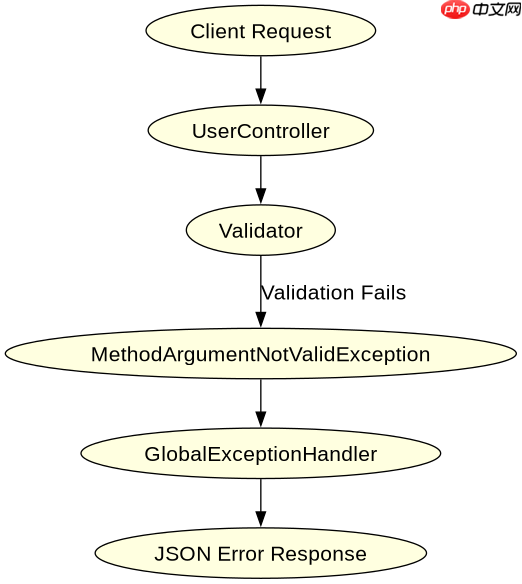
当参数校验失败时,Spring Boot 会抛出 MethodArgumentNotValidException。通过实现 ControllerAdvice 并捕获该异常,可以提取所有校验错误信息,将其封装为统一的 JSON 结构返回给前端,从而避免默认的 400 错误页面或堆栈跟踪信息泄露。

当输入包含纯空白字符时校验结果如何
如果传入的字符串仅包含空格、制表符等空白字符,@NotBlank 会判定其无效,因为该注解会在校验前自动调用 trim() 方法去除两端空白。这与 @NotEmpty 不同,后者不会去除空白,仅检查长度是否大于零。
以下是一个完整的 Spring Boot Controller 示例,展示了如何使用 @NotBlank 以及如何处理校验异常:
import org.springframework.boot.SpringApplication;
import org.springframework.boot.autoconfigure.SpringBootApplication;
import org.springframework.http.ResponseEntity;
import org.springframework.validation.annotation.Validated;
import org.springframework.web.bind.MethodArgumentNotValidException;
import org.springframework.web.bind.annotation.*;
import jakarta.validation.constraints.NotBlank;
import java.util.HashMap;
import java.util.Map;
import java.util.stream.Collectors;

@SpringBootApplication
public class ValidationApplication {
    public static void main(String[] args) {
        SpringApplication.run(ValidationApplication.class, args);
    }
}

@RestController
@Validated
public class UserController {

    @PostMapping("/user")
    public ResponseEntity<String> createUser(@Valid @RequestBody UserRequest request) {
        return ResponseEntity.ok("User created: " + request.getName());
    }

    public static class UserRequest {
        @NotBlank(message = "Name cannot be blank")
        private String name;

        // Getters and Setters
        public String getName() { return name; }
        public void setName(String name) { this.name = name; }
    }

    @ExceptionHandler(MethodArgumentNotValidException.class)
    public ResponseEntity<Map<String, Object>> handleValidationExceptions(
            MethodArgumentNotValidException ex) {
        Map<String, Object> body = new HashMap<>();
        body.put("timestamp", System.currentTimeMillis());
        body.put("status", 400);
        body.put("error", "Validation Failed");

        // Collect all field errors into a list of messages
        String errors = ex.getBindingResult().getFieldErrors().stream()
                .map(error -> error.getField() + ": " + error.getDefaultMessage())
                .collect(Collectors.joining(", "));
        body.put("errors", errors);

        return ResponseEntity.badRequest().body(body);
    }
}
预期结果:
- 输入 {"name": ""} 返回 400,错误信息包含 "name: Name cannot be blank"
- 输入 {"name": " "} 返回 400,错误信息包含 "name: Name cannot be blank"
- 输入 {"name": "John"} 返回 200,成功创建用户
以下是校验流程的简化映射图:



















