








使用契约测试保证兼容的核心做法是引入 pact 框架,通过消费者驱动的方式在单元测试中定义期望的 api 交互契约。具体实现时,需要在消费者的测试类中配置 pactconsumertestext 扩展,利用 @pact 注解构建包含请求路径、方法和响应状态的预期模型,并在测试方法中调用服务并验证返回结果是否符合该契约。这样做的结果是生成一个 json 格式的契约文件,该文件记录了接口的详细规范,确保后续提供者端的实现或变更不会破坏这些约定。

如何在消费者端编写契约测试用例
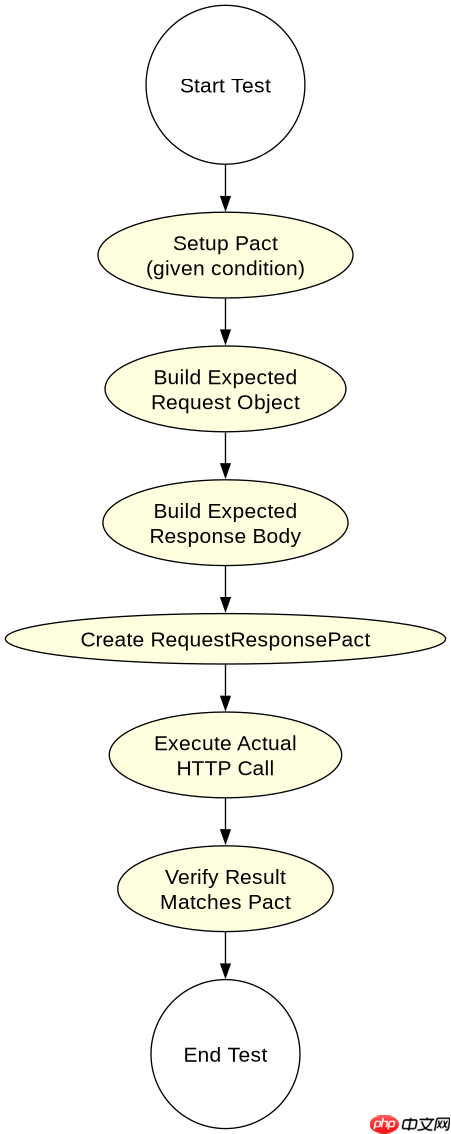
在消费者端编写契约测试用例时,需要创建一个继承自 PactConsumerTestExt 的测试类,该类会自动处理契约文件的生成和存储。首先,定义一个私有方法来构建契约,该方法需标注 @Pact("consumer"),在其中设置预期的 HTTP 请求细节,如 GET 请求访问 /api/users/1,并指定期望的响应状态码为 200 以及包含特定字段的 JSON 响应体。接着,在测试方法中实例化客户端并发起实际请求,最后使用 PactVerification 断言来验证实际响应是否与定义的契约一致。这种机制确保了代码逻辑与接口规范同步更新。
import au.com.dius.pact.consumer.Pact;
import au.com.dius.pact.consumer.PactVerification;
import au.com.dius.pact.consumer.junit5.PactConsumerTestExt;
import au.com.dius.pact.consumer.junit5.ServiceProvider;
import au.com.dius.pact.model.RequestResponsePact;
import org.junit.jupiter.api.Test;
import org.junit.jupiter.api.extension.ExtendWith;

import static au.com.dius.pact.consumer.PactDslWithContainer.likeValue;
import static org.hamcrest.MatcherAssert.assertThat;
import static org.hamcrest.Matchers.equalTo;

@ExtendWith(PactConsumerTestExt.class)
@ServiceProvider(serviceName = "user-service", provider = "user-provider")
public class UserContractTest {

    @Pact(consumer = "consumer")
    public RequestResponsePact createPact(RequestResponsePactBuilder builder) {
        return builder
            .given("user exists with id 1")
            .uponReceiving("Request for user 1")
            .path("/api/users/1")
            .method("GET")
            .willRespondWith()
            .status(200)
            .headers(mapOf("Content-Type", "application/json"))
            .body(new DslJson().object() {{
                stringType("id", 1);
                stringType("name", likeValue("John Doe"));
            }})
            .toPact();
    }

    @Test
    @PactVerification("user-service")
    public void verifyUserContract() {
        // 模拟客户端调用
        String response = httpClient.get("/api/users/1");
        assertThat(response, equalTo("{\"id\":1,\"name\":\"John Doe\"}"));
    }
}
上述代码展示了完整的消费者契约测试结构。运行此测试后,会在本地目录生成 pact.json 文件,其中包含了请求和响应的详细定义。开发者只需关注业务逻辑的正确性,而接口兼容性则由框架自动校验。若修改了代码导致响应结构变化,测试将失败并提示契约不匹配,从而在开发阶段拦截兼容性问题。
立即学习“Java免费学习笔记(深入)”;

FilePond 是一个 JavaScript 文件上传库,支持通过拖拽、粘贴和 API 方式处理文件、目录、URL 和 Data URI。它包含内置的图像优化功能、异步分块上传功能,并提供了适用于 React、Vue、Angular 和 Svelte 的适配器。
如何验证提供者端符合消费者契约
在提供者端验证契约时,需使用 PactVerificationTarget 或 PactBroker 集成方式,加载消费者生成的契约文件并执行验证。具体做法是在提供者测试类中注入契约源,通常指向本地 pact.json 文件或远程 Pact Broker。测试运行时,框架会读取每个消费者的契约条目,向提供者发送对应的请求,并检查响应是否严格符合契约定义。如果提供者返回的状态码、头部信息或响应体字段类型与契约不符,测试将报错。这种方法实现了跨服务的自动化回归测试,防止后端重构破坏前端依赖。

import au.com.dius.pact.provider.junit5.PactVerificationContext;
import au.com.dius.pact.provider.junit5.PactVerificationTest;
import au.com.dius.pact.provider.junit5.Target;
import au.com.dius.pact.provider.junit5.PactFolder;
import org.junit.jupiter.api.BeforeEach;
import org.junit.jupiter.api.Test;
import org.junit.jupiter.api.extension.ExtendWith;

@ExtendWith({au.com.dius.pact.provider.junit5.PactRunnerExtension.class})
@PactFolder("target/pacts")
public class UserProviderVerificationTest {

    @Target
    public Map<PactVerificationTarget, List<PactVerificationTarget>> targets() {
        return Map.of(
            new PactVerificationTarget(new File("target/pacts")),
            Collections.emptyList()
        );
    }

    @BeforeEach
    public void beforeEach(PactVerificationContext context) {
        context.setTarget(new HttpTestTarget("localhost", 8080, "/"));
    }

    @PactVerificationTest
    public void verifyProvidersPact(PactVerificationContext context) {
        context.verifyInteraction();
    }
}
这段提供者验证代码配置了从 target/pacts 目录加载契约,并指向本地运行的服务实例。执行测试时,框架会解析所有消费者契约,逐一发送请求并比对响应。例如,若消费者期望 name 字段为字符串,而提供者返回了数字,测试将立即失败。这种方式确保了提供者在任何部署前都经过兼容性审查,有效避免了因接口变更导致的系统故障。
当契约中包含可选字段时如何处理缺失值
当契约中包含可选字段时,若提供者返回的数据中缺失该字段,契约测试默认会判定为失败,因为框架要求响应体必须完全匹配契约定义的结构。为解决此问题,需在消费者契约构建阶段明确标记字段为可选,或使用 likeValue 配合空值容忍策略。具体而言,可以在 DslJson 中使用 booleanType 或 numberType 并允许 null,或者在契约文件中设置 required: false 属性。这样,即使提供者未返回该字段,测试也能通过,从而适应后端灵活的数据返回策略,避免因非关键字段缺失导致的不必要测试失败。



















