








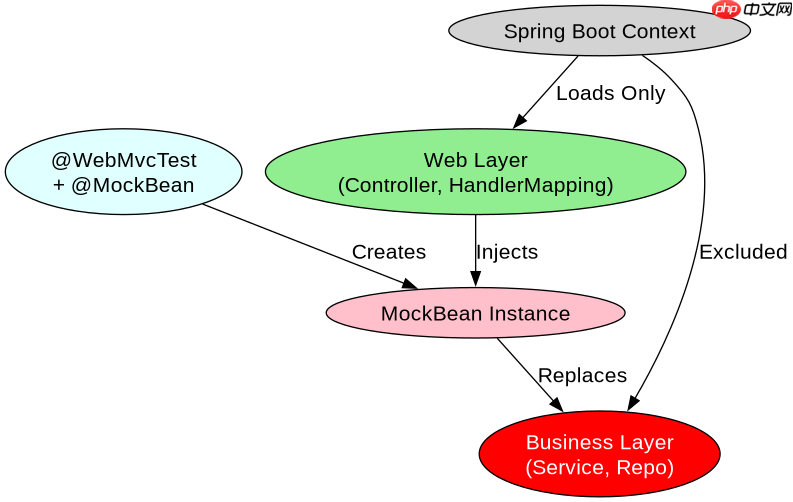
使用 @webmvctest 测试 controller 时,spring boot 会仅加载 web 层组件(如 @controller、@controlleradvice、handlermapping 等),而不会自动加载 service 或 repository 层。为了隔离测试,你需要通过 @mockbean 模拟依赖的 service,并使用 mockmvc 发起 http 请求来验证响应状态、json 内容或重定向行为。

如何配置 MockMvc 并注入 Mock Bean?
在测试类上添加 @WebMvcTest 注解后,Spring 会自动配置 MockMvc 实例,你可以直接将其注入到测试方法中。对于 Controller 依赖的业务逻辑层,必须使用 @MockBean 创建模拟对象,否则启动时会因缺少 Bean 而报错。配置完成后,即可调用 mockMvc.perform() 发送请求。
import org.junit.jupiter.api.Test;
import org.springframework.beans.factory.annotation.Autowired;
import org.springframework.boot.test.autoconfigure.web.servlet.WebMvcTest;
import org.springframework.boot.test.mock.bean.MockBean;
import org.springframework.test.web.servlet.MockMvc;

import static org.mockito.BDDMockito.given;
import static org.springframework.test.web.servlet.request.MockMvcRequestBuilders.get;
import static org.springframework.test.web.servlet.result.MockMvcResultMatchers.status;
import static org.springframework.test.web.servlet.result.MockMvcResultMatchers.jsonPath;

@WebMvcTest(UserController.class)
class UserControllerTest {

    @Autowired
    private MockMvc mockMvc;

    @MockBean
    private UserService userService;

    @Test
    void shouldReturnUserWhenFound() throws Exception {
        given(userService.findById(1L)).willReturn(new User(1L, "Alice"));

        mockMvc.perform(get("/users/1"))
               .andExpect(status().isOk())
               .andExpect(jsonPath("$.name").value("Alice"));
    }
}
上述代码展示了标准的测试结构:@WebMvcTest 限定扫描范围,@MockBean 提供 UserServiceImpl 的替身,given(...).willReturn(...) 定义模拟行为,最后通过 andExpect 链式断言验证结果。这种写法确保了测试只关注 Controller 的路由映射和序列化逻辑,不涉及数据库或真实业务计算。
立即学习“Java免费学习笔记(深入)”;

如何处理 Controller 中的异常与全局拦截器?
@WebMvcTest 默认会加载 @ControllerAdvice 和 @ExceptionHandler,因此可以直接测试异常处理逻辑。如果 Controller 依赖自定义的 HandlerInterceptor 或 Filter,这些组件也会被自动注册到 MockMvc 的过滤器链中。若需禁用某些拦截器,可通过 @WebMvcTest(excludeFilters = ...) 或手动配置 MockMvc 的过滤器链来实现更精细的控制。

import org.junit.jupiter.api.Test;
import org.springframework.beans.factory.annotation.Autowired;
import org.springframework.boot.test.autoconfigure.web.servlet.WebMvcTest;
import org.springframework.boot.test.mock.bean.MockBean;
import org.springframework.http.MediaType;
import org.springframework.test.web.servlet.MockMvc;
import org.springframework.test.web.servlet.MvcResult;

import static org.mockito.BDDMockito.given;
import static org.mockito.Mockito.times;
import static org.springframework.test.web.servlet.request.MockMvcRequestBuilders.post;
import static org.springframework.test.web.servlet.result.MockMvcResultMatchers.status;

@WebMvcTest(UserController.class)
class UserControllerExceptionTest {

    @Autowired
    private MockMvc mockMvc;

    @MockBean
    private UserService userService;

    @Test
    void shouldHandleNotFoundException() throws Exception {
        given(userService.findById(999L)).willThrow(new RuntimeException("User not found"));

        mockMvc.perform(post("/users")
                .contentType(MediaType.APPLICATION_JSON)
                .content("{\"id\": 999}"))
               .andExpect(status().isInternalServerError());
    }
}
该示例演示了当 Service 抛出异常时,@ControllerAdvice 如何捕获并返回错误响应。由于 @WebMvcTest 包含异常处理器,测试无需额外配置即可验证全局异常映射。注意 post 请求需指定 MediaType 以触发正确的反序列化流程,若未指定可能导致 415 Unsupported Media Type 错误。
当 Controller 依赖多个 Service 时如何避免 Bean 冲突?
若 Controller 构造函数注入多个 Service,@WebMvcTest 会为每个被引用的 Service 生成独立的 @MockBean。只要所有依赖都在 @MockBean 中声明,就不会出现 NoSuchBeanDefinitionException。若某个 Service 未被显式 Mock,但存在于主应用上下文中,则会被真实加载,可能导致测试变慢或引入副作用。建议始终为 Controller 的所有直接依赖添加 @MockBean,以保持测试的纯粹性和可预测性。



















