








php生成中文验证码的核心做法是调用gd库的imagettftext()函数,通过指定中文字体文件路径、颜色及随机坐标将汉字绘制到画布上。你需要准备一个支持中文的字体文件(如.ttf),创建图像资源后设置背景色,循环生成随机字符并逐个写入,最后输出image/png或image/jpeg格式。若需增强安全性,可叠加干扰线或噪点,并确保字体文件在服务器端可读。

如何配置GD库与字体环境以支持中文渲染
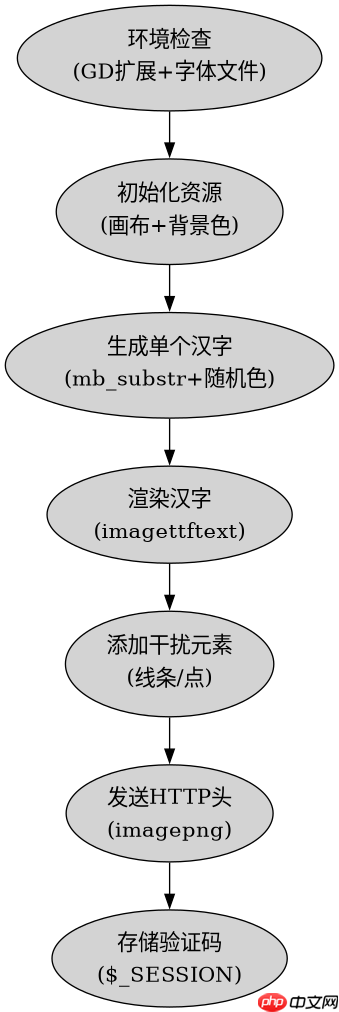
必须确保PHP已启用gd扩展且系统安装了中文字体文件,否则imagettftext()会报错或显示乱码。开发者需确认phpinfo()中gd模块存在,并将字体文件(如simhei.ttf)放置于Web目录外或具备读取权限的路径。初始化时通过imagecreatetruecolor()创建画布,用imagecolorallocate()定义背景色,这是所有后续绘图操作的基础前提。
<?php
// 1. 检查GD扩展
if (!extension_loaded('gd')) {
    die('GD extension is not loaded');
}

// 2. 设置字体路径(需替换为实际存在的字体文件)
$fontPath = '/path/to/simhei.ttf';
if (!file_exists($fontPath)) {
    die('Font file not found');
}

// 3. 创建画布
$width = 200;
$height = 60;
$image = imagecreatetruecolor($width, $height);

// 4. 分配背景色(白色)
$bgColor = imagecolorallocate($image, 255, 255, 255);
imagefill($image, 0, 0, $bgColor);

// 5. 定义可选汉字池
$chars = '永和贤齐始站真言宝面文方平发兴亮全八君实喜宗明庭奇传任位健单唐南双名同向各多声章帮商';
$charCount = 4;
$captchaText = '';

// 6. 生成随机汉字并绘制
for ($i = 0; $i < $charCount; $i++) {
    // 随机选择一个汉字
    $charIndex = mt_rand(0, mb_strlen($chars, 'utf-8') - 1);
    $char = mb_substr($chars, $charIndex, 1, 'utf-8');
    $captchaText .= $char;

    // 随机颜色
    $textColor = imagecolorallocate($image, mt_rand(0, 100), mt_rand(0, 100), mt_rand(0, 100));

    // 随机位置和角度
    $x = 30 + $i * 40;
    $y = 40;
    $angle = mt_rand(-15, 15);

    // 绘制文字
    imagettftext($image, 24, $angle, $x, $y, $textColor, $fontPath, $char);
}

// 7. 添加干扰线
for ($i = 0; $i < 5; $i++) {
    $lineColor = imagecolorallocate($image, mt_rand(150, 255), mt_rand(150, 255), mt_rand(150, 255));
    imageline($image, mt_rand(0, $width), mt_rand(0, $height), mt_rand(0, $width), mt_rand(0, $height), $lineColor);
}

// 8. 输出图像
header('Content-Type: image/png');
imagepng($image);
imagedestroy($image);

// 存储验证码文本到Session供验证使用
session_start();
$_SESSION['captcha'] = $captchaText;
?>
上述代码运行后会在浏览器直接输出PNG格式的图像。关键步骤包括:使用mb_substr安全截取UTF-8编码的中文字符,避免乱码;通过imagettftext指定字体路径实现中文渲染;利用mt_rand控制位置与角度增加识别难度。最终生成的验证码文本存入$_SESSION以便后续表单提交时比对。
立即学习“PHP免费学习笔记(深入)”;

使用官方Model Context Protocol PHP SDK将PHP应用程序功能暴露为MCP工具、资源和提示,用于代理工作流。
如何优化中文验证码的视觉清晰度与抗干扰能力
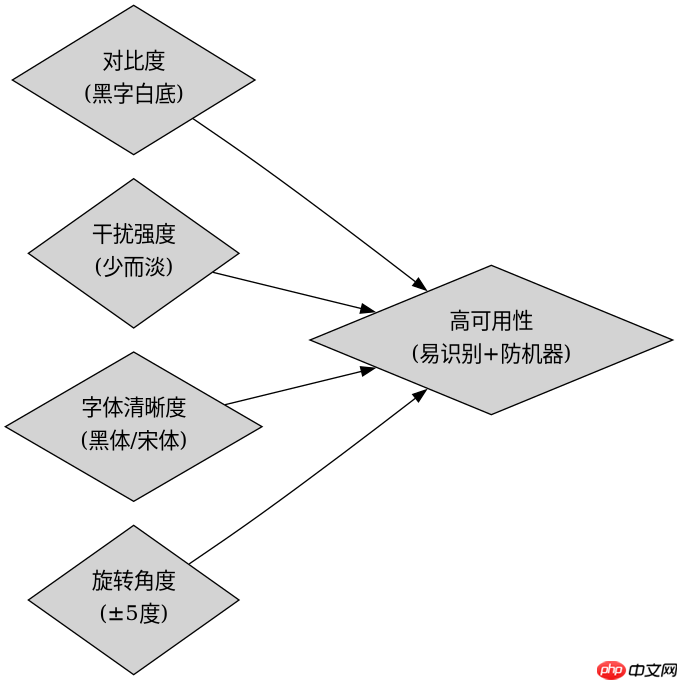
提升中文验证码可用性的关键在于平衡干扰元素与字符辨识度。过密的干扰线或过高对比度的背景色会导致OCR或人工识别困难。应限制干扰线数量(建议3至5条),使用浅色线条(RGB值大于150),并确保汉字颜色与背景形成足够反差。同时,固定字号(如24px)和合理间距(每字间隔约40像素)可防止字符重叠。此外,避免使用过于花哨的字体,选择黑体或宋体等结构清晰的字体能显著提高识别率。
<?php
// 优化版:调整干扰参数与字体样式
$fontPath = '/path/to/simhei.ttf';
$width = 200;
$height = 60;
$image = imagecreatetruecolor($width, $height);
$bgColor = imagecolorallocate($image, 240, 240, 240); // 浅灰背景
imagefill($image, 0, 0, $bgColor);

$chars = '永和贤齐始站真言宝面文方平发兴亮全八君实喜宗明庭奇传任位健单唐南双名同向多声章帮商';
$charCount = 4;
$captchaText = '';

for ($i = 0; $i < $charCount; $i++) {
    $charIndex = mt_rand(0, mb_strlen($chars, 'utf-8') - 1);
    $char = mb_substr($chars, $charIndex, 1, 'utf-8');
    $captchaText .= $char;

    // 深色文字确保对比度
    $textColor = imagecolorallocate($image, 0, 0, 0);

    // 固定间距,减少随机偏移
    $x = 35 + $i * 40;
    $y = 42;
    $angle = mt_rand(-5, 5); // 减小角度范围

    imagettftext($image, 24, $angle, $x, $y, $textColor, $fontPath, $char);
}

// 少量干扰线,浅色
for ($i = 0; $i < 3; $i++) {
    $lineColor = imagecolorallocate($image, 200, 200, 200);
    imageline($image, mt_rand(0, $width), mt_rand(0, $height), mt_rand(0, $width), mt_rand(0, $height), $lineColor);
}

header('Content-Type: image/png');
imagepng($image);
imagedestroy($image);
session_start();
$_SESSION['captcha'] = $captchaText;
?>
该优化版本将背景改为浅灰色(RGB 240,240,240),文字设为纯黑,确保高对比度。干扰线减少至3条且颜色接近背景(RGB 200,200,200),降低视觉干扰。角度随机范围缩小至±5度,避免字符过度倾斜。这些调整使验证码在保持一定安全性的同时,更易于人类用户识别,符合无障碍设计原则。
当字体文件缺失或路径错误时会返回什么结果
若imagettftext()调用的字体文件不存在或路径不可读,函数将触发警告并返回false,导致图像中对应位置无文字显示,仅保留背景与干扰元素。此时生成的验证码虽无语法错误,但内容缺失,无法用于身份验证。开发者应在调用前通过file_exists()校验路径,并在失败时记录日志或返回默认占位图,避免静默失败影响用户体验。



















