








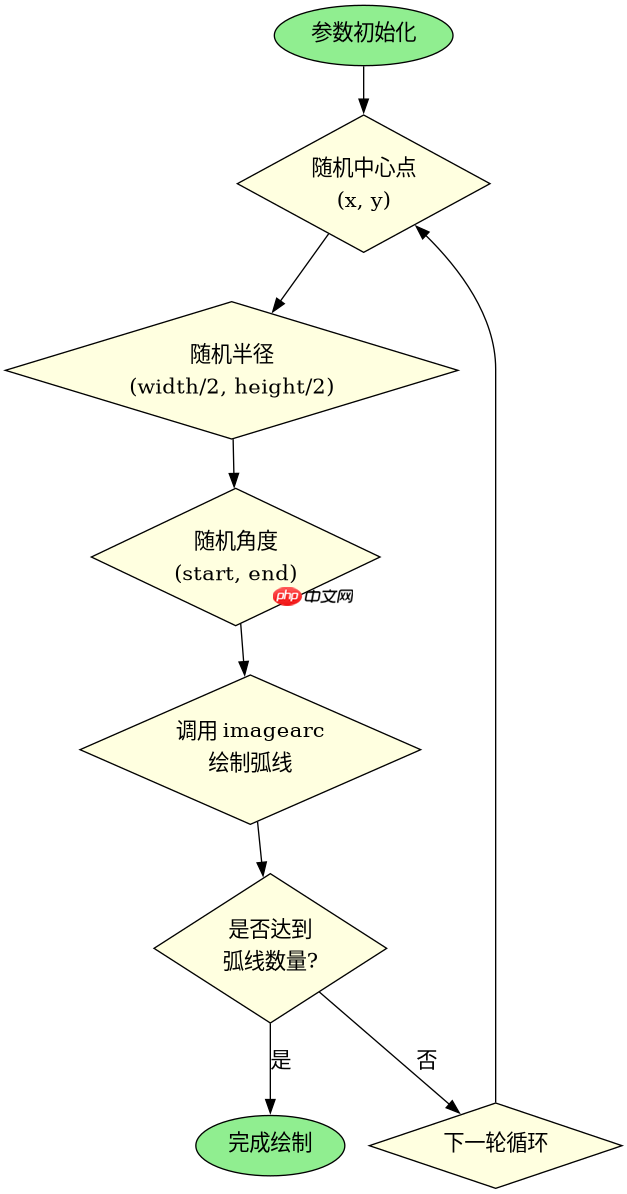
使用php生成带弧度干扰线的验证码,核心在于利用gd库的imagearc函数绘制半透明或不同颜色的弧线,并将其叠加在字符图像上。具体做法是创建画布、生成随机字符、设置字体颜色后,通过循环调用imagearc指定不同的中心点、半径和起止角度来绘制多条弯曲线条,最后输出为png或jpeg格式。若需调整干扰强度,只需增加弧线数量或增大半径范围即可。

如何配置GD库参数以控制弧度的曲率和位置
要精确控制弧度的曲率和位置,需要理解imagearc函数的参数含义:中心坐标($x, $y)、宽度和高度($width, $height)以及起始和结束角度($start, $end)。曲率主要由半径决定,而位置由中心点决定。通过随机化这些参数,可以确保每次生成的验证码都有独特的干扰线形态。
<?php
// 创建画布
$width = 200;
$height = 60;
$image = imagecreatetruecolor($width, $height);

// 背景色
$bgColor = imagecolorallocate($image, 240, 240, 240);
imagefill($image, 0, 0, $bgColor);

// 生成随机字符串
$chars = 'ABCDEFGHJKLMNPQRSTUVWXYZ23456789';
$captcha_code = '';
for ($i = 0; $i < 4; $i++) {
    $captcha_code .= $chars[rand(0, strlen($chars) - 1)];
}

// 绘制文字
$textColor = imagecolorallocate($image, 0, 0, 0);
$font_size = 24;
$font_file = './arial.ttf'; // 确保有字体文件
imagettftext($image, $font_size, 0, 30, 40, $textColor, $font_file, $captcha_code);

// 绘制带弧度的干扰线
for ($i = 0; $i < 5; $i++) {
    $lineColor = imagecolorallocate($image, rand(0, 255), rand(0, 255), rand(0, 255));
    $x1 = rand(0, $width);
    $y1 = rand(0, $height);
    $x2 = rand(0, $width);
    $y2 = rand(0, $height);

    // 计算圆心和半径以形成弧线
    $center_x = ($x1 + $x2) / 2;
    $center_y = ($y1 + $y2) / 2;
    $radius = rand(50, 150);
    $start_angle = rand(0, 360);
    $end_angle = $start_angle + rand(30, 90);

    imagearc($image, $center_x, $center_y, $radius * 2, $radius * 2, $start_angle, $end_angle, $lineColor);
}

// 输出图像
header('Content-Type: image/png');
imagepng($image);
imagedestroy($image);
?>
如何优化干扰线与文字的对比度以确保可读性
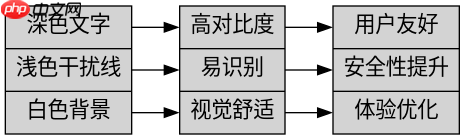
优化对比度的关键在于选择干扰线的颜色和透明度。如果干扰线颜色过深或与文字颜色相近,会降低验证码的可读性。建议将干扰线设置为较浅的颜色或使用半透明效果,同时保持文字颜色为深色。此外,可以通过调整弧线的粗细和密度来平衡干扰效果和识别难度。

Build MCP servers and clients for PHP applications with the official PHP SDK
下载
使用官方Model Context Protocol PHP SDK将PHP应用程序功能暴露为MCP工具、资源和提示,用于代理工作流。
立即学习“PHP免费学习笔记(深入)”;
<?php
// 创建画布
$width = 200;
$height = 60;
$image = imagecreatetruecolor($width, $height);

// 背景色
$bgColor = imagecolorallocate($image, 255, 255, 255);
imagefill($image, 0, 0, $bgColor);

// 生成随机字符串
$chars = 'ABCDEFGHJKLMNPQRSTUVWXYZ23456789';
$captcha_code = '';
for ($i = 0; $i < 4; $i++) {
    $captcha_code .= $chars[rand(0, strlen($chars) - 1)];
}

// 绘制文字(深色)
$textColor = imagecolorallocate($image, 0, 0, 0);
$font_size = 24;
$font_file = './arial.ttf';
imagettftext($image, $font_size, 0, 30, 40, $textColor, $font_file, $captcha_code);

// 绘制浅色半透明干扰线
for ($i = 0; $i < 3; $i++) {
    // 使用较浅的颜色
    $lineColor = imagecolorallocatealpha($image, 200, 200, 200, 50); // 半透明
    $x1 = rand(0, $width);
    $y1 = rand(0, $height);
    $x2 = rand(0, $width);
    $y2 = rand(0, $height);

    $center_x = ($x1 + $x2) / 2;
    $center_y = ($y1 + $y2) / 2;
    $radius = rand(50, 150);
    $start_angle = rand(0, 360);
    $end_angle = $start_angle + rand(30, 90);

    imagearc($image, $center_x, $center_y, $radius * 2, $radius * 2, $start_angle, $end_angle, $lineColor);
}

// 输出图像
header('Content-Type: image/png');
imagepng($image);
imagedestroy($image);
?>
当验证码图片加载失败时如何排查GD库问题
当验证码图片加载失败时,通常是因为GD库未正确安装或配置。首先检查PHP是否已启用GD扩展,可以通过phpinfo()查看。其次,确认字体文件路径是否正确,特别是使用imagettftext时。如果仍无法显示,尝试简化代码,仅绘制基本图形以排除字体问题。最后,检查服务器权限,确保脚本有写入临时文件或访问字体的权限。


















