








Iterator 遍历集合时如何映射元素
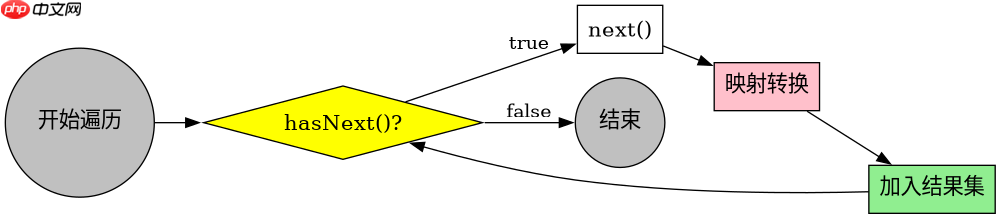
使用 iterator 实现元素映射的核心做法是:在遍历过程中通过 next() 获取原始元素,调用转换逻辑生成新对象或值,并将结果存入新的集合中。具体而言,先创建目标集合(如 list),再获取源集合的迭代器,循环判断 hasnext() 并处理 next() 返回值,最终返回填充好的新集合。此过程不依赖索引,适用于所有实现了 iterable 接口的数据结构,且能安全地在遍历时避免并发修改异常。
如何在映射过程中过滤特定条件元素
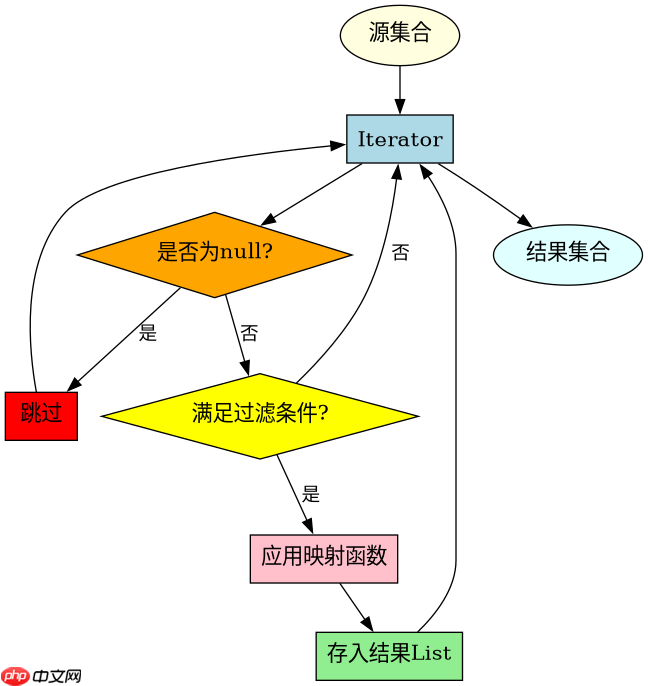
在迭代器遍历阶段进行过滤的做法是:在调用 next() 后,立即对元素执行条件判断,仅当满足条件时才将其映射并加入目标集合。例如,若需保留长度大于 3 的字符串,可在循环体内添加 if (element.length() > 3) 判断,满足则执行映射逻辑,否则跳过。这样既完成了元素转换,又实现了数据筛选,无需额外创建中间集合或多次遍历。

基于空指针异常的具体排查与处理
在使用迭代器映射时,若源集合包含 null 元素,直接调用其方法会抛出 NullPointerException。解决该问题的具体做法是在 next() 后立即检查是否为 null,若为 null 则跳过或赋予默认值。例如,在映射字符串长度时,应先判断 if (item == null) continue;,确保后续操作的安全性。这种防御性编程能有效避免因脏数据导致的程序崩溃,提升代码健壮性。
立即学习“Java免费学习笔记(深入)”;
import java.util.*;

public class IteratorMapper {
    public static List<String> mapAndFilter(List<String> source, Predicate<String> filter, Function<String, String> mapper) {
        List<String> result = new ArrayList<>();
        if (source == null) return result;
        Iterator<String> it = source.iterator();
        while (it.hasNext()) {
            String item = it.next();
            if (item == null) continue;
            if (filter.test(item)) {
                result.add(mapper.apply(item));
            }
        }
        return result;
    }

    public static void main(String[] args) {
        List<String> data = Arrays.asList("apple", "bat", null, "cat", "dog");
        List<String> filteredMapped = mapAndFilter(data,
            s -> s.length() > 3,
            String::toUpperCase
        );
        System.out.println(filteredMapped);
    }
}
预期输出:[APPLE, CAT]
分析:
- 输入列表包含


















