








JDBC 事务中如何确保审计日志与业务数据的一致性
在 jdbc 中实现数据审计,核心做法是将业务数据的更新和审计日志的写入放在同一个 connection 的事务中执行。通过设置 setautocommit(false) 开启事务,依次执行业务 sql 和审计 sql,若任一环节失败则调用 rollback() 回滚,成功则调用 commit() 提交。这样能保证要么业务数据和审计记录同时存在,要么都不存在,从而满足强一致性要求。

具体实现时,需要获取数据库连接后关闭自动提交模式。接着使用 PreparedStatement 分别准备业务更新语句和审计插入语句。执行这两条语句后,根据执行结果决定是提交还是回滚。如果在执行过程中抛出异常,必须在 finally 块或 try-with-resources 结构中确保事务状态被正确处理,防止连接泄漏或事务挂起。
import java.sql.Connection;
import java.sql.DriverManager;
import import java.sql.PreparedStatement;

public class AuditTransactionExample {
    public static void main(String[] args) {
        String url = "jdbc:mysql://localhost:3306/mydb";
        String user = "root";
        String password = "password";

        try (Connection conn = DriverManager.getConnection(url, user, password)) {
            // 1. 关闭自动提交,开启事务
            conn.setAutoCommit(false);

            try {
                // 2. 执行业务操作
                String businessSql = "UPDATE accounts SET balance = balance - ? WHERE id = ?";
                try (PreparedStatement pStmtBiz = conn.prepareStatement(businessSql)) {
                    pStmtBiz.setDouble(1, 100.0);
                    pStmtBiz.setInt(2, 1);
                    pStmtBiz.executeUpdate();
                }

                // 3. 执行审计操作
                String auditSql = "INSERT INTO audit_log (action, details, timestamp) VALUES (?, ?, ?)";
                try (PreparedStatement pStmtAudit = conn.prepareStatement(auditSql)) {
                    pStmtAudit.setString(1, "DEBIT");
                    pStmtAudit.setString(2, "Transferred 100 from account 1");
                    pStmtAudit.setTimestamp(3, new java.sql.Timestamp(System.currentTimeMillis()));
                    pStmtAudit.executeUpdate();
                }

                // 4. 提交事务
                conn.commit();
                System.out.println("Transaction committed successfully.");

            } catch (Exception e) {
                // 5. 发生异常,回滚事务
                conn.rollback();
                System.err.println("Transaction rolled back due to error: " + e.getMessage());
                throw e;
            } finally {
                // 恢复自动提交(可选,取决于连接池配置)
                conn.setAutoCommit(true);
            }
        } catch (Exception e) {
            e.printStackTrace();
        }
    }
}
上述代码展示了标准的 JDBC 事务管理流程。首先通过 DriverManager.getConnection 获取连接,并立即调用 setAutoCommit(false)。随后在 try 块中顺序执行业务更新和审计插入。如果两个操作都成功,调用 conn.commit() 使更改生效。如果任何一步抛出异常,进入 catch 块调用 conn.rollback() 撤销所有更改。这种机制确保了审计日志不会在业务失败的情况下单独留存,也不会因为审计失败而丢失业务数据。
如何处理长事务中的锁竞争与性能问题
当审计逻辑涉及复杂查询或大量数据写入时,长事务可能导致数据库行锁持有时间过长,进而引发锁竞争和性能下降。解决这一问题的做法是尽量缩短事务持续时间,将非必要的读取操作移出事务范围,或者采用异步写入审计日志的方式。如果必须同步写入,应确保审计 SQL 尽可能简单且快速,避免在事务中执行耗时操作。
立即学习“Java免费学习笔记(深入)”;

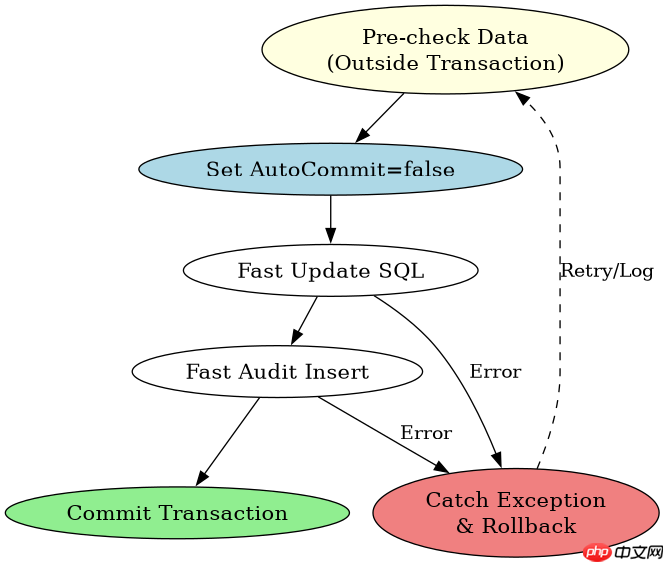
在实际开发中,可以通过分析事务内的执行步骤来优化性能。例如,先进行数据校验和业务逻辑处理,这些可以在事务外完成。只有当确定要提交数据时,才开启事务并执行最终的更新和审计插入。此外,可以使用数据库的隔离级别设置来平衡一致性和并发性能,如使用 READ_COMMITTED 而不是 SERIALIZABLE,以减少锁的范围。
import java.sql.Connection;
import java.sql.DriverManager;
import java.sql.PreparedStatement;
import java.sql.ResultSet;

public class OptimizedAuditTransaction {
    public static void main(String[] args) {
        String url = "jdbc:mysql://localhost:3306/mydb";
        String user = "root";
        String password = "password";

        try (Connection conn = DriverManager.getConnection(url, user, password)) {
            // 1. 事务外进行数据校验和准备
            int accountId = 1;
            double amount = 100.0;

            // 模拟复杂的业务逻辑或数据校验,不在事务中
            if (!isValidAccount(accountId)) {
                System.out.println("Invalid account.");
                return;
            }

            // 2. 开启事务
            conn.setAutoCommit(false);
            try {
                // 3. 执行快速的事务内操作
                String updateSql = "UPDATE accounts SET balance = balance - ? WHERE id = ?";
                try (PreparedStatement pStmt = conn.prepareStatement(updateSql)) {
                    pStmt.setDouble(1, amount);
                    pStmt.setInt(2, accountId);
                    int rowsAffected = pStmt.executeUpdate();

                    if (rowsAffected == 0) {
                        throw new RuntimeException("No account updated.");
                    }
                }

                // 4. 执行快速的审计插入
                String auditSql = "INSERT INTO audit_log (action, details, timestamp) VALUES (?, ?, ?)";
                try (PreparedStatement pStmtAudit = conn.prepareStatement(auditSql)) {
                    pStmtAudit.setString(1, "DEBIT");
                    pStmtAudit.setString(2, "Optimized transfer of " + amount + " from account " + accountId);
                    pStmtAudit.setTimestamp(3, new java.sql.Timestamp(System.currentTimeMillis()));
                    pStmtAudit.executeUpdate();
                }

                // 5. 提交事务
                conn.commit();
                System.out.println("Optimized transaction committed.");

            } catch (Exception e) {
                conn.rollback();
                System.err.println("Optimized transaction rolled back: " + e.getMessage());
            } finally {
                conn.setAutoCommit(true);
            }
        } catch (Exception e) {
            e.printStackTrace();
        }
    }

    private static boolean isValidAccount(int id) {
        // 模拟校验逻辑,实际中可能查库,但建议在校验阶段不持锁
        return id > 0;
    }
}
这段代码演示了优化后的事务处理方式。关键改进在于将数据校验等耗时操作移出了事务范围。在 try 块内部,只保留了最核心的更新和审计插入操作。这样可以显著减少事务持有锁的时间,降低与其他事务的冲突概率。同时,通过检查 executeUpdate() 的返回值,可以提前发现数据不存在的情况并抛出异常,触发回滚,避免无效的数据写入。
基于程序中某个输入、条件或结果的具体问题
在上面的代码中,如果业务更新语句影响的行数为 0(即没有匹配到任何账户),程序会抛出异常并回滚事务。这是一个具体的条件判断结果:当 accountId 不存在时,UPDATE 语句返回 0,导致 RuntimeException 被抛出,进而触发 rollback()。这意味着审计日志也不会被写入,保证了数据的一致性。如果希望在这种情况下仍然记录审计日志(例如记录“尝试更新不存在的账户”),则需要调整逻辑,在捕获特定异常或检查结果后,决定是否继续执行审计插入。
import java.sql.Connection;
import java.sql.DriverManager;
import java.sql.PreparedStatement;

public class ConditionalAuditTransaction {
    public static void main(String[] args) {
        String url = "jdbc:mysql://localhost:3306/mydb";
        String user = "root";
        String password = "password";

        try (Connection conn = DriverManager.getConnection(url, user, password)) {
            conn.setAutoCommit(false);
            try {
                int accountId = 999; // 假设这个ID不存在
                double amount = 100.0;

                String updateSql = "UPDATE accounts SET balance = balance - ? WHERE id = ?";
                try (PreparedStatement pStmt = conn.prepareStatement(updateSql)) {
                    pStmt.setDouble(1, amount);
                    pStmt.setInt(2, accountId);
                    int rowsAffected = pStmt.executeUpdate();

                    // 具体条件判断:如果影响行数为0,说明账户不存在
                    if (rowsAffected == 0) {
                        // 可以选择记录审计日志,但不更新业务数据
                        String auditSql = "INSERT INTO audit_log (action, details, timestamp) VALUES (?, ?, ?)";
                        try (PreparedStatement pStmtAudit = conn.prepareStatement(auditSql)) {
                            pStmtAudit.setString(1, "FAILED_ATTEMPT");
                            pStmtAudit.setString(2, "Attempted to debit non-existent account " + accountId);
                            pStmtAudit.setTimestamp(3, new java.sql.Timestamp(System.currentTimeMillis()));
                            pStmtAudit.executeUpdate();
                        }
                        // 注意:这里没有抛出异常,所以会提交事务,但业务数据未变
                        conn.commit();
                        System.out.println("Conditional audit logged for failed attempt.");
                    } else {
                        // 正常情况:更新成功,记录成功审计
                        String auditSql = "INSERT INTO audit_log (action, details, timestamp) VALUES (?, ?, ?)";
                        try (PreparedStatement pStmtAudit = conn.prepareStatement(auditSql)) {
                            pStmtAudit.setString(1, "SUCCESS");
                            pStmtAudit.setString(2, "Successfully debited " + amount + " from account " + accountId);
                            pStmtAudit.setTimestamp(3, new java.sql.Timestamp(System.currentTimeMillis()));
                            pStmtAudit.executeUpdate();
                        }
                        conn.commit();
                        System.out.println("Conditional audit logged for success.");
                    }
                }

            } catch (Exception e) {
                conn.rollback();
                System.err.println("Transaction rolled back: " + e.getMessage());
            } finally {
                conn.setAutoCommit(true);
            }
        } catch (Exception e) {
            e.printStackTrace();
        }
    }
}
此代码片段展示了基于 rowsAffected 结果的分支处理。当 accountId 为 999 且不存在时,UPDATE 返回 0。程序进入 if (rowsAffected == 0) 分支,执行一条特殊的审计插入,记录“失败尝试”,然后提交事务。此时业务数据未改变,但审计日志中有一条记录。如果 accountId 存在,则进入 else 分支,执行正常的业务更新和成功审计记录。这种灵活性允许开发者根据具体业务需求定制审计策略,同时保持事务的一致性控制。



















