








在spring boot rest接口中处理日期时间参数,最稳妥的方式是使用@datetimeformat注解配合java.time.localdatetime类型,或者使用自定义的converter。直接接收字符串并手动解析容易出错且难以维护,而依赖全局配置则不够灵活。通过注解指定格式,框架会自动完成从http请求参数到java对象的转换,确保数据类型的正确性。

如何使用注解处理标准格式的时间参数
使用@DateTimeFormat注解可以直接将请求中的字符串转换为LocalDateTime对象。这种方式适用于大多数标准场景,只需在控制器方法的参数上添加注解并指定pattern属性即可。例如,设置pattern = "yyyy-MM-dd HH:mm:ss"可以匹配常见的中文或ISO风格时间串。如果请求头中未提供该参数,需考虑默认值处理,通常建议结合required=false或使用默认参数值。
import org.springframework.format.annotation.DateTimeFormat;
import org.springframework.web.bind.annotation.GetMapping;
import org.springframework.web.bind.annotation.RequestParam;
import org.springframework.web.bind.annotation.RestController;

import java.time.LocalDateTime;

@RestController
public class TimeController {

    @GetMapping("/query")
    public String queryByTime(
            @RequestParam(required = false)
            @DateTimeFormat(pattern = "yyyy-MM-dd HH:mm:ss") LocalDateTime startTime) {
        if (startTime == null) {
            return "No time provided";
        }
        return "Received: " + startTime.toString();
    }
}预期结果:当发送GET请求/query?startTime=2023-10-01 12:00:00时,返回Received: 2023-10-01T12:00:00。若省略参数,返回No time provided。若格式错误(如2023/10/01),Spring将抛出HttpMessageNotReadableException或绑定异常,具体取决于全局异常处理器配置。

如何统一处理不同格式的日期时间输入
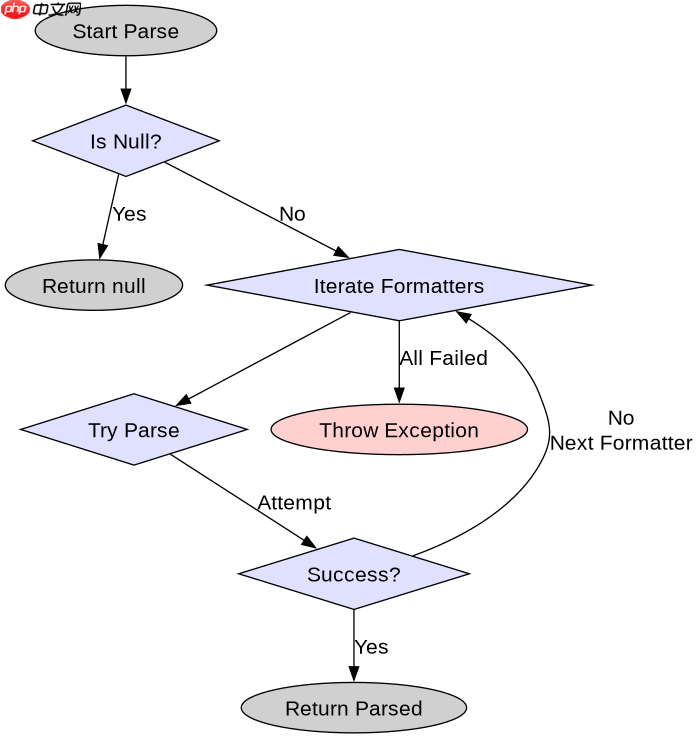
当客户端可能发送多种时间格式(如yyyy-MM-dd、yyyy/MM/dd或Unix时间戳)时,单一注解无法满足需求。此时应实现一个自定义的Converter<string localdatetime></string>,并在配置类中注册。这种方法解耦了业务逻辑与格式解析逻辑,提高了代码的可测试性和复用性。转换器内部可以使用DateTimeFormatterBuilder来支持多格式匹配,或者根据输入特征动态选择解析器。
import org.springframework.core.convert.converter.Converter;
import org.springframework.stereotype.Component;

import java.time.LocalDateTime;
import java.time.format.DateTimeFormatter;
import java.time.format.DateTimeParseException;
import java.util.Arrays;
import java.util.List;

@Component
public class FlexibleTimeConverter implements Converter<String, LocalDateTime> {

    private static final List<DateTimeFormatter> FORMATTERS = Arrays.asList(
            DateTimeFormatter.ofPattern("yyyy-MM-dd HH:mm:ss"),
            DateTimeFormatter.ofPattern("yyyy-MM-dd"),
            DateTimeFormatter.ofPattern("yyyy/MM/dd HH:mm:ss")
    );

    @Override
    public LocalDateTime convert(String source) {
        if (source == null || source.isEmpty()) {
            return null;
        }
        for (DateTimeFormatter formatter : FORMATTERS) {
            try {
                return LocalDateTime.parse(source, formatter);
            } catch (DateTimeParseException e) {
                // Try next formatter
            }
        }
        throw new IllegalArgumentException("Invalid date format: " + source);
    }
}预期结果:注册该转换器后,控制器方法可直接接收LocalDateTime参数而无需@DateTimeFormat。发送?time=2023-10-01可成功解析为2023-10-01T00:00:00。发送?time=2023/10/01 12:00:00也可成功解析。若发送无效字符串abc,将抛出IllegalArgumentException,由全局异常处理器捕获并返回400错误。
如何处理时区转换问题
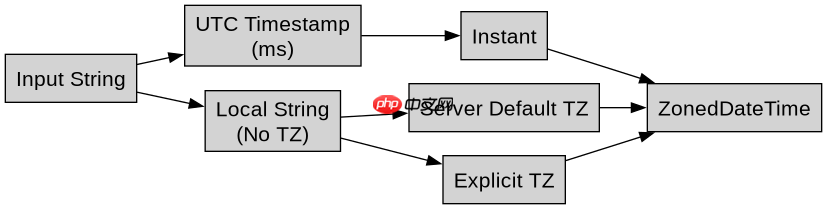
在处理跨时区应用时,仅解析本地时间可能导致数据偏差。最佳实践是始终在服务器端使用ZonedDateTime或OffsetDateTime接收带有时区信息的时间戳,或在接收到本地时间后显式指定时区。如果前端传递的是UTC时间戳(毫秒),应使用Instant进行转换。对于必须使用LocalDateTime的场景,应在服务层明确其所属时区,避免隐式依赖系统默认时区。建议在配置文件中固定server.servlet.session.cookie.secure及JVM时区,确保一致性。

















