








JavaScript 中箭头函数中怎么使用默认参数
在 javascript 的箭头函数中,默认参数的使用方式与普通函数完全一致。你只需在参数列表的等号后直接指定默认值即可。当调用时未传入该参数或传入值为 undefined,函数将自动使用这个默认值。

默认参数与剩余参数如何配合使用
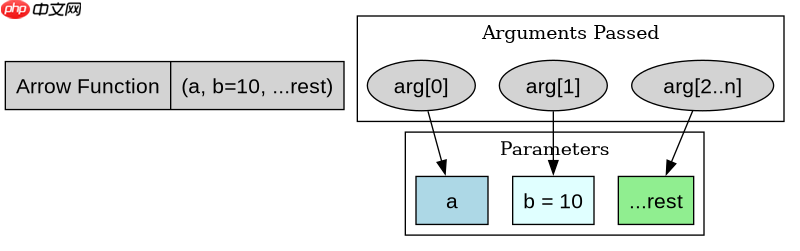
当箭头函数同时包含默认参数和剩余参数(...)时,剩余参数必须放在最后。默认参数会匹配具体的位置,而剩余参数则收集所有剩余的参数到一个数组中。这种组合在处理可选配置项时非常有用。

默认参数中的表达式求值时机
默认参数不仅可以是字面量,还可以是表达式或对其他参数的引用。需要注意的是,默认值的计算发生在函数被调用的那一刻,而不是定义时。如果默认值依赖于前面的参数,那么前面的参数必须先被定义。
立即学习“Java免费学习笔记(深入)”;

const greet = (name = 'Guest', age = 0) => {
  console.log(`Hello ${name}, you are ${age} years old.`);
};

// 测试用例
console.log('--- Test 1: No arguments ---');
greet(); // Output: Hello Guest, you are 0 years old.

console.log('--- Test 2: One argument ---');
greet('Alice'); // Output: Hello Alice, you are 0 years old.

console.log('--- Test 3: Two arguments ---');
greet('Bob', 25); // Output: Hello Bob, you are 25 years old.

console.log('--- Test 4: Undefined argument ---');
greet(undefined, 30); // Output: Hello Guest, you are 30 years old.
const sumWithDefault = (a, b = 10, ...rest) => {
const total = a + b + rest.reduce((acc, val) => acc + val, 0);
return { a, b, rest, total };
};
// 测试用例
console.log('--- Test 1: Only required arg ---');
console.log(sumWithDefault(5));
// Output: { a: 5, b: 10, rest: [], total: 15 }
console.log('--- Test 2: Required and default ---');
console.log(sumWithDefault(5, 20));
// Output: { a: 5, b: 20, rest: [], total: 25 }
console.log('--- Test 3: With rest params ---');
console.log(sumWithDefault(5, 20, 1, 2, 3));
// Output: { a: 5, b: 20, rest: [1, 2, 3], total: 31 }const createProfile = (name, role = 'User', permissions = []) => {
// 注意:这里 permissions 是一个新数组,避免共享引用问题
// 但在默认参数中,如果传入了对象/数组,它们会被复用
// 为了演示依赖前参,我们看下面的例子
return { name, role, permissions };
};
const getGreeting = (prefix = 'Hi', name = prefix.toUpperCase()) => {
return `${prefix}, ${name}!`;
};
// 测试用例
console.log('--- Test 1: Default expression ---');
console.log(getGreeting()); // Output: Hi, HI!
console.log('--- Test 2: Custom prefix ---');
console.log(getGreeting('Hello')); // Output: Hello, HELLO!
console.log('--- Test 3: Array default mutation risk ---');
const p1 = createProfile('Alice');
const p2 = createProfile('Bob');
p1.permissions.push('admin');
console.log(p1.permissions); // ['admin']
console.log(p2.permissions); // [] (Safe because new array created per call)
// 更复杂的依赖示例
const calculateDiscount = (price, taxRate = 0.1, discount = price * taxRate) => {
return price - discount;
};
console.log('--- Test 4: Dependent default param ---');
console.log(calculateDiscount(100)); // Output: 90 (100 - 100*0.1) 
















