








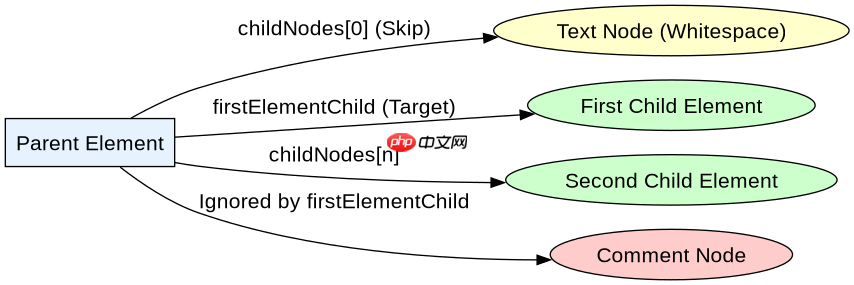
firstelementchild 属性用于获取元素节点下的第一个子元素节点,它会自动跳过文本节点和注释节点。要使用它,只需在目标 dom 元素后添加该属性即可,例如 element.firstelementchild。如果元素没有子元素,或者第一个子节点不是元素(如纯文本),则返回 null。
firstElementChild 与 childNodes[0] 的区别是什么
firstElementChild 只返回元素类型的子节点,而 childNodes[0] 返回的是第一个子节点,可能是文本节点、注释节点或元素节点。在实际开发中,如果 HTML 结构包含换行或缩进,childNodes[0] 很可能是一个文本节点,导致后续操作报错,而 firstElementChild 能直接定位到真正的第一个标签。
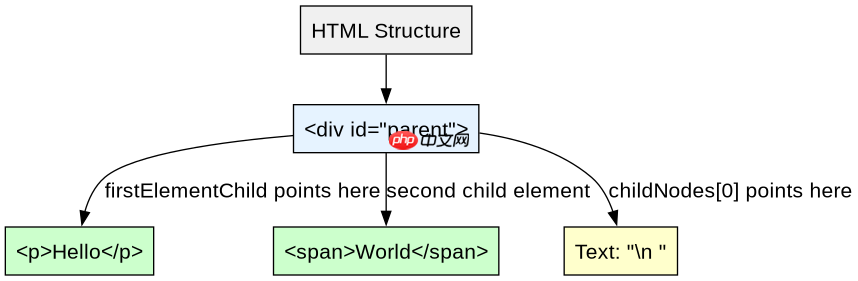
<div id="parent">
  <p>Hello</p><div class="aritcle_card flexRow">
                                                        <div class="artcardd flexRow">
                                                                <a class="aritcle_card_img" href="/xiazai/skill13332" title="JavaScript工具包免费版"><img
                                                                                src="https://img.php.cn/upload/skill/001/246/273/6adaf20e352aa140.jpg" alt="JavaScript工具包免费版" ></a>
                                                                <div class="aritcle_card_info flexColumn">
                                                                        <a href="/xiazai/skill13332" title="JavaScript工具包免费版">JavaScript工具包免费版</a>
                                                                        <p>JavaScript 陷阱防范与优选实践指南,覆盖异步、类型转换、闭包等核心场景。</p>
                                                                </div>
                                                                <a href="/xiazai/skill13332" title="JavaScript工具包免费版" class="aritcle_card_btn flexRow flexcenter"><b></b><span>下载</span> </a>
                                                        </div>
                                                </div><p><span>立即学习</span>“<a href="https://pan.quark.cn/s/c1c2c2ed740f" style="text-decoration: underline !important; color: blue; font-weight: bolder;" rel="nofollow" target="_blank">Java免费学习笔记(深入)</a>”;</p>
  <span>World</span>
</div>

<script>
const parent = document.getElementById('parent');
console.log(parent.childNodes[0]); // 可能是文本节点(换行)
console.log(parent.firstElementChild); // <p>Hello</p><p><span>立即学习</span>“<a href="https://pan.quark.cn/s/c1c2c2ed740f" style="text-decoration: underline !important; color: blue; font-weight: bolder;" rel="nofollow" target="_blank">Java免费学习笔记(深入)</a>”;</p>
</script>
当父元素为空时 firstElementChild 返回什么
当父元素没有任何子节点时,firstElementChild 会返回 null。这与 children.length === 0 的情况一致。开发者在使用该属性前,通常不需要额外判断是否为空,因为访问 null 的属性会抛出错误,这有助于快速发现逻辑问题。如果需要安全访问,可以使用可选链操作符 ?.。
<div id="empty"></div>

<script>
const empty = document.getElementById('empty');
console.log(empty.firstElementChild); // null
console.log(empty.children.length);   // 0

// 安全访问示例
const first = empty.firstElementChild?.tagName;
console.log(first); // undefined
</script> 

















