








java 中读取文本文件应使用 filereader 配合 bufferedreader,通过循环调用 readline() 方法逐行获取内容。这种方式能自动处理字符编码转换并提升 i/o 效率,最终将每一行字符串存入变量供业务逻辑使用。

如何正确关闭资源防止内存泄漏
必须使用 try-with-resources 语法块来管理 FileReader 的生命周期。该机制会在代码块结束时自动调用 close() 方法释放底层文件句柄,无需手动编写 finally 块进行异常捕获和关闭操作。
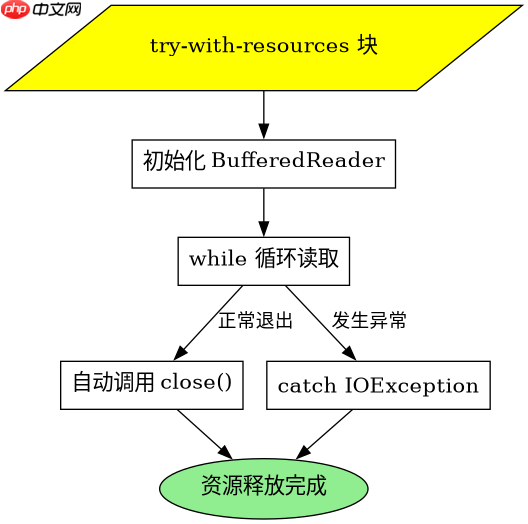
import java.io.BufferedReader;
import java.io.FileReader;
import java.io.IOException;

public class Main {
    public static void main(String[] args) {
        String filePath = "data.txt";
        // 使用 try-with-resources 自动管理资源
        try (BufferedReader reader = new BufferedReader(new FileReader(filePath))) {
            String line;
            while ((line = reader.readLine()) != null) {
                System.out.println(line);
            }
        } catch (IOException e) {
            System.err.println("读取文件失败: " + e.getMessage());
        }
    }
}
遇到空行或特殊字符时如何处理
readLine() 在遇到连续换行符时会返回空字符串 "",而非 null。当文件末尾存在非标准编码字符时,可能抛出 MalformedInputException。此时需检查返回值是否为空串以跳过无效行,或在构造 FileReader 时显式指定 StandardCharsets.UTF_8 避免平台默认编码差异导致的乱码问题。

立即学习“Java免费学习笔记(深入)”;

import java.io.BufferedReader;
import java.io.FileReader;
import java.io.IOException;
import java.nio.charset.StandardCharsets;

public class Main {
    public static void main(String[] args) {
        String filePath = "data.txt";
        try (BufferedReader reader = new BufferedReader(
                new FileReader(filePath, StandardCharsets.UTF_8))) {
            String line;
            while ((line = reader.readLine()) != null) {
                if (line.isEmpty()) {
                    continue; // 跳过空行
                }
                System.out.println("有效行: " + line);
            }
        } catch (IOException e) {
            System.err.println("读取失败: " + e.getMessage());
        }
    }
}
基于程序中某个输入、条件或结果的具体问题
当输入文件路径指向一个不存在的文件时,FileReader 构造函数会直接抛出 FileNotFoundException。这是程序启动阶段即可确定的硬性错误,必须在调用读取逻辑前通过 File.exists() 预判,或在 catch 块中专门处理该异常类型以避免程序崩溃。


















