








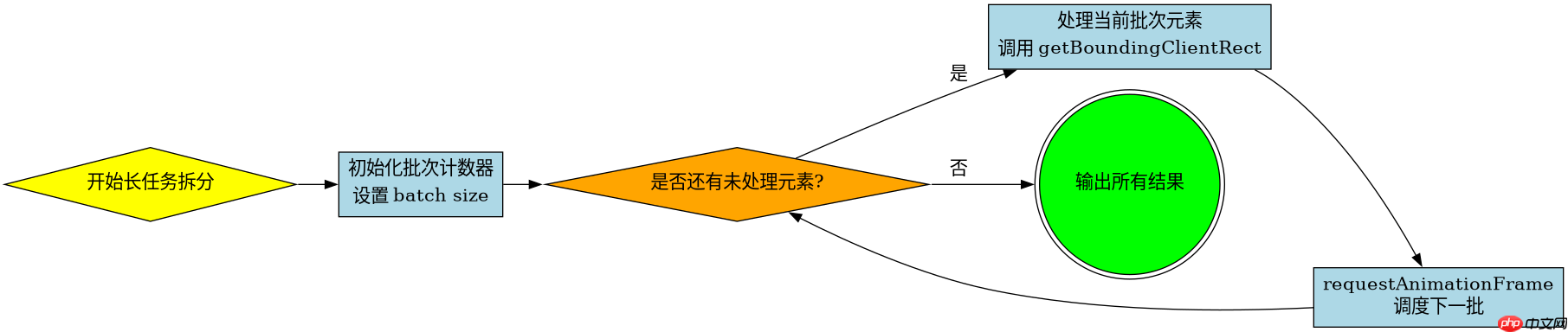
使用 requestanimationframe 将计算过程拆分到多个帧中执行,避免阻塞主线程。具体做法是将需要遍历的 dom 节点列表分批,每批处理完后通过回调触发下一批,直到所有节点都完成测量。这样可以将原本可能超过 50ms 的长任务拆解为多个短任务,确保 ui 渲染和交互不被卡死。
如何确定分批处理的阈值与调度时机
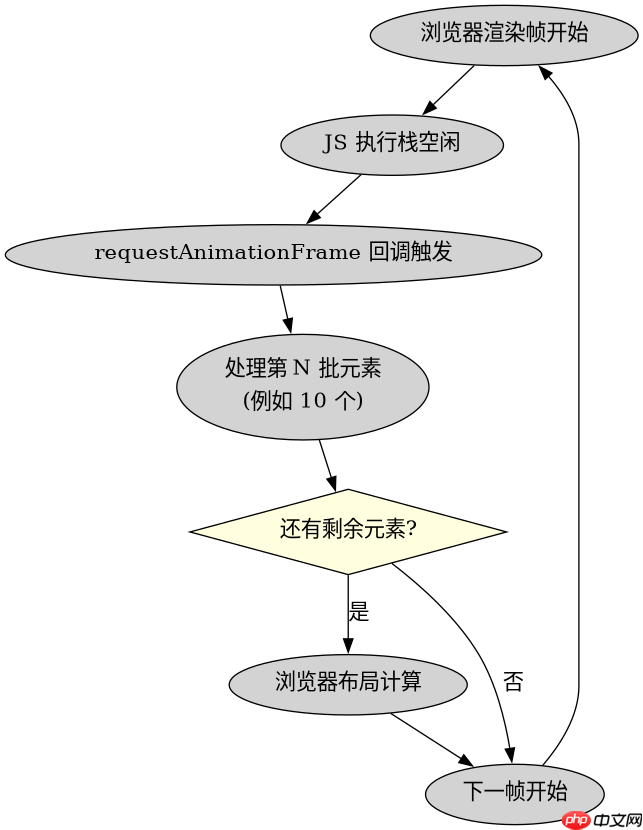
分批的核心在于控制每批处理的数量以及利用 requestAnimationFrame 的调度机制。通常建议每批处理 10 到 20 个元素,具体数量取决于单个元素测量的复杂度。通过在每一批处理结束后调用 requestAnimationFrame 来安排下一批,可以确保浏览器在下一帧渲染前执行这些计算,从而维持 60fps 的流畅度。如果某一批处理时间过长,浏览器会自动跳过或合并帧,但合理的分批能最大程度减少这种风险。
function splitGetBoundingClientRect(elements) {
  const results = [];
  let index = 0;
  const batchSize = 10; // 每批处理10个元素

  function processBatch() {
    const end = Math.min(index + batchSize, elements.length);
    for (; index < end; index++) {
      // 强制重排,获取当前元素的边界矩形
      const rect = elements[index].getBoundingClientRect();
      results.push(rect);
    }

    if (index < elements.length) {
      // 继续下一批
      requestAnimationFrame(processBatch);
    } else {
      console.log('All measurements completed', results);
    }
  }

  requestAnimationFrame(processBatch);
}
如何处理动态变化的 DOM 列表
当 DOM 列表是动态变化的,例如在滚动加载或实时数据更新时,直接遍历静态数组可能导致遗漏或重复。此时需要在每批处理前重新确认待处理列表的状态,或者使用一个队列来管理新增的元素。关键是在每次 requestAnimationFrame 回调中,检查当前索引是否仍然有效,并处理可能插入的新元素。这要求程序具备对列表状态变化的感知能力,确保测量的完整性和准确性。

立即学习“Java免费学习笔记(深入)”;

function splitDynamicGetBoundingClientRect(getElementsFn) {
  let processedCount = 0;
  let allResults = [];

  function process() {
    const currentElements = getElementsFn();
    const total = currentElements.length;
    const batchSize = 10;
    const start = processedCount;
    const end = Math.min(start + batchSize, total);

    for (let i = start; i < end; i++) {
      const rect = currentElements[i].getBoundingClientRect();
      allResults[i] = rect;
    }

    processedCount = end;

    if (processedCount < total) {
      requestAnimationFrame(process);
    } else {
      console.log('Dynamic measurement done', allResults);
    }
  }

  requestAnimationFrame(process);
}
基于批量测量结果的具体问题:如何高效存储和访问这些矩形数据
在完成了长任务拆分后,一个具体的问题是:如何高效地存储和访问这些分散在不同帧中生成的矩形数据?由于 getBoundingClientRect 返回的是只读对象,且每次调用都会产生新的对象实例,直接将这些对象存入一个大数组可能会导致内存占用增加。更优的做法是使用一个映射表(Map)或普通对象,以元素的 ID 或索引为键,存储对应的矩形数据。这样可以在后续需要时通过 O(1) 的时间复杂度快速查找特定元素的边界信息,而无需遍历整个结果数组。

















