








使用 groupby 对统一格式后的属性值进行分组,并选取每组中的第一个元素即可实现去重。具体做法是调用 enumerable.groupby 方法,传入一个将原始数据转换为统一格式(如去除空格、转小写)的键选择器,然后从每个分组中提取 key 或首项,从而得到去重后的结果集。

GroupBy 如何处理格式化后的重复项
GroupBy 会将具有相同键的元素归入同一个 IGrouping<tkey tsource></tkey> 集合中。当键是经过格式化处理的值时,所有格式一致但原始值不同的项会被视为同一组。通过遍历这些分组并取第一项,可以保留原始数据的完整性,同时基于格式化后的逻辑完成去重。
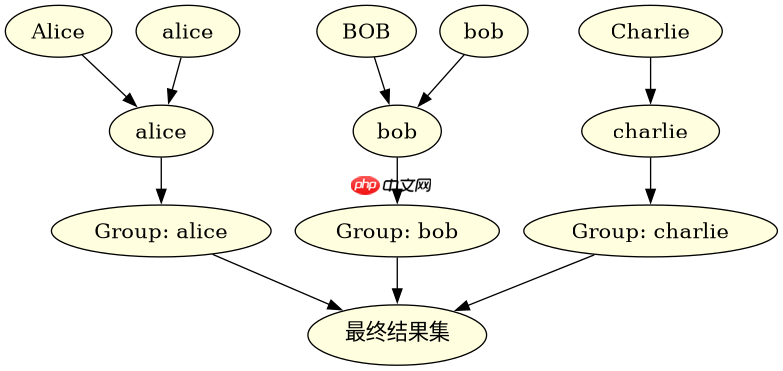
using System;
using System.Collections.Generic;
using System.Linq;

class Program
{
    static void Main()
    {
        var names = new List<string>
        {
            " Alice ",
            "alice",
            " BOB ",
            "bob",
            "Charlie"
        };

        var distinctNames = names
            .GroupBy(n => n.Trim().ToLower())
            .Select(g => g.First())
            .ToList();

        foreach (var name in distinctNames)
        {
            Console.WriteLine(name);
        }
    }
}
运行上述代码,预期输出为:
Alice
Bob
Charlie
这里 Trim().ToLower() 确保了 " Alice " 和 "alice" 被视为相同的键。 g.First() 返回的是原始字符串 " Alice ",如果希望返回格式化后的标准形式,可以将 Select 改为 Select(g => g.Key)。

如何自定义比较器以支持更复杂的格式统一
如果格式统一规则较为复杂,或者需要忽略特定字符(如标点符号),可以使用 IEqualityComparer<t></t> 自定义键的比较逻辑。这种方式比在 GroupBy 中直接转换字符串更灵活,且能更好地处理对象类型的去重。

using System;
using System.Collections.Generic;
using System.Linq;
using System.Text.RegularExpressions;

class Program
{
    class CustomStringComparer : IEqualityComparer<string>
    {
        public bool Equals(string x, string y)
        {
            if (x == null || y == null) return x == y;
            // 移除所有非字母数字字符并转小写
            var cleanX = Regex.Replace(x, @"[^a-z0-9]", "").ToLower();
            var cleanY = Regex.Replace(y, @"[^a-z0-9]", "").ToLower();
            return cleanX == cleanY;
        }

        public int GetHashCode(string obj)
        {
            if (obj == null) return 0;
            var clean = Regex.Replace(obj, @"[^a-z0-9]", "").ToLower();
            return clean.GetHashCode();
        }
    }

    static void Main()
    {
        var items = new List<string>
        {
            "Hello!",
            "hello?",
            "HELLO",
            "World."
        };

        var distinctItems = items
            .Distinct(new CustomStringComparer())
            .ToList();

        foreach (var item in distinctItems)
        {
            Console.WriteLine(item);
        }
    }
}
运行上述代码,预期输出为:
Hello!
World.
CustomStringComparer 实现了 IEqualityComparer<string></string>,其 GetHashCode 和 Equals 方法均基于清理后的字符串。 Distinct 方法直接使用此比较器进行去重,无需显式分组。
当输入列表为空或包含null值时会发生什么
如果输入列表为空, GroupBy 或 Distinct 将返回空集合,不会抛出异常。如果列表中包含 null 值, GroupBy 会将所有 null 值归为一组,因为 null 与 null 相等。 Distinct 也会将所有 null 视为相同项,只保留一个 null。需要注意的是,如果在格式化过程中使用了 .Trim() 等方法, null 会导致 NullReferenceException,因此在使用链式调用前需确保数据非空或使用 ?. 运算符。















