








使用 list<string></string> 的 removeall 方法并传入 string.isnullorempty 委托即可直接删除列表中的空字符串。该方法会原地修改列表,移除所有值为 null 或 "" 的元素,返回被移除元素的数量。

RemoveAll 如何过滤空值
RemoveAll 接受一个 Predicate<t></t> 委托,遍历列表并对每个元素执行该委托。当委托返回 true 时,该元素会被移除。对于 string 类型,最标准的做法是直接使用 string.IsNullOrEmpty 作为谓词,它能同时处理 null 引用和长度为 0 的空字符串。
using System;
using System.Collections.Generic;

class Program
{
    static void Main()
    {
        List<string> list = new List<string>
        {
            "hello",
            null,
            "world",
            "",
            "test"
        };

        int removedCount = list.RemoveAll(string.IsNullOrEmpty);

        Console.WriteLine($"Removed: {removedCount}");
        foreach (var item in list)
        {
            Console.WriteLine(item ?? "null");
        }
    }
}
运行上述代码,输出结果为:
Removed: 2
hello
world
test


使用 LINQ Where 创建新列表
如果不希望修改原始列表,可以使用 LINQ 的 Where 方法筛选出非空字符串,并通过 ToList() 生成一个新的列表。这种方式函数式更强,但会产生额外的内存分配。
using System;
using System.Collections.Generic;
using System.Linq;

class Program
{
    static void Main()
    {
        List<string> originalList = new List<string>
        {
            "hello",
            null,
            "world",
            "",
            "test"
        };

        // 创建新列表,保留非空字符串
        List<string> filteredList = originalList
            .Where(s => !string.IsNullOrEmpty(s))
            .ToList();

        Console.WriteLine("Original:");
        foreach (var item in originalList)
        {
            Console.WriteLine(item ?? "null");
        }

        Console.WriteLine("Filtered:");
        foreach (var item in filteredList)
        {
            Console.WriteLine(item ?? "null");
        }
    }
}运行结果中,originalList 保持不变,仍包含 null 和空字符串;filteredList 仅包含 "hello", "world", "test"。
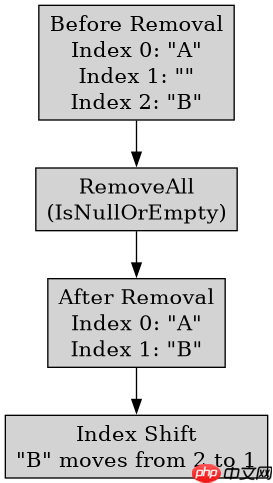
空字符串在列表中的索引变化
在使用 RemoveAll 删除空字符串后,列表的大小会减小,后续元素的索引会向前移动。例如,如果原列表为 ["A", "", "B"],删除空字符串后变为 ["A", "B"]。原索引 2 的 "B" 现在位于索引 1。这种索引变化是原地删除操作的正常现象,无需额外处理,因为 RemoveAll 已经完成了所有元素的重新排列。















