








java 7 引入的 try-with-resources 语句通过实现 autocloseable 接口的资源,在代码块结束时自动调用 close() 方法。只需将资源实例化放在 try(资源) 括号内,jvm 就会负责统一关闭,无需手动编写 finally 块。

try-with-resources 如何管理多个资源的生命周期
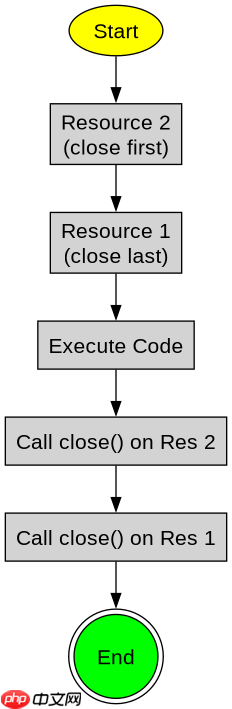
当需要处理多个资源时,可以在 try 括号中用分号分隔声明多个变量。JVM 会按照声明的逆序(从后往前)依次调用它们的 close() 方法。如果某个资源的 close() 抛出异常,它会被抑制并添加到原始异常的 suppressed 列表中,确保所有资源都能被尝试关闭。
import java.io.*;

public class MultiResourceExample {
    public static void main(String[] args) {
        // 同时管理两个资源:BufferedReader 和 FileInputStream
        try (FileInputStream fis = new FileInputStream("data.txt");
             BufferedReader br = new BufferedReader(new InputStreamReader(fis))) {

            String line;
            while ((line = br.readLine()) != null) {
                System.out.println(line);
            }
        } catch (IOException e) {
            System.err.println("IO Error: " + e.getMessage());
        }
        // 退出 try 块时,br.close() 先执行,然后 fis.close() 执行
    }
}
预期结果:程序读取文件内容并打印,退出时按逆序关闭流。若 br.close() 失败,fis.close() 仍会被调用,且异常信息可通过 e.getSuppressed() 获取。
立即学习“Java免费学习笔记(深入)”;

try-with-resources 如何处理自定义可关闭资源
任何实现了 java.lang.AutoCloseable 接口的类都可以作为资源使用。开发者只需在自定义类中重写 close() 方法,即可将其放入 try 括号中由 JVM 统一管理。这适用于数据库连接、网络连接或自定义句柄等场景。

import java.io.*;

// 自定义资源类
class CustomResource implements AutoCloseable {
    private String name;

    public CustomResource(String name) {
        this.name = name;
        System.out.println(name + " opened.");
    }

    public void doWork() {
        System.out.println(name + " is working.");
    }

    @Override
    public void close() throws Exception {
        System.out.println(name + " closed automatically.");
    }
}

public class CustomResourceExample {
    public static void main(String[] args) {
        try (CustomResource res = new CustomResource("MyResource")) {
            res.doWork();
        } catch (Exception e) {
            System.err.println("Error: " + e.getMessage());
        }
    }
}
预期结果:输出 "MyResource opened." -> "MyResource is working." -> "MyResource closed automatically."。证明自定义资源能被正确识别并自动关闭。
基于 try-with-resources 中 close() 抛出的具体异常处理
如果在 try 块内部发生异常,而随后某个资源的 close() 也抛出异常,JVM 会将 close() 的异常作为“抑制异常”附加到主异常上。主异常仍然是最初导致 try 块退出的那个异常,这保证了错误链的完整性,开发者可以通过 getSuppressed() 方法遍历所有被抑制的关闭异常。



















