








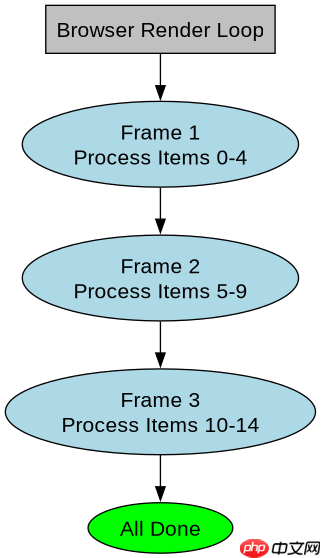
使用 requestanimationframe 将长任务拆分为多个帧执行,以避免阻塞主线程。具体做法是定义一个处理函数,每次在 raf 回调中只处理数据列表中的一小部分元素,读取其 computedstyle 并更新 dom,当所有元素处理完毕后停止调度。这样做可以将原本可能超过 16ms 的同步计算分散到多帧中,保持页面响应。

如何确保拆分逻辑不会遗漏或重复处理元素?
通过维护一个索引指针 currentIndex 来追踪当前处理到的位置,每次处理完一批后递增该指针,直到指针等于总长度。这种方式保证了每个元素只被访问一次,且顺序固定,避免了状态混乱导致的遗漏或重复。
const elements = document.querySelectorAll('.item');
const batchSize = 5;
let currentIndex = 0;

function processBatch() {
  const end = Math.min(currentIndex + batchSize, elements.length);
  for (let i = currentIndex; i < end; i++) {
    const style = window.getComputedStyle(elements[i]);
    // 模拟耗时操作:读取 width 和 height
    console.log(`Item ${i}: w=${style.width}, h=${style.height}`);
  }
  currentIndex = end;
  if (currentIndex < elements.length) {
    requestAnimationFrame(processBatch);
  } else {
    console.log('All items processed.');
  }
}

requestAnimationFrame(processBatch);
如果 computedStyle 读取导致强制重排(Reflow),拆分是否还能缓解性能问题?
是的,拆分依然有效。虽然每次读取 getComputedStyle 都可能触发强制同步布局,但将其分散在多帧中执行,意味着每帧的布局计算量减少,从而降低单帧卡顿的概率。浏览器可以在帧间隙进行其他渲染工作,用户感知的流畅度会提升。关键在于控制每批处理的元素数量,使其总耗时远低于 16ms。

Build Java agent transport gateways with Atmosphere
下载
使用Atmosphere构建通过WebSocket、SSE、gRPC、WebTransport、MCP、A2A和AG-UI流传输的JVM代理网关,并带有治理钩子。
立即学习“Java免费学习笔记(深入)”;

// 验证小批量下的性能表现
const smallBatchSize = 2;
let smallCurrentIndex = 0;

function processSmallBatch() {
  const end = Math.min(smallCurrentIndex + smallBatchSize, elements.length);
  for (let i = smallCurrentIndex; i < end; i++) {
    const rect = elements[i].getBoundingClientRect();
    // 仅读取几何属性,避免额外样式计算开销
    console.log(`Rect ${i}: ${rect.width}x${rect.height}`);
  }
  smallCurrentIndex = end;
  if (smallCurrentIndex < elements.length) {
    requestAnimationFrame(processSmallBatch);
  }
}

requestAnimationFrame(processSmallBatch);
基于程序中某个输入、条件或结果的具体问题
当 elements 列表为空时,程序应直接结束而不发起任何 requestAnimationFrame 调用。在上述代码中,由于初始 currentIndex 为 0,若 elements.length 为 0,则 end 也为 0,循环不执行,currentIndex 变为 0,判断条件 currentIndex 为假,因此不会递归调用,确保了空输入的健壮性。
















