empty-cells 属性控制表格中空单元格的边框和背景显示。设置 show 时,即使单元格为空也会绘制边框;设置 hide 时,空单元格的边框和背景会被隐藏,使表格看起来更紧凑。默认值为 show。

empty-cells: show 的默认表现是什么
在默认情况下,浏览器会为空的 <td> 或 <code><th> 元素绘制边框和背景色。这意味着如果数据缺失,表格中会出现明显的空白方框。这种行为由 CSS 规范定义,旨在保持表格结构的完整性。<p><img src="https://img.php.cn/upload/article/000/969/633/179488605061006.png" alt="CSS中empty-cells属性怎么控制原生表格空单元格显示"></p><pre class="brush:php;toolbar:false;"><!DOCTYPE html>
<html>
<head>
<style>
table {
border-collapse: collapse;
empty-cells: show;
}
td, th {
border: 1px solid black;
padding: 10px;
background-color: #f0f0f0;
}
</style>
</head>
<body>
<table>
<tr>
<th>姓名</th>
<th>年龄</th>
</tr>
<tr>
<td>Alice</td>
<td></td>
</tr>
</table>
</body>
</html></pre><p>预期结果:第二行第二列的单元格虽然内容为空,但会显示灰色背景和黑色边框。</p>
<p><span>立即学习</span>“<a href="https://pan.quark.cn/s/cb6835dc7db1" style="text-decoration: underline !important; color: blue; font-weight: bolder;" rel="nofollow" target="_blank">前端免费学习笔记(深入)</a>”;</p><div class="aritcle_card flexRow">
<div class="artcardd flexRow">
<a class="aritcle_card_img" href="/xiazai/gongju/2905" title="CSS"><img
src="https://img.php.cn/upload/manual/000/969/633/6af2b1226ad9e733.png" alt="CSS" ></a>
<div class="aritcle_card_info flexColumn">
<a href="/xiazai/gongju/2905" title="CSS">CSS</a>
<p>CSS 官方网站入口。访问 W3C 的 CSS 页面,查看 CSS 标准、学习资料与工作组动态;CSS 是 Web 标准,无需下载安装。</p>
</div>
<a href="/xiazai/gongju/2905" title="CSS" class="aritcle_card_btn flexRow flexcenter"><b></b><span>下载</span> </a>
</div>
</div>
<h2>
<code>empty-cells: hide 如何隐藏空单元格
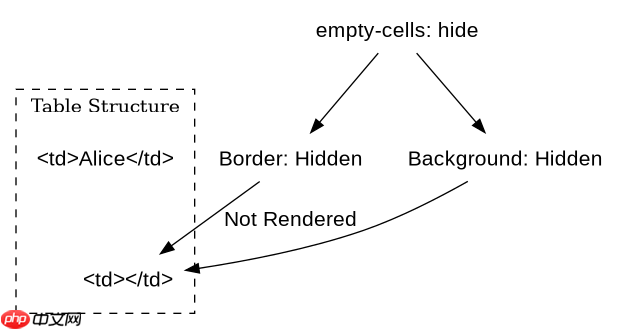
当设置为 hide 时,空单元格的边框和背景将不可见。这通常用于数据密集型的报表,以减少视觉噪音。注意,此属性仅在 border-collapse 为 separate(默认值)时生效。如果使用了 collapse,该属性将被忽略。
<!DOCTYPE html>
<html>
<head>
<style>
  table {
    border-collapse: separate;
    empty-cells: hide;
  }
  td, th {
    border: 1px solid black;
    padding: 10px;
    background-color: #f0f0f0;
  }
</style>
</head>
<body>
  <table>
    <tr>
      <th>姓名</th>
      <th>年龄</th>
    </tr>
    <tr>
      <td>Alice</td>
      <td></td>
    </tr>
  </table>
</body>
</html>
预期结果:第二行第二列的单元格不显示任何边框或背景,与相邻单元格之间的分隔线消失。
使用 border-collapse: collapse 时 empty-cells 是否有效
在 border-collapse: collapse 模式下,empty-cells 属性无效。这是因为合并边框模式会将相邻单元格的边框合并为一个,无法单独控制单个空单元格的边框渲染。此时,空单元格仍会显示边框,除非通过其他手段如移除单元格内容并调整布局来处理。