








WatchService 中 OVERFLOW 事件如何触发与处理
watchservice 在检测到系统事件丢失时会生成 overflow 事件,开发者需要轮询队列并消费该事件以重置状态。具体做法是在循环中调用 take() 或 poll(),检查返回的 watchkey 是否为 null 且事件类型为 standardwatcheventkinds.overflow。一旦捕获到该事件,说明之前的部分事件已丢失,此时应重新扫描目录以恢复同步,并继续处理后续的正常事件。

如何区分 OVERFLOW 与其他文件变更事件
OVERFLOW 事件不关联具体的文件路径,而是直接绑定在 WatchKey 上,这与 ENTRY_CREATE 等事件不同。在处理逻辑中,必须先获取 WatchKey 上的所有待处理事件,遍历这些事件时识别出类型为 OVERFLOW 的那一项。由于它没有附带文件名,无法直接定位是哪个文件发生了变化,只能表明监控服务内部发生了积压或丢失。开发者需据此判断是否需要执行全量刷新而非增量更新。
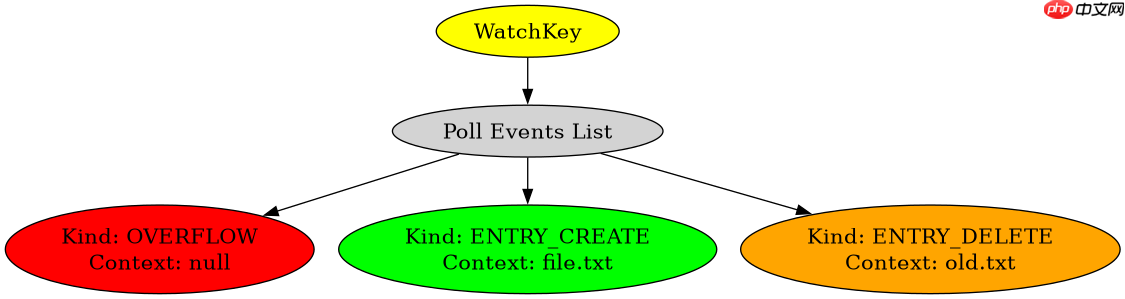
基于 OVERFLOW 事件的目录重扫描实现
当程序接收到 OVERFLOW 信号后,最稳妥的做法是放弃当前的增量缓存,对整个被监控目录进行重新遍历。这能确保文件系统状态与内存中的记录一致。以下代码展示了完整的监听循环,包含对 OVERFLOW 的具体处理逻辑以及重扫描的实现。

Build Java agent transport gateways with Atmosphere
下载
使用Atmosphere构建通过WebSocket、SSE、gRPC、WebTransport、MCP、A2A和AG-UI流传输的JVM代理网关,并带有治理钩子。
立即学习“Java免费学习笔记(深入)”;
import java.io.IOException;
import java.nio.file.*;
import java.nio.file.attribute.BasicFileAttributes;
import java.util.Set;
import java.util.HashSet;

public class WatchServiceDemo {
    private static final Path targetDir = Paths.get("./test_dir");
    private static Set<Path> knownFiles = new HashSet<>();

    public static void main(String[] args) throws IOException, InterruptedException {
        // 初始化已知文件列表
        scanDirectory(targetDir);

        WatchService watchService = FileSystems.getDefault().newWatchService();
        targetDir.register(watchService,
                StandardWatchEventKinds.ENTRY_CREATE,
                StandardWatchEventKinds.ENTRY_DELETE,
                StandardWatchEventKinds.ENTRY_MODIFY);

        System.out.println("开始监控: " + targetDir);

        while (true) {
            WatchKey key = watchService.take();
            boolean hasOverflow = false;

            for (WatchEvent<?> event : key.pollEvents()) {
                if (event.kind() == StandardWatchEventKinds.OVERFLOW) {
                    hasOverflow = true;
                    System.out.println("检测到 OVERFLOW 事件,事件可能丢失");
                } else {
                    Path changedPath = (Path) event.context();
                    Path fullPath = targetDir.resolve(changedPath);
                    handleEvent(event.kind(), fullPath);
                }
            }

            if (hasOverflow) {
                System.out.println("执行全量重扫描...");
                knownFiles.clear();
                scanDirectory(targetDir);
            }

            key.reset();
        }
    }

    private static void scanDirectory(Path dir) throws IOException {
        Files.walkFileTree(dir, new SimpleFileVisitor<Path>() {
            @Override
            public FileVisitResult visitFile(Path file, BasicFileAttributes attrs) throws IOException {
                knownFiles.add(file);
                return FileVisitResult.CONTINUE;
            }

            @Override
            public FileVisitResult preVisitDirectory(Path dir, BasicFileAttributes attrs) throws IOException {
                knownFiles.add(dir);
                return FileVisitResult.CONTINUE;
            }
        });
    }

    private static void handleEvent(StandardWatchEventKinds kind, Path path) {
        if (kind == StandardWatchEventKinds.ENTRY_CREATE || kind == StandardWatchEventKinds.ENTRY_MODIFY) {
            knownFiles.add(path);
            System.out.println("新增/修改: " + path);
        } else if (kind == StandardWatchEventKinds.ENTRY_DELETE) {
            knownFiles.remove(path);
            System.out.println("删除: " + path);
        }
    }
}
运行上述程序后,如果在短时间内创建大量文件导致操作系统缓冲区溢出,控制台将打印“检测到 OVERFLOW 事件”和“执行全量重扫描”。随后 knownFiles 集合将被清空并重新填充当前磁盘上的所有文件路径,从而保证数据一致性。




















