








Fetch API 怎么实现请求数据预格式化
在 javascript 中,可以通过 fetch() 返回的 promise 链式调用 .then() 方法来实现请求数据的预格式化。具体做法是:先发起请求获取原始响应(如 json),然后在第一个 .then() 中解析并转换数据结构,再返回处理后的结果供后续使用。

如何对 JSON 响应进行字段重命名与类型转换
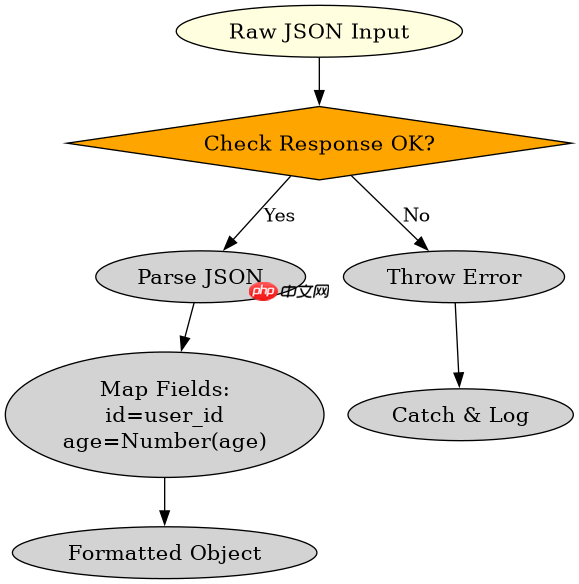
针对从服务器返回的标准 JSON 数据,可以在 .then(res => res.json()) 之后立即对数据进行映射,例如将 user_id 重命名为 id,并将字符串类型的年龄转换为数字类型。
const url = 'https://api.example.com/user';

fetch(url)
  .then(response => {
    if (!response.ok) {
      throw new Error('Network response was not ok');
    }
    return response.json();
  })
  .then(data => {
    // 预格式化:重命名字段并转换类型
    const formattedData = {
      id: data.user_id,
      name: data.username,
      age: Number(data.age_string),
      is_active: Boolean(data.status === 'active')
    };
    console.log(formattedData);
    return formattedData;
  })
  .catch(error => {
    console.error('There has been a problem with your fetch operation:', error);
  });
如何处理嵌套对象中的深层数据提取
当 API 返回的数据包含嵌套结构时,可以直接在 .then() 中使用可选链操作符或解构赋值来提取深层字段,并进行必要的默认值填充,确保前端组件能直接消费扁平化或标准化的数据。

Build Java agent transport gateways with Atmosphere
下载
使用Atmosphere构建通过WebSocket、SSE、gRPC、WebTransport、MCP、A2A和AG-UI流传输的JVM代理网关,并带有治理钩子。
立即学习“Java免费学习笔记(深入)”;

const nestedUrl = 'https://api.example.com/profile';

fetch(nestedUrl)
  .then(res => res.json())
  .then(rawProfile => {
    // 预格式化:提取嵌套地址信息并合并到顶层
    const { user, address } = rawProfile;
    const standardizedProfile = {
      fullName: `${user.firstName} ${user.lastName}`,
      email: user.email,
      city: address?.city || 'Unknown',
      zipCode: address?.zip || '00000'
    };
    console.log(standardizedProfile);
    return standardizedProfile;
  })
  .catch(err => console.error('Fetch failed:', err));
基于程序中某个输入、条件或结果的具体问题
如果请求失败(例如网络错误或 HTTP 状态码非 2xx),上述代码中的 .catch() 块会捕获异常并打印错误信息,而不会执行任何数据格式化逻辑,从而避免程序因无效数据而崩溃。


















