








使用 fetch 获取 3gp 数据时,应调用 response.arraybuffer() 方法将响应体转换为二进制缓冲区。拿到 arraybuffer 后,通过 url.createobjecturl() 将其包装为 blob url,即可直接赋值给视频元素的 src 属性进行播放或下载。此方法避免了手动处理字节流的繁琐,且能确保浏览器正确识别 mime 类型。

如何验证服务器返回的 Content-Type 是否正确
在请求阶段检查响应头中的 Content-Type 字段,确认其值为 video/3gpp 或 video/3gp。如果服务端未设置或设置了错误的类型(如 application/octet-stream),浏览器可能无法自动关联播放器。可以在代码中读取 response.headers.get('Content-Type') 并与预期值比对,若不一致则抛出异常或记录日志,防止后续解析失败。

const url = 'https://example.com/video.3gp';

async function checkContentType() {
  const response = await fetch(url, { method: 'HEAD' });
  const contentType = response.headers.get('Content-Type');

  if (!contentType) {
    throw new Error('Missing Content-Type header');
  }

  const validTypes = ['video/3gpp', 'video/3gp'];
  const isMatch = validTypes.some(type => contentType.includes(type));

  if (!isMatch) {
    console.warn(`Unexpected content type: ${contentType}`);
  } else {
    console.log('Content-Type is valid for 3GP');
  }
}

checkContentType();
如何处理大文件导致的内存溢出问题
当 3GP 文件体积较大时,一次性加载到 ArrayBuffer 可能会占用过多内存。此时应改用流式处理,利用 response.body.getReader() 逐块读取数据。虽然对于简单的视频播放场景,通常推荐直接使用 blob() 或 arrayBuffer(),但在需要实时处理或分片传输的场景下,流式读取是更稳妥的选择。通过监听数据流并逐步构建 Blob,可以有效控制内存峰值。

使用Atmosphere构建通过WebSocket、SSE、gRPC、WebTransport、MCP、A2A和AG-UI流传输的JVM代理网关,并带有治理钩子。
立即学习“Java免费学习笔记(深入)”;
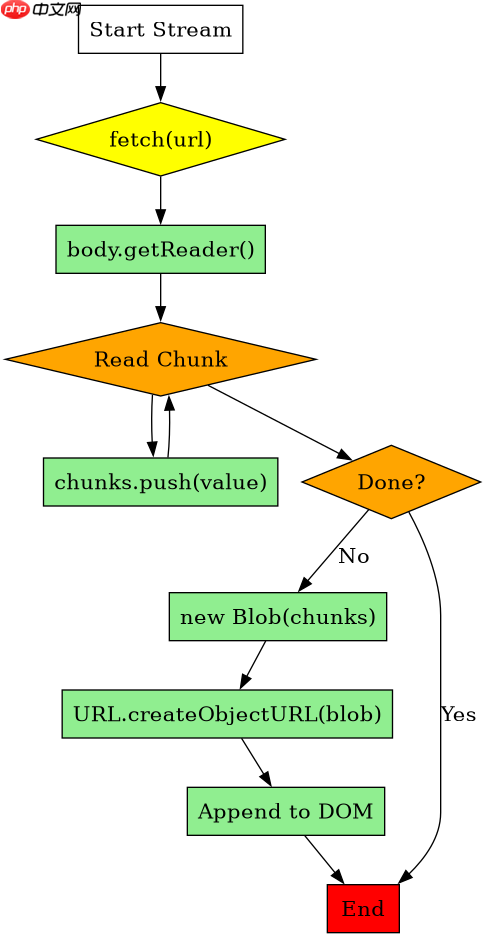
const url = 'https://example.com/large_video.3gp';

async function streamVideo() {
  const response = await fetch(url);
  const reader = response.body.getReader();
  const chunks = [];

  while (true) {
    const { done, value } = await reader.read();
    if (done) break;
    chunks.push(value);
  }

  const blob = new Blob(chunks, { type: 'video/3gpp' });
  const videoUrl = URL.createObjectURL(blob);

  const video = document.createElement('video');
  video.src = videoUrl;
  video.controls = true;
  document.body.appendChild(video);
}
基于程序中某个输入、条件或结果的具体问题
当网络请求发生错误(如 404 或 500)时,fetch 不会自动抛出异常,而是返回一个已解决的 Promise,其中 response.ok 为 false。此时若直接调用 response.blob() 或 response.arrayBuffer(),可能会得到一个空的或包含错误信息的二进制数据,导致视频播放失败。因此,必须在调用转换方法前检查 response.ok,并在失败时处理错误信息,例如从响应体中提取错误详情或显示用户友好的提示。

















