








php视频转码输出0字节通常是因为ffmpeg进程执行失败、权限不足或管道通信中断。排查时,必须捕获ffmpeg的标准错误输出并检查其退出状态码,同时确认临时目录的写入权限和磁盘空间是否充足。

如何正确捕获FFmpeg的错误信息
直接调用exec()而不获取错误流是导致0字节文件的常见原因。通过收集stderr,可以明确知道是编码参数错误还是输入文件损坏。
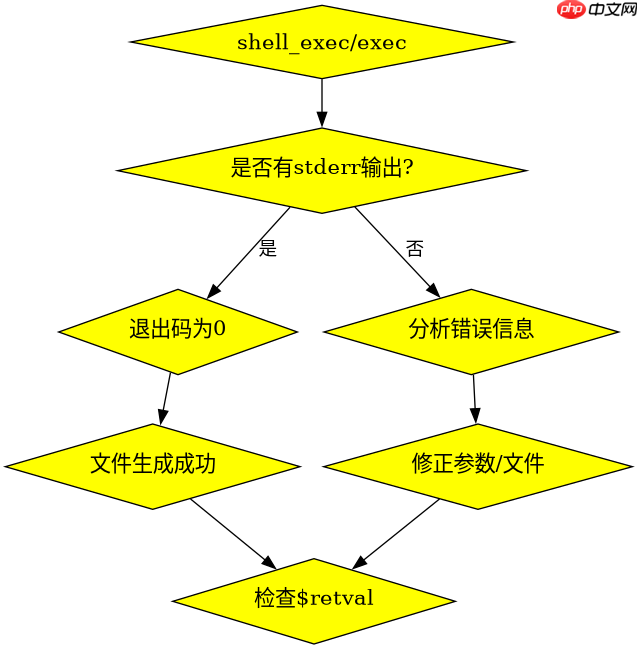
$command = 'ffmpeg -i input.mp4 -c:v libx264 output.mp4 2>&1';
$last_line = shell_exec($command);
$retval = null;
exec($command, $output, $retval);
echo "Exit Code: $retval\n";
echo "Output: " . implode("\n", $output);预期结果:若成功,$retval为0;若失败,$output包含具体错误日志,如No such file or directory或Invalid data found。
立即学习“PHP免费学习笔记(深入)”;

如何验证临时目录与磁盘空间
FFmpeg在转码过程中需要读写临时文件。如果sys_get_temp_dir()指向的目录无写入权限或磁盘已满,输出文件将保持0字节。需使用is_writable()和disk_free_space()进行前置检查。

$tempDir = sys_get_temp_dir();
if (!is_writable($tempDir)) {
    die("Temp dir not writable: $tempDir");
}
if (disk_free_space($tempDir) < 1024 * 1024 * 500) { // 至少500MB
    die("Not enough disk space");
}
预期结果:脚本在转码前拦截权限或空间不足的情况,避免生成无效文件。
当输入文件路径含特殊字符时如何处理
若输入路径包含空格或中文,未加引号会导致FFmpeg解析错误,进而产生0字节输出。需对路径进行escapeshellarg()处理。
$input = '/path/to/my video.mp4';
$output = '/path/to/output.mp4';
$cmd = sprintf('ffmpeg -i %s -c:v libx264 %s', escapeshellarg($input), escapeshellarg($output));
exec($cmd, $out, $ret);预期结果:$ret为0,且output.mp4大小正常。特殊字符被正确转义,避免命令注入或解析失败。



















