使用 serversocketchannel 绑定端口并进入阻塞等待,配合 selector 注册 op_accept 事件实现非阻塞连接处理。当客户端建立连接后,通过 bytebuffer 读取原始字节流,利用字符串匹配解析 http 请求头中的方法、路径和协议版本。根据解析结果构造包含状态码、响应头和正文的 http 响应报文,写入 socketchannel 完成交互。

如何解析 HTTP 请求行与头部字段
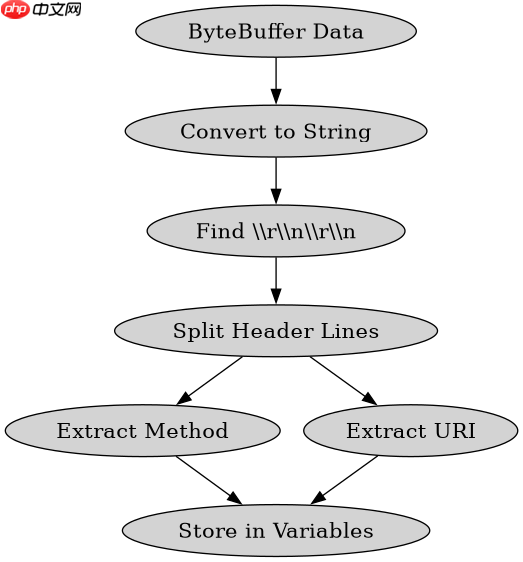
从 SocketChannel 读取数据到 ByteBuffer 后,需将字节转换为字符串以提取请求信息。HTTP 请求由请求行和头部字段组成,以 \r\n 分隔。通过查找第一个双换行符 \r\n\r\n 确定头部结束位置,截取其前的内容并按行分割。第一行为请求行,包含方法、URI 和协议;后续每行按冒号分割键值对。若缓冲区数据不足,需继续读取直到获取完整头部或检测到连接关闭。
import java.io.IOException;
import java.net.InetSocketAddress;
import java.nio.ByteBuffer;
import java.nio.channels.SelectionKey;
import java.nio.channels.Selector;
import java.nio.channels.ServerSocketChannel;
import java.nio.channels.SocketChannel;
import java.util.Iterator;
import java.util.Set;

public class SimpleHttpServer {
    private static final int PORT = 8080;
    private Selector selector;

    public void start() throws IOException {
        ServerSocketChannel serverChannel = ServerSocketChannel.open();
        serverChannel.configureBlocking(false);
        serverChannel.bind(new InetSocketAddress(PORT));

        selector = Selector.open();
        serverChannel.register(selector, SelectionKey.OP_ACCEPT);

        System.out.println("Server started on port " + PORT);
        while (!Thread.interrupted()) {
            if (selector.select() == 0) continue;
            Set<SelectionKey> keys = selector.selectedKeys();
            Iterator<SelectionKey> it = keys.iterator();
            while (it.hasNext()) {
                handleKey(it.next());
                it.remove();
            }
        }
    }

    private void handleKey(SelectionKey key) throws IOException {
        if (key.isAcceptable()) {
            ServerSocketChannel ssc = (ServerSocketChannel) key.channel();
            SocketChannel client = ssc.accept();
            client.configureBlocking(false);
            client.register(selector, SelectionKey.OP_READ);
        } else if (key.isReadable()) {
            SocketChannel client = (SocketChannel) key.channel();
            ByteBuffer buffer = ByteBuffer.allocate(1024);
            int read = client.read(buffer);
            if (read == -1) {
                client.close();
                return;
            }
            buffer.flip();
            byte[] data = new byte[buffer.remaining()];
            buffer.get(data);
            String request = new String(data, "UTF-8");

            // 简单解析:查找 \r\n\r\n
            int headerEnd = request.indexOf("\r\n\r\n");
            if (headerEnd != -1) {
                String headerPart = request.substring(0, headerEnd);
                String[] lines = headerPart.split("\r\n");
                if (lines.length > 0) {
                    String requestLine = lines[0];
                    String[] parts = requestLine.split(" ");
                    if (parts.length >= 2) {
                        String method = parts[0];
                        String uri = parts[1];
                        System.out.println("Received: " + method + " " + uri);

                        // 构造响应
                        String response = "HTTP/1.1 200 OK\r\n" +
                                          "Content-Type: text/plain\r\n" +
                                          "Content-Length: 13\r\n" +
                                          "\r\n" +
                                          "Hello, World!";
                        ByteBuffer respBuf = ByteBuffer.wrap(response.getBytes("UTF-8"));
                        while (respBuf.hasRemaining()) {
                            client.write(respBuf);
                        }
                    }
                }
            }
        }
    }

    public static void main(String[] args) throws IOException {
        new SimpleHttpServer().start();
    }
}
如何处理并发连接与资源释放
在 Selector 循环中,每个接受的客户端连接都会注册为独立的 SelectionKey。当 SocketChannel 读取完毕或发生错误时,必须显式调用 close() 方法关闭通道并注销 Key,否则会导致资源泄漏。对于高并发场景,应确保 ByteBuffer 的使用是线程安全的,或者为每个连接分配独立的缓冲区对象。此外,HTTP 长连接(Keep-Alive)需要维护连接状态,而本示例采用短连接模式,每次请求处理后即准备接受新连接或关闭当前连接。

立即学习“Java免费学习笔记(深入)”;

基于 URI 路径的具体路由问题
在上述程序中,所有请求均返回相同的 "Hello, World!" 响应。若要根据 uri 变量实现不同路径的路由,例如区分 /index 和 /api,需在解析出 uri 后添加条件判断逻辑。通过 String.equals() 或 String.startsWith() 匹配具体路径,并返回对应的响应体内容。未匹配的路径可返回 404 Not Found 状态码。这种简单的字符串匹配适用于静态资源或少量 API 端点,复杂路由需引入正则表达式或专用路由库。