JDBC 批量操作重试怎么实现
通过捕获 batchupdateexception 并解析其返回的更新计数数组,可以定位到具体失败的操作索引。利用 statement.addbatch() 和 executebatch() 配合事务回滚,能够针对出错的数据行进行局部重试或跳过,从而保证批量操作的原子性与可靠性。

如何解析 BatchUpdateException 获取失败索引
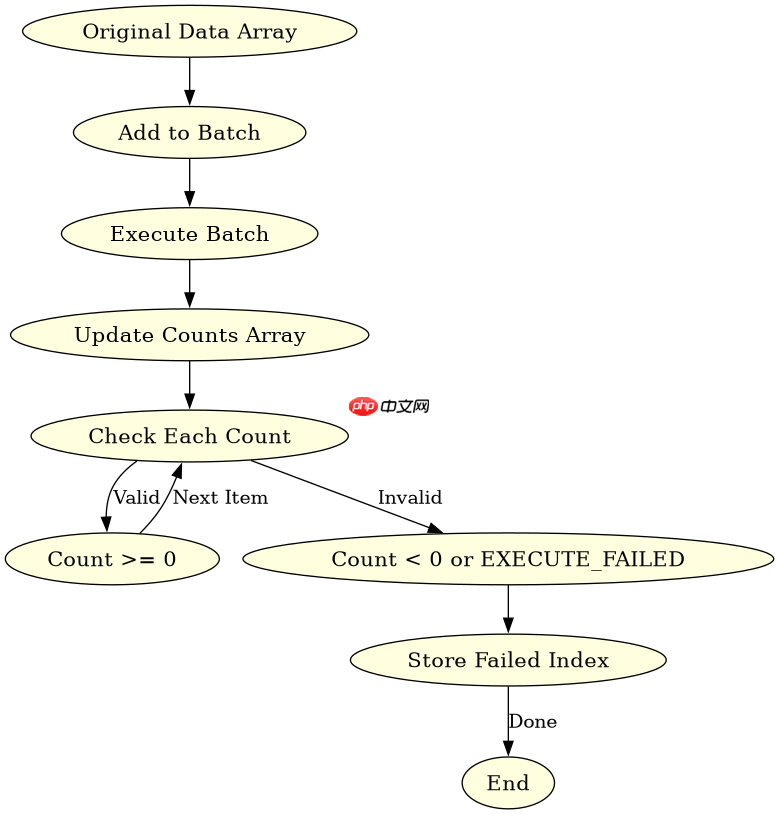
BatchUpdateException 提供了 getUpdateCounts() 方法,该方法返回一个整型数组,其中每个元素对应一次批量执行的结果。成功执行的语句通常返回非负整数,而失败的语句可能返回 EXECUTE_FAILED 常量或抛出异常。开发者需要遍历该数组,找出第一个小于零的值,即为失败操作的起始位置。

重试逻辑中如何处理部分成功的数据
在重试机制中,必须区分已成功提交和尚未处理的数据。如果数据库支持保存点(Savepoint),可以在批量执行前设置保存点,失败时回滚至该点并重试剩余部分。如果不使用保存点,则需手动维护索引,将未成功的记录重新加入批次,并在事务提交前确保所有数据的一致性。
立即学习“Java免费学习笔记(深入)”;

import java.sql.*;

public class BatchRetryExample {
    public static void main(String[] args) {
        String url = "jdbc:mysql://localhost:3306/test";
        String user = "root";
        String password = "password";

        // 模拟要批量插入的数据
        int[] dataToInsert = {1, 2, 3, 4, 5};

        try (Connection conn = DriverManager.getConnection(url, user, password)) {
            conn.setAutoCommit(false);
            Statement stmt = conn.createStatement();

            for (int value : dataToInsert) {
                stmt.addBatch("INSERT INTO test_table (id) VALUES (" + value + ")");
            }

            try {
                int[] results = stmt.executeBatch();
                System.out.println("Batch executed successfully.");
                conn.commit();
            } catch (BatchUpdateException e) {
                handleBatchFailure(e, conn, stmt, dataToInsert);
            }
        } catch (SQLException e) {
            e.printStackTrace();
        }
    }

    private static void handleBatchFailure(BatchUpdateException e, Connection conn, Statement stmt, int[] originalData) throws SQLException {
        int[] updateCounts = e.getUpdateCounts();
        int failedIndex = -1;

        // 查找第一个失败的索引
        for (int i = 0; i < updateCounts.length; i++) {
            if (updateCounts[i] == Statement.EXECUTE_FAILED || updateCounts[i] < 0) {
                failedIndex = i;
                break;
            }
        }

        if (failedIndex != -1) {
            System.out.println("Failed at index: " + failedIndex);
            // 回滚事务
            conn.rollback();

            // 重新执行从失败索引开始的数据
            for (int i = failedIndex; i < originalData.length; i++) {
                stmt.addBatch("INSERT INTO test_table (id) VALUES (" + originalData[i] + ")");
            }

            try {
                int[] retryResults = stmt.executeBatch();
                conn.commit();
                System.out.println("Retry successful.");
            } catch (BatchUpdateException retryEx) {
                conn.rollback();
                System.err.println("Retry failed again.");
            }
        }
    }
}