








使用 requestanimationframe 将读取操作拆分到多个帧中,避免阻塞主线程。具体做法是定义一个包含所有目标元素的数组,在每帧回调中处理一部分元素,通过递归或队列机制直到全部完成。

如何确保长任务不阻塞渲染?
利用 requestAnimationFrame 的调度机制,浏览器会在重绘前执行回调,从而保证 UI 更新不被阻断。核心在于控制单次处理的元素数量,使其耗时远低于 16ms。
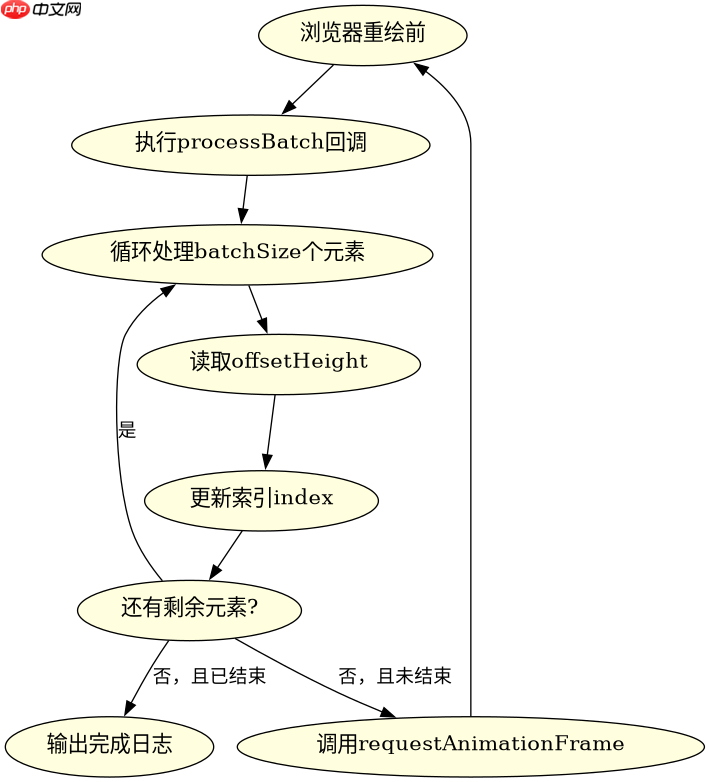
const elements = document.querySelectorAll('.item');
const batchSize = 50;
let index = 0;

function processBatch() {
  const end = Math.min(index + batchSize, elements.length);
  for (; index < end; index++) {
    // 模拟读取 outerHeight
    const height = elements[index].offsetHeight;
    console.log('Processed', index, 'height:', height);
  }
  if (index < elements.length) {
    requestAnimationFrame(processBatch);
  } else {
    console.log('All done');
  }
}

requestAnimationFrame(processBatch);
如何处理动态添加的元素?
当 DOM 结构发生变化时,需重新获取元素列表或维护一个动态队列。若使用静态快照,新元素不会被处理;若使用实时查询,则需考虑性能开销。建议在实际应用中结合 MutationObserver 监听变化。

立即学习“Java免费学习笔记(深入)”;

// 假设有一个动态添加元素的场景
const observer = new MutationObserver((mutations) => {
  mutations.forEach((mutation) => {
    mutation.addedNodes.forEach((node) => {
      if (node.nodeType === 1) { // Element node
        // 将新元素加入待处理队列
        pendingElements.push(node);
      }
    });
  });
});

observer.observe(document.body, { childList: true });

// 在主循环中处理新增元素
function processDynamicBatch() {
  while (pendingElements.length > 0) {
    const element = pendingElements.shift();
    const height = element.offsetHeight;
    console.log('New element height:', height);
  }
  requestAnimationFrame(processDynamicBatch);
}
如果某个元素不存在怎么办?
在遍历过程中,若遇到 null 或 undefined 元素,应跳过并记录日志,避免抛出异常。可通过类型检查或可选链操作符安全访问属性。


















