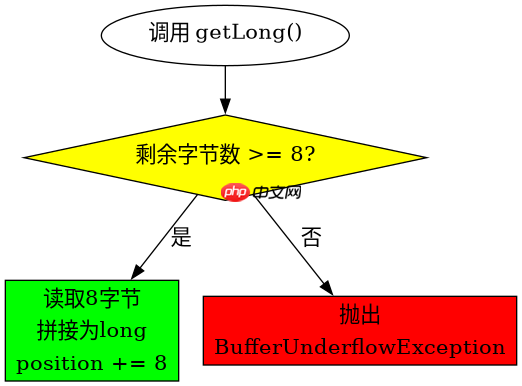
调用 bytebuffer 实例的 getlong() 方法即可从当前 position 读取 8 个字节并拼接为 long 值,同时自动将 position 增加 8。该方法默认遵循缓冲区的字节序(order),若缓冲区为大端序则按大端解析,小端序则按小端解析;若剩余字节不足 8 个会抛出 bufferunderflowexception。

getLong() 遇到空输入或越界时会返回什么
当缓冲区剩余容量不足 8 字节时,getLong() 不会返回部分数据或特殊标记,而是直接抛出 java.nio.BufferUnderflowException。这是 NIO 缓冲区的严格模式行为,确保读取操作的原子性。
import java.nio.ByteBuffer;

public class TestGetLong {
    public static void main(String[] args) {
        // 创建一个仅含 4 字节的缓冲区
        ByteBuffer buffer = ByteBuffer.allocate(4);
        buffer.putLong(0x01020304L); // 实际只写入了前4字节,后4字节为0
        buffer.flip();

        try {
            long val = buffer.getLong();
            System.out.println("Read: " + val);
        } catch (Exception e) {
            System.out.println("Exception: " + e.getClass().getSimpleName());
        }
    }
}
预期输出:
Exception: BufferUnderflowException
立即学习“Java免费学习笔记(深入)”;

getLong() 在不同字节序下如何影响结果
字节序决定了多字节整数在内存中的排列方式。getLong() 依据缓冲区的 order 属性进行解析。若未显式设置,ByteBuffer.allocate() 创建的堆缓冲区默认为大端序(ByteOrder.BIG_ENDIAN)。切换为小端序后,相同字节序列会被解释为完全不同的数值。

import java.nio.ByteBuffer;
import java.nio.ByteOrder;

public class TestEndianness {
    public static void main(String[] args) {
        byte[] bytes = new byte[]{0x01, 0x02, 0x03, 0x04, 0x05, 0x06, 0x07, 0x08};

        // 大端序:高位在前
        ByteBuffer bigEndian = ByteBuffer.wrap(bytes).order(ByteOrder.BIG_ENDIAN);
        long bigVal = bigEndian.getLong();

        // 小端序:低位在前
        ByteBuffer littleEndian = ByteBuffer.wrap(bytes).order(ByteOrder.LITTLE_ENDIAN);
        long littleVal = littleEndian.getLong();

        System.out.printf("Big Endian: %d (0x%016X)%n", bigVal, bigVal);
        System.out.printf("Little Endian: %d (0x%016X)%n", littleVal, littleVal);
    }
}
预期输出:
Big Endian: 72623859790382856 (0x0102030405060708)
Little Endian: 578460007821390000 (0x0807060504030201)
基于程序中某个输入、条件或结果的具体问题
在上面的 TestEndianness 示例中,我们使用了同一个字节数组 bytes,分别以大端和小端顺序读取。这验证了 getLong() 的行为完全依赖于缓冲区的 order 状态。如果开发者忘记在读取前设置正确的字节序,或者混用了不同字节序的缓冲区,会导致数据解析错误。因此,在使用 getLong() 前,务必确认缓冲区的字节序与数据源一致。