在 javascript 运行时中查看 x25519 密钥交换耗时,最直接的方法是使用 web crypto api 的 crypto.subtle.derivebits 方法,并结合 performance.now() 进行高精度计时。由于该操作是异步的,你需要使用 async/await 语法来等待其完成,并计算调用前后的时间差。这种方法能准确反映从 cpu 开始处理到结果返回的总耗时,包括可能的后台线程调度开销。

如何测量单次密钥派生的精确耗时
要获取单次操作的耗时,必须确保输入数据是固定的,以避免因数据生成带来的随机性干扰。我们使用两个固定的 32 字节数组分别代表私钥和公钥,模拟一次标准的 Diffie-Hellman 密钥交换过程。通过记录 performance.now() 的起始和结束时间,我们可以得到以毫秒为单位的耗时。需要注意的是,Web Crypto API 的操作通常非常快,可能在微秒级别,因此单次测量的波动可能较大,建议在实际应用中多次测量取平均值。
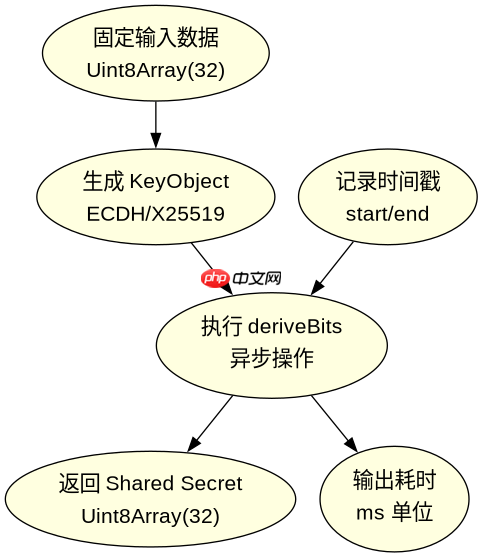
const privateKeyData = new Uint8Array(32).fill(1); // 模拟私钥
const publicKeyData = new Uint8Array(32).fill(2); // 模拟公钥

// 创建 KeyObject
const privateKey = await crypto.subtle.importKey(
  'raw',
  privateKeyData,
  { name: 'ECDH', namedCurve: 'X25519' },
  false,
  ['deriveBits']
);

const publicKey = await crypto.subtle.importKey(
  'raw',
  publicKeyData,
  { name: 'ECDH', namedCurve: 'X25519' },
  false,
  []
);

// 计时开始
const start = performance.now();

// 执行密钥交换
const sharedSecret = await crypto.subtle.deriveBits(
  { name: 'ECDH', public: publicKey },
  privateKey,
  256 // 期望输出位数
);

// 计时结束
const end = performance.now();
console.log(`耗时: ${(end - start).toFixed(4)} ms`);
console.log(`共享密钥长度: ${sharedSecret.byteLength} bytes`);
批量测试下的性能稳定性分析
为了评估 X25519 在持续负载下的表现,我们需要进行批量测试。这有助于发现是否存在内存泄漏或 JIT 编译优化后的性能提升。我们将上述单次操作封装在一个循环中,执行 1000 次,并记录总耗时和平均耗时。这种模式更接近真实场景中服务器处理并发连接的情况。通过对比不同批次的数据,可以观察到浏览器或 Node.js 环境对加密原语的实现是否稳定。

立即学习“Java免费学习笔记(深入)”;
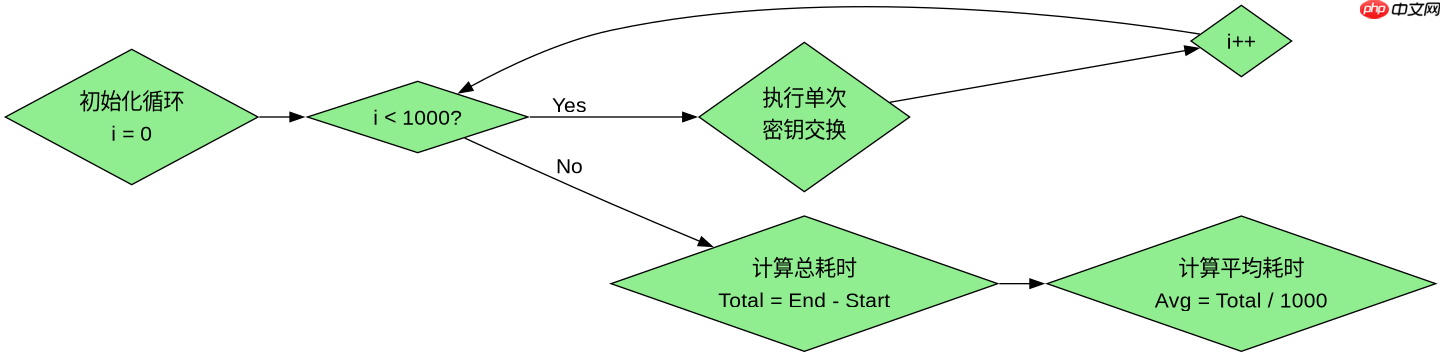
const iterations = 1000;
const totalStart = performance.now();

for (let i = 0; i < iterations; i++) {
  const privKey = await crypto.subtle.importKey(
    'raw',
    new Uint8Array(32).fill(i),
    { name: 'ECDH', namedCurve: 'X25519' },
    false,
    ['deriveBits']
  );
  const pubKey = await crypto.subtle.importKey(
    'raw',
    new Uint8Array(32).fill(i + 1),
    { name: 'ECDH', namedCurve: 'X25519' },
    false,
    []
  );

  await crypto.subtle.deriveBits(
    { name: 'ECDH', public: pubKey },
    privKey,
    256
  );
}

const totalEnd = performance.now();
console.log(`总耗时: ${(totalEnd - totalStart).toFixed(2)} ms`);
console.log(`平均每次耗时: ${((totalEnd - totalStart) / iterations).toFixed(4)} ms`);
X25519 密钥交换在不同浏览器引擎中的差异
虽然 Web Crypto API 提供了统一的标准接口,但底层实现依赖于各浏览器的加密库(如 OpenSSL、BoringSSL 或 Platform Crypto Provider)。在 Chrome 中,通常使用 BoringSSL,而在 Firefox 中可能使用 NSS 或系统原生库。这些底层实现的差异会导致性能上的细微差别。此外,Node.js 环境默认使用 OpenSSL,其性能通常优于浏览器环境,因为避免了浏览器沙箱的限制。开发者在进行跨平台部署时,应针对目标运行环境进行基准测试,而不是假设所有环境的性能一致。特别是在移动端浏览器中,CPU 频率限制可能会显著影响加密操作的耗时。