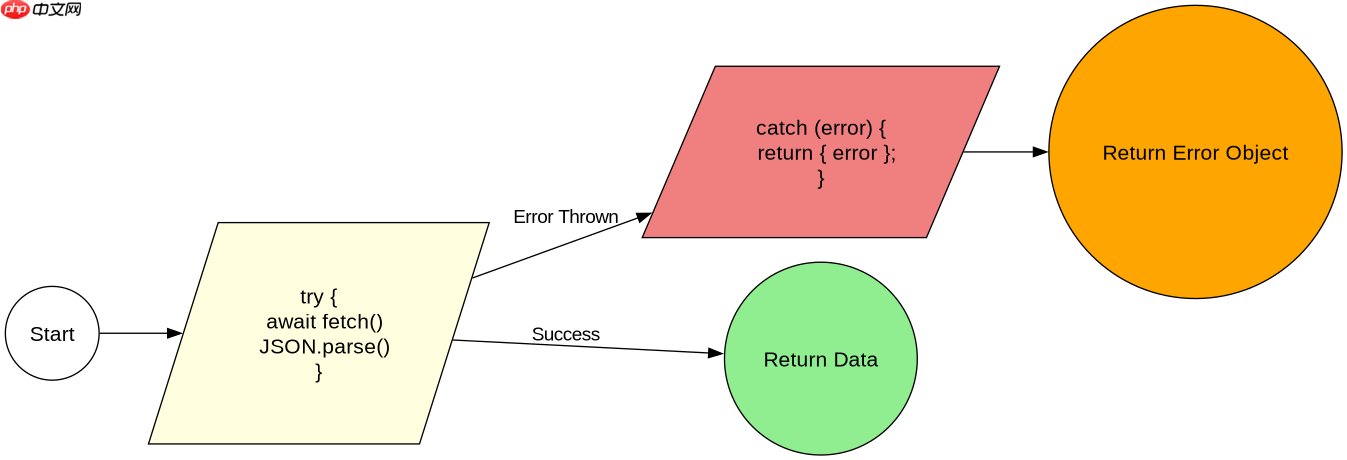
在 javascript 异步错误处理中,async 函数捕获传感器错误最直接且可靠的方法是使用 try...catch 语句包裹对传感器 api 的调用。由于 async 函数返回的是 promise,其内部抛出的任何同步或异步异常(包括网络请求失败、数据解析错误或硬件通信中断)都会导致该 promise 被拒绝,而 try...catch 能够拦截这些被拒绝的状态并执行相应的错误处理逻辑。通过这种方式,开发者可以在代码层面统一处理传感器读取过程中的各种异常情况,确保程序不会因单个传感器的故障而崩溃。
getSensorData() 遇到空值或无效 JSON 会返回什么
当传感器接口返回空字符串或非标准格式的响应时,getSensorData() 函数会在 JSON.parse() 阶段抛出 SyntaxError。这个错误会被外层的 try...catch 捕获,最终函数返回一个包含 error 字段的对象,而不是直接抛出未处理的异常。这种设计确保了调用方始终能拿到结构一致的数据,即使数据源不可用。
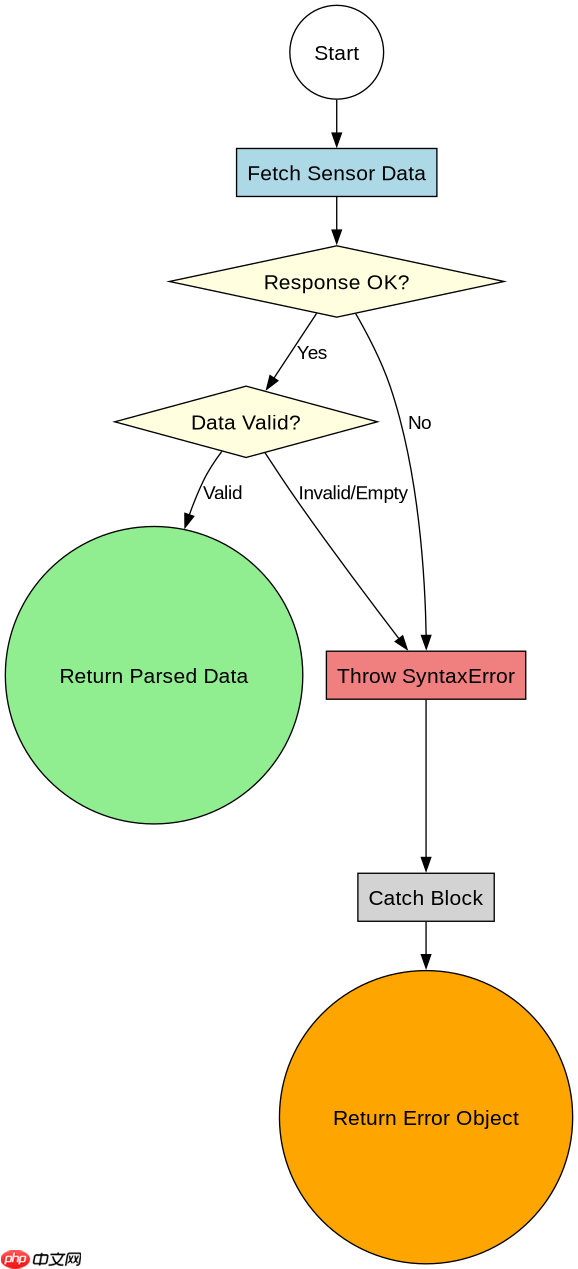
const getSensorData = async (sensorId) => {
  try {
    const response = await fetch(`/api/sensors/${sensorId}`);
    if (!response.ok) {
      throw new Error(`HTTP error! status: ${response.status}`);
    }
    const text = await response.text();
    // 模拟传感器返回空值或无效JSON的情况
    if (text === '' || text === 'null') {
      throw new Error('Empty sensor data');
    }
    return JSON.parse(text);
  } catch (error) {
    console.error('Failed to fetch sensor data:', error.message);
    return { error: error.message, sensorId: sensorId };
  }
};

// 测试用例:模拟返回空字符串
(async () => {
  const originalFetch = global.fetch;
  global.fetch = async (url) => ({
    ok: true,
    text: async () => '' // 模拟空响应
  });

  const result = await getSensorData('temp-01');
  console.log(result); // 输出: { error: 'Empty sensor data', sensorId: 'temp-01' }

  global.fetch = originalFetch;
})();
传感器超时设置如何影响错误捕获时机
在异步操作中,如果传感器响应时间超过预期,程序可能会挂起或产生不确定的行为。通过为 fetch 添加 signal 或使用 Promise.race 可以强制设定超时时间。一旦超时触发,AbortError 会被 catch 块捕获,从而允许程序及时释放资源并记录超时日志,而不是无限期等待。这种机制对于实时性要求高的传感器数据处理至关重要。

掌握 ES6+ 特性,包括 async/await、解构、扩展运算符、箭头函数、Promise、模块、迭代器、生成器以及函数式编程模式,编写简洁高效的 Java
立即学习“Java免费学习笔记(深入)”;
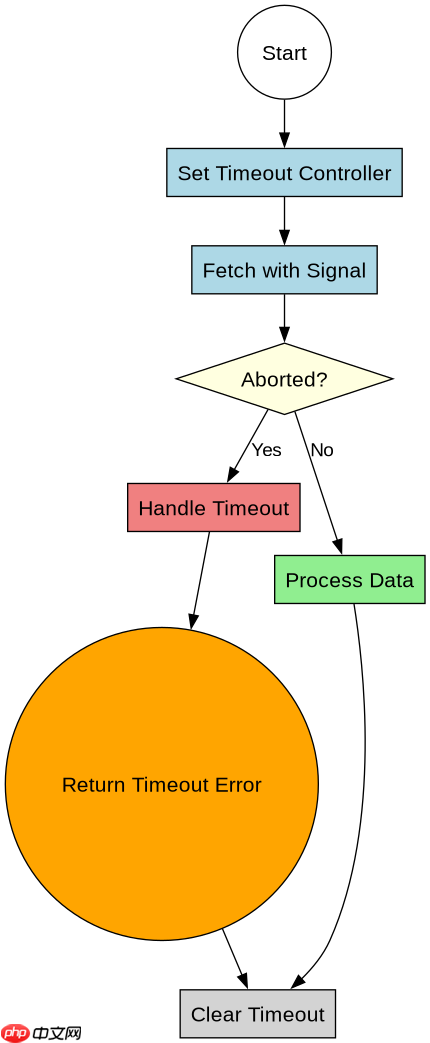
const getSensorDataWithTimeout = async (sensorId, timeoutMs = 5000) => {
  const controller = new AbortController();
  const timeoutId = setTimeout(() => controller.abort(), timeoutMs);

  try {
    const response = await fetch(`/api/sensors/${sensorId}`, {
      signal: controller.signal
    });
    clearTimeout(timeoutId);

    if (!response.ok) {
      throw new Error(`HTTP error! status: ${response.status}`);
    }
    return await response.json();
  } catch (error) {
    if (error.name === 'AbortError') {
      console.warn(`Sensor ${sensorId} timed out after ${timeoutMs}ms`);
      return { error: 'Timeout', sensorId: sensorId, timeout: timeoutMs };
    }
    console.error('Failed to fetch sensor data:', error.message);
    return { error: error.message, sensorId: sensorId };
  } finally {
    clearTimeout(timeoutId);
  }
};

// 测试用例:模拟超时
(async () => {
  const originalFetch = global.fetch;
  global.fetch = async (url, options) => {
    return new Promise((resolve, reject) => {
      if (options && options.signal && options.signal.aborted) {
        reject(new DOMException('The operation was aborted.', 'AbortError'));
      } else {
        // 模拟长时间延迟
        setTimeout(() => {
          resolve({ ok: true, json: async () => ({ value: 25 }) });
        }, 10000); // 超过默认5秒超时
      }
    });
  };

  const result = await getSensorDataWithTimeout('temp-01', 2000);
  console.log(result); // 输出: { error: 'Timeout', sensorId: 'temp-01', timeout: 2000 }

  global.fetch = originalFetch;
})();
基于 getSensorData() 返回结果中的 error 字段进行具体判断
在上一节的代码实现中,getSensorData() 和 getSensorDataWithTimeout() 都统一返回了一个包含 error 字段的对象。当调用方接收到这个返回值时,可以通过检查 result.error 是否存在来判断操作是否成功。如果 result.error 存在,说明发生了错误,此时可以根据具体的错误消息(如 "Empty sensor data" 或 "Timeout")采取不同的重试策略或降级方案。这种基于返回值结构的错误处理方式,避免了使用 try...catch 进行流程控制的复杂性,使得错误处理逻辑更加清晰和可预测。