








在 laravel 中封装 ffmpeg 转码服务,核心做法是创建一个 service 类来管理进程调用,并通过配置项隔离不同环境的二进制路径。推荐使用 shuchijit/php-ffmpeg 或原生 process 组件执行命令,将视频处理逻辑与业务代码解耦,确保在队列任务中能稳定运行。

如何构建可复用的转码服务类
直接回答:通过定义一个继承自 Illuminate\Support\ServiceProvider 的服务提供者,并在其中绑定单例实例,可以实现全局可用的转码服务。该服务类内部封装了 Process 对象,负责拼接 FFmpeg 参数并处理输出流。
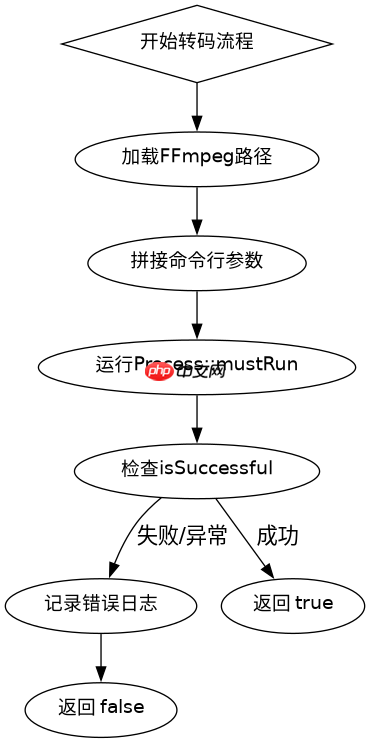
namespace App\Services;

use Illuminate\Support\Facades\Process;
use Symfony\Component\Process\Exception\ProcessFailedException;

class VideoTranscoderService
{
    protected string $binaryPath;

    public function __construct()
    {
        // 从配置文件中读取 ffmpeg 路径,支持环境差异
        $this->binaryPath = config('services.ffmpeg.binary', '/usr/bin/ffmpeg');
    }

    /**
     * 执行基础转码操作
     *
     * @param string $inputPath 输入文件绝对路径
     * @param string $outputPath 输出文件绝对路径
     * @param array $options 额外参数数组
     * @return bool 是否成功
     */
    public function convert(string $inputPath, string $outputPath, array $options = []): bool
    {
        // 构建基础命令
        $command = [
            $this->binaryPath,
            '-y',           // 覆盖输出文件
            '-i', $inputPath,
            ...$options,
            $outputPath
        ];

        try {
            $process = Process::mustRun($command);
            return $process->isSuccessful();
        } catch (ProcessFailedException $e) {
            // 记录错误日志,便于排查
            \Log::error('FFmpeg conversion failed: ' . $e->getMessage());
            return false;
        }
    }
}
上述代码展示了最核心的转换逻辑。在实际项目中,你需要在 config/services.php 中添加 'ffmpeg' => ['binary' => env('FFMPEG_BINARY', '/usr/bin/ffmpeg')] 配置。调用时只需注入 VideoTranscoderService,传入源文件和目标路径即可。对于耗时操作,务必将该服务的方法放入 Laravel Queue 中异步执行,避免阻塞 Web 请求。
立即学习“PHP免费学习笔记(深入)”;

Laravel Cloud(cloud.laravel.com)。此技能用于处理所有 Laravel Cloud 请求,包括搜索和读取数据。只要任务涉及 Laravel Cloud,即使用此技能。
如何处理转码过程中的状态监控与日志
直接回答:通过解析 FFmpeg 的标准错误输出(stderr)来获取实时进度,并将其映射为百分比。在服务类中增加一个回调机制,允许外部监听进度事件,从而在前端展示进度条或更新数据库状态。

namespace App\Services;

use Illuminate\Support\Facades\Process;
use Symfony\Component\Process\Process as SymfonyProcess;

class ProgressAwareTranscoder extends VideoTranscoderService
{
    /**
     * 带进度的转码方法
     *
     * @param string $inputPath
     * @param string $outputPath
     * @param callable $onProgress 进度回调函数,接收 (current, total) 参数
     * @return bool
     */
    public function convertWithProgress(string $inputPath, string $outputPath, callable $onProgress): bool
    {
        $command = [
            $this->binaryPath,
            '-y',
            '-i', $inputPath,
            '-c:v', 'libx264',
            '-an', // 仅转视频,忽略音频以简化示例
            $outputPath
        ];

        $process = new SymfonyProcess($command);
        $duration = $this->getVideoDuration($inputPath); // 假设有一个辅助方法获取时长

        $process->run(function ($type, $buffer) use (&$onProgress, $duration) {
            if (SymfonyProcess::ERR === $type) {
                // 解析 FFmpeg 输出的时间戳信息
                // 典型格式: time=00:01:23.45 bitrate=... speed=...
                if (preg_match('/time=(\d+):(\d+):(\d+\.\d+)/', $buffer, $matches)) {
                    $hours = (int)$matches[1];
                    $minutes = (int)$matches[2];
                    $seconds = (float)$matches[3];
                    $currentTime = $hours * 3600 + $minutes * 60 + $seconds;

                    if ($duration > 0) {
                        $percent = min(100, ($currentTime / $duration) * 100);
                        $onProgress($percent, $duration);
                    }
                }
            }
        });

        return $process->isSuccessful();
    }

    private function getVideoDuration(string $path): float
    {
        // 简略实现:实际应使用 ffprobe 获取精确时长
        return 120.0;
    }
}
这段代码展示了如何在转码过程中提取关键信息。FFmpeg 会在 stderr 中不断输出类似 time=00:00:10.50 的标记。通过正则表达式捕获这些标记,可以计算出当前处理进度。将进度数据通过回调函数传递给上层业务逻辑,例如更新数据库中的 progress 字段。这种设计使得转码服务不仅是一个黑盒执行器,还能提供透明的状态反馈。
当输入文件不存在或权限不足时服务会返回什么
直接回答:如果输入文件路径无效或 FFmpeg 进程因权限问题无法访问文件,Process 组件会抛出 ProcessFailedException,且 isSuccessful() 返回 false。服务层应捕获此异常并记录详细错误,而不是让程序崩溃。
在之前的 convert 方法中,我们已经使用了 try-catch 块来包裹 Process::mustRun()。当 InputFileNotFound 或 PermissionDenied 发生时,FFmpeg 会立即退出并返回非零状态码。Laravel 的 Process 门面检测到非零状态码后,会触发异常。此时,Log::error 会记录下具体的系统错误信息。开发者可以通过检查日志中的错误字符串来判断是文件缺失还是权限问题,从而在业务层做出相应处理,例如提示用户上传失败或联系管理员修复权限。

















