








在hyperf中强制下载文件,核心做法是实例化 swoole\http\response 对象并设置相应的响应头与状态码。具体操作时,需调用 $response->header() 添加 content-disposition 和 content-type,使用 $response->status(200) 确保状态正常,最后通过 $response->end() 输出文件内容或路径。

如何设置正确的响应头以触发浏览器下载行为
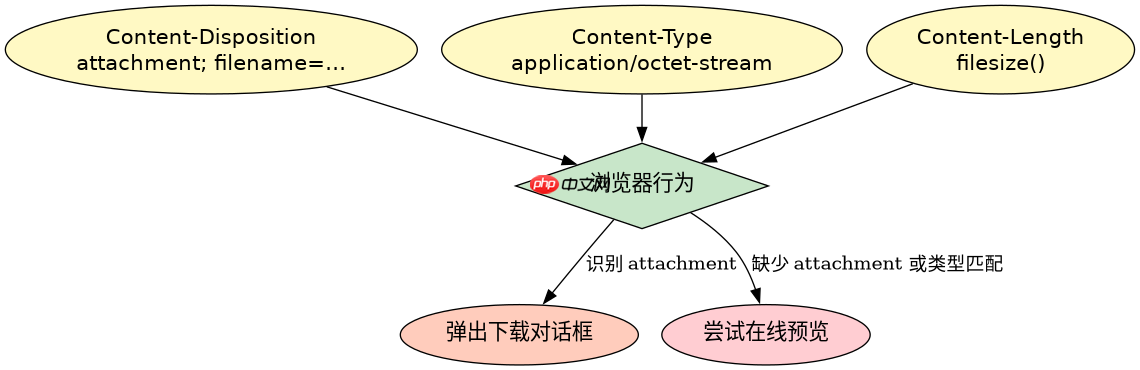
要触发浏览器的“另存为”对话框,必须正确配置 Content-Disposition 响应头。该头的值应设置为 attachment,并附带文件名参数。同时,Content-Type 应设为 application/octet-stream 以告知浏览器这是二进制流,避免直接预览。若忽略这些头部,浏览器可能会尝试直接在页面中渲染文件(如图片或PDF),而非下载。
use Hyperf\HttpServer\Annotation\AutoController;
use Hyperf\HttpServer\Annotation\GetMapping;
use Psr\Http\Message\ResponseInterface;

#[AutoController]
class FileDownloadController
{
    #[GetMapping("/download")]
    public function download(): ResponseInterface
    {
        $file = '/path/to/your/file.pdf';
        if (!file_exists($file)) {
            return new \Swoole\Http\Response(); // 实际项目中应返回404
        }

        $response = new \Swoole\Http\Response();
        $filename = basename($file);

        // 设置下载头
        $response->header('Content-Disposition', 'attachment; filename="' . $filename . '"');
        $response->header('Content-Type', 'application/octet-stream');
        $response->header('Content-Length', filesize($file));

        // 输出文件内容
        $response->end(file_get_contents($file));

        return $response;
    }
}
上述代码展示了完整的控制器实现。输入为本地文件路径,结果为浏览器弹出下载框。关键点在于 Content-Disposition: attachment 的使用。若文件名包含中文,建议使用 urlencode 处理文件名部分,例如 filename*=UTF-8''". urlencode($filename) . "",以确保兼容性。

如何处理大文件以避免内存溢出
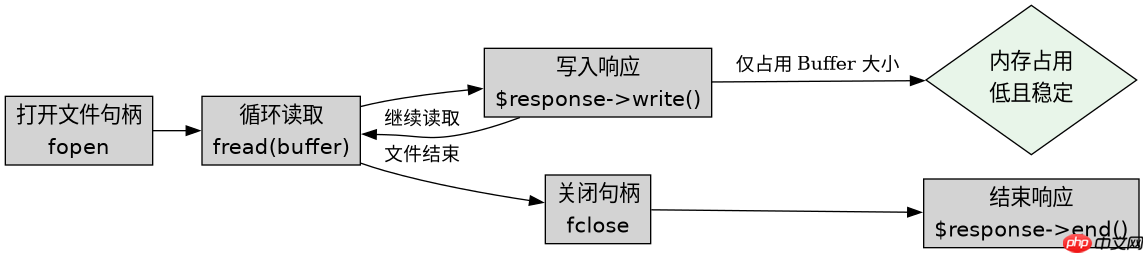
对于大文件,直接使用 file_get_contents() 会将整个文件加载到内存中,导致 Memory Limit Exceeded 错误。解决此问题的方法是使用流式读取,即分块读取文件并通过 $response->write() 逐步发送数据。这种方式将内存占用控制在固定的缓冲区大小内,适合GB级别的文件传输。
public function downloadLargeFile(): ResponseInterface
{
    $file = '/path/to/large/file.zip';
    $response = new \Swoole\Http\Response();

    $response->header('Content-Disposition', 'attachment; filename="large_file.zip"');
    $response->header('Content-Type', 'application/octet-stream');
    $response->header('Accept-Ranges', 'bytes');

    $handle = fopen($file, 'rb');
    if ($handle === false) {
        $response->status(500);
        $response->end('File not found');
        return $response;
    }

    $bufferSize = 8192; // 8KB buffer
    while (!feof($handle)) {
        $chunk = fread($handle, $bufferSize);
        if ($chunk === false || strlen($chunk) === 0) break;
        $response->write($chunk);
    }
    fclose($handle);
    $response->end();

    return $response;
}
该段代码演示了流式下载的实现。输入为大文件路径,结果是通过 write() 方法分块输出。关键区别在于使用了 fopen 和 fread 循环,而非一次性读取。这确保了即使文件很大,PHP进程也不会因内存不足而崩溃。注意 Accept-Ranges: bytes 头部的添加,它允许客户端支持断点续传,提升用户体验。
当文件不存在时程序会返回什么状态码
当指定的文件路径不存在时,程序应返回 404 Not Found 状态码,而不是尝试下载一个空文件或报错。在上面的示例中,如果 file_exists() 检查失败,或者 fopen() 返回 false,应当立即设置响应状态为 404 并结束响应。这有助于前端正确处理错误情况,例如显示“文件未找到”提示,而不是下载一个损坏的文件。
















