filechannel 的 position() 方法用于获取或设置通道当前的读写位置,类似于文件指针。调用无参 position() 可返回当前偏移量,传入参数 position(long pos) 可将指针移动到指定字节处,后续读写操作将从该新位置开始执行。

如何读取指定位置的字节数据
要读取文件中特定位置的字节,需先使用 position(pos) 将通道指针移至目标偏移量,再调用 read(ByteBuffer buffer) 进行读取。读取完成后,通道指针会自动向后移动已读取的字节数。
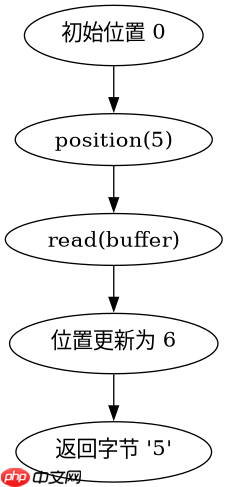
import java.io.IOException;
import java.nio.ByteBuffer;
import java.nio.channels.FileChannel;
import java.nio.file.Paths;
import java.nio.file.StandardOpenOption;

public class PositionReadExample {
    public static void main(String[] args) throws IOException {
        // 假设文件内容为 "0123456789" (10个字节)
        String filePath = "test.txt";

        try (FileChannel channel = FileChannel.open(Paths.get(filePath), StandardOpenOption.READ)) {
            // 1. 获取当前位置(初始通常为 0)
            long initialPos = channel.position();
            System.out.println("Initial position: " + initialPos);

            // 2. 设置位置到索引 5
            channel.position(5);
            long newPos = channel.position();
            System.out.println("New position: " + newPos);

            // 3. 读取一个字节
            ByteBuffer buffer = ByteBuffer.allocate(1);
            int bytesRead = channel.read(buffer);

            if (bytesRead != -1) {
                buffer.flip();
                byte b = buffer.get();
                System.out.println("Read byte at pos 5: " + (char)b);
                System.out.println("Position after read: " + channel.position());
            }
        }
    }
}
如何写入数据到指定位置
向文件指定位置写入数据时,同样需要先通过 position(pos) 定位。如果该位置超出当前文件大小,通道会自动扩展文件空间,中间未填充的部分通常补零(取决于操作系统和文件系统)。写入后,指针会移动到写入结束后的下一个位置。

立即学习“Java免费学习笔记(深入)”;
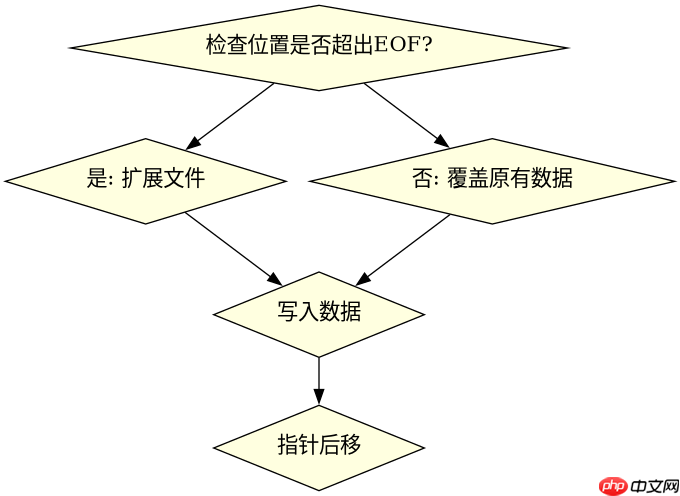
import java.io.IOException;
import java.nio.ByteBuffer;
import java.nio.channels.FileChannel;
import java.nio.file.Paths;
import java.nio.file.StandardOpenOption;

public class PositionWriteExample {
    public static void main(String[] args) throws IOException {
        String filePath = "test_write.txt";

        // 清空并创建文件
        try (FileChannel channel = FileChannel.open(Paths.get(filePath),
                StandardOpenOption.CREATE, StandardOpenOption.TRUNCATE_EXISTING, StandardOpenOption.WRITE)) {

            // 1. 直接跳到第 10 个字节位置
            channel.position(10);

            // 2. 准备数据 "A"
            ByteBuffer buffer = ByteBuffer.wrap(new byte[]{65}); // 'A' is 65

            // 3. 写入
            channel.write(buffer);

            // 此时文件内容应为:\x00\x00...\x00(10 zeros) A
            // 当前指针位置变为 11
            System.out.println("Position after write: " + channel.position());
        }
    }
}
position() 在并发访问下是否线程安全
FileChannel 的 position() 方法不是线程安全的。如果多个线程同时调用 position() 或执行读写操作,它们会共享同一个通道内部的位置状态,导致相互覆盖。例如,线程 A 设置位置为 0,线程 B 设置位置为 100,随后线程 A 执行读取,实际读取到的可能是从位置 100 开始的数据,而非预期的位置 0。因此,多线程环境下必须使用同步机制(如 synchronized 块或 ReentrantLock)来保护对 position() 的调用,或者每个线程使用独立的 FileChannel 实例。