在 nginx 中使用 alias 映射虚拟目录到磁盘,核心做法是在 location 块中指定 url 路径与本地文件系统的绝对路径对应关系。配置时需注意 alias 后的路径必须包含末尾斜杠,且该指令会完全替换 location 匹配的路径前缀,而非追加。若处理静态资源,建议配合 autoindex on 开启目录浏览功能。

如何配置基本路径映射并解决权限问题
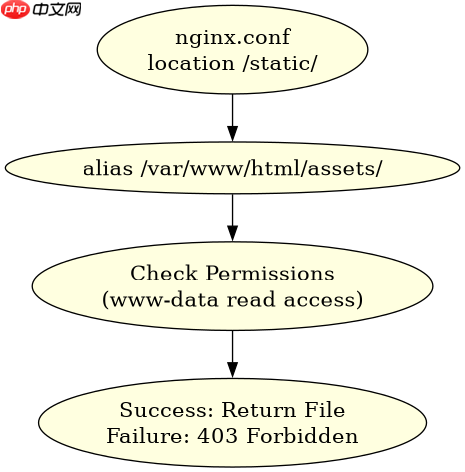
通过修改 nginx.conf 或站点配置文件,使用 location /static/ 指向 /var/www/html/assets/ 即可实现映射。配置完成后需检查系统权限,确保 Nginx 运行用户(如 www-data)对目标目录有读取权限,否则将返回 403 Forbidden 错误。
server {
    listen 80;
    server_name example.com;

    location /static/ {
        alias /var/www/html/assets/;
        autoindex on;
    }
}
预期结果:访问 http://example.com/static/test.txt 将直接读取 /var/www/html/assets/test.txt 的内容。若目录无执行权限或所有者非 Nginx 用户,需执行 chmod -R 755 /var/www/html/assets 修复。
alias 与 root 在处理路径时的关键差异是什么
root 指令会将 location 匹配的路径追加到指定的根目录后,而 alias 则用其指定的路径完全替换 location 的路径部分。这种差异导致两者在正则匹配或复杂路径下行为截然不同,alias 更适合精确映射特定子目录。


# 使用 root 的情况
location /images/ {
    root /var/www/html;
}
# 请求 /images/logo.png -> /var/www/html/images/logo.png

# 使用 alias 的情况
location /files/ {
    alias /var/www/data/files/;
}
# 请求 /files/doc.pdf -> /var/www/data/files/doc.pdf
预期结果:当请求 /images/logo.png 时,root 方式会在 /var/www/html 下查找 images/logo.png;而 alias 方式在请求 /files/doc.pdf 时,会直接去 /var/www/data/files/doc.pdf 查找,忽略 /files/ 前缀。若误用 root 替代 alias 映射非层级目录,会导致 404 错误。
当 alias 路径不存在或包含特殊字符时会发生什么
如果 alias 指向的磁盘路径不存在,Nginx 会直接返回 404 Not Found,不会尝试创建目录。若路径中包含空格或中文等特殊字符,需确保文件系统支持且 Nginx 配置文件中未启用严格的 URI 解码限制,否则可能导致解析失败或安全拦截。
location /special/ {
    alias /var/www/special dir/;
}
预期结果:若 /var/www/special dir/ 存在且可读,访问 /special/file.txt 正常返回内容。若路径拼写错误或权限不足,服务器返回标准 404 页面。建议在配置前使用 ls -l 验证路径存在性,并对含空格的目录名使用引号包裹或在配置中正确转义。