在 linux 中,nginx 使用 lua 脚本监控代理超时状态的核心做法是结合 lua-nginx-module 与 nginx 内置的 $upstream_timeout 变量。通过配置 log_format 将该变量写入访问日志,即可直接获取上游连接、读取或发送阶段的耗时数据,无需额外编写复杂的 lua 逻辑。

如何配置日志格式以捕获上游超时信息?
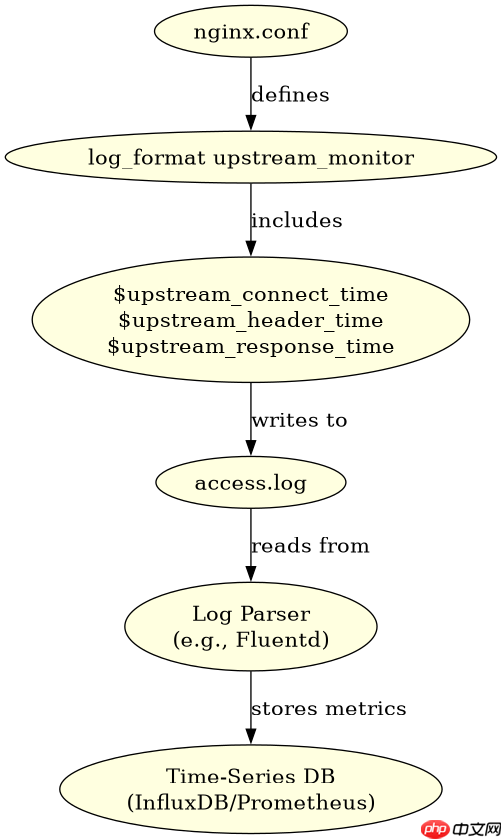
要捕获超时信息,必须在 Nginx 配置文件的 http 块中定义包含 $upstream_response_time 和 $upstream_connect_time 等变量的日志格式。这些变量由 Nginx 核心模块自动维护,Lua 脚本只需读取它们或通过日志解析工具提取。
server {
    listen 80;
    server_name example.com;

    # 定义包含上游超时的日志格式
    log_format upstream_monitor '$remote_addr - $remote_user [$time_local] '
                                '"$request" $status $body_bytes_sent '
                                '"$http_referer" "$http_user_agent" '
                                'upstream_connect_time: $upstream_connect_time '
                                'upstream_header_time: $upstream_header_time '
                                'upstream_response_time: $upstream_response_time';

    access_log /var/log/nginx/upstream_monitor.log upstream_monitor;

    location /api/ {
        proxy_pass http://backend_pool;

        # 可选:使用 Lua 进行实时拦截或告警
        content_by_lua_block {
            -- 这里可以读取 ngx.var.upstream_response_time
            -- 如果超过阈值,可以触发告警或记录到 Redis
            local resp_time = ngx.var.upstream_response_time
            if resp_time and tonumber(resp_time) > 5.0 then
                -- 模拟告警逻辑
                ngx.log(ngx.ERR, "Upstream timeout detected: " .. resp_time)
            end
        }
    }
}
上述配置中,log_format 定义了名为 upstream_monitor 的格式,其中 $upstream_connect_time 记录建立连接的耗时,$upstream_header_time 记录从发出请求到收到响应头部的耗时,$upstream_response_time 记录总耗时。当代理超时发生时,这些值会反映具体的阶段耗时,帮助定位是网络层还是应用层的问题。
Lua 脚本如何实时处理超时事件并上报?
除了日志记录,Lua 脚本可以在请求生命周期中实时检查超时状态,并将关键指标上报到监控系统如 Prometheus 或发送告警通知。这适用于需要低延迟告警的场景。


-- init_by_lua_block 中初始化全局变量
local redis = require "resty.redis"
local red = redis:new()
red:set_timeout(1000) -- 1 second

-- 连接 Redis(实际生产中应复用连接池)
local ok, err = red:connect("127.0.0.1", 6379)
if not ok then
    ngx.log(ngx.ERR, "failed to connect to Redis: ", err)
end

location /api/ {
    proxy_pass http://backend_pool;

    access_by_lua_block {
        local start_time = ngx.now()

        -- 执行代理请求
        ngx.location.capture_proxy("/internal_proxy")

        local end_time = ngx.now()
        local duration = end_time - start_time

        -- 检查是否超时
        if duration > 5.0 then
            -- 上报到 Redis
            local ok, err = red:hset("upstream_timings", ngx.var.request_uri, tostring(duration))
            if not ok then
                ngx.log(ngx.ERR, "failed to report to Redis: ", err)
            end
        end
    }
}
在 access_by_lua_block 中,可以通过计算请求开始和结束的时间差来判断是否超时。如果超时,可以将数据写入 Redis 或其他外部存储,供后续分析或告警使用。这种方法比日志解析更实时,但增加了 Lua 脚本的复杂性和对 Redis 的依赖。
当上游服务无响应时,Nginx 返回什么状态码?
当上游服务无响应导致超时时,Nginx 默认返回 502 Bad Gateway 或 504 Gateway Timeout 状态码,具体取决于超时类型和配置。例如,如果连接超时,通常返回 502;如果读取超时,可能返回 504。
error_page 502 504 /custom_error.html;
location = /custom_error.html {
    internal;
    default_type text/html;
    return 200 "<html><body><h1>Service Unavailable</h1><p>Please try again later.</p></body></html>";
}
通过自定义错误页面,可以提升用户体验。同时,建议在 proxy_next_upstream 指令中配置重试策略,以便在主节点超时时尝试其他健康节点,提高系统可用性。