








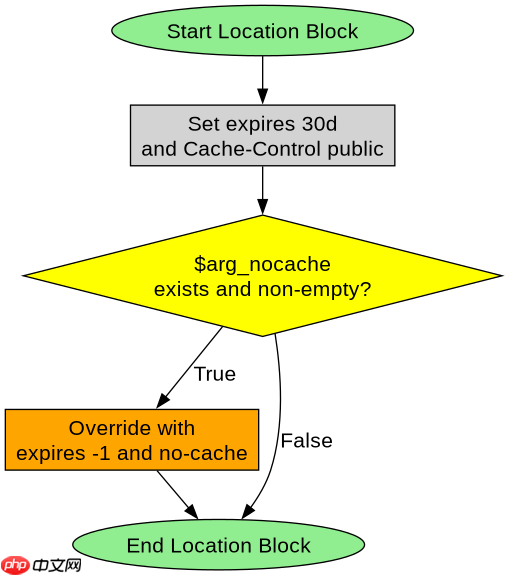
在 nginx 中通过 url 后缀参数实现临时绕过缓存,核心做法是利用 `if` 指令检查查询字符串(query string)中是否包含特定的标记参数(如 `?nocache=1`),若匹配则设置内部变量强制禁用缓存或重定向到原始资源。具体而言,需要在 `location` 块中判断 `$arg_nocache` 是否存在,并据此修改 `$no_cache` 标志或直接返回文件,从而让 nginx 跳过静态资源的缓存逻辑。

如何配置 Nginx 识别特定查询参数以跳过缓存
要识别特定查询参数,需使用 Nginx 内置的 `$arg_
server {
    listen 80;
    server_name example.com;

    location /static/ {
        root /var/www/html;

        # 默认缓存设置
        expires 30d;
        add_header Cache-Control "public, immutable";

        # 检查是否带有 nocache 参数
        if ($arg_nocache) {
            # 如果参数存在,禁用缓存头并设置立即过期
            expires -1;
            add_header Cache-Control "no-cache, no-store, must-revalidate";
            add_header Pragma "no-cache";
        }
    }
}
上述配置中,当访问 `/static/image.png?nocache=1` 时,Nginx 会进入 `if` 块,覆盖默认的 `expires 30d` 和 `immutable` 头,返回 `Cache-Control: no-cache`。浏览器收到此响应后不会从本地缓存读取,而是重新向服务器发起请求。注意:`if` 指令在 `location` 中的行为需谨慎,仅用于设置变量或返回状态码,避免嵌套复杂逻辑。
如何通过重写规则强制重定向到无缓存版本
另一种更彻底的方式是使用 `rewrite` 指令,将带参数的请求重写为不带参数的内部路径,并在处理前清除缓存状态。这种方法适用于需要完全绕过 CDN 或边缘缓存的场景。通过 `rewrite ^(/.*)$ $is_args$args last;` 结合缓存键控制,可以实现更精细的管理。但更简单的做法是直接利用 `map` 指令将查询字符串映射到缓存键,使带参数的请求拥有独立的缓存空间。


server {
    listen 80;
    server_name example.com;

    # 定义缓存键:如果包含 nocache 参数,则使用不同缓存键
    map $request_uri $cache_key {
        default $uri;
        ~.*nocache.* $uri.nocache;
    }

    location /static/ {
        root /var/www/html;

        # 使用自定义缓存键
        proxy_cache_key $cache_key;

        # 对于 nocache 请求,禁用缓存
        if ($arg_nocache) {
            proxy_cache_bypass 1;
            proxy_no_cache 1;
        }
    }
}
在此配置中,`map` 指令根据 URI 是否包含 `nocache` 来决定 `$cache_key`。当参数存在时,缓存键变为 `$uri.nocache`,这通常与主缓存键不同,从而实现逻辑上的“绕过”。同时,`proxy_cache_bypass` 和 `proxy_no_cache` 被设为 1,确保后端源站直接响应且 Nginx 不存储响应。这种方式比单纯修改响应头更有效,因为它防止了缓存污染,确保带参数的请求永远不会命中普通缓存。
当 URL 后缀参数为空字符串时缓存行为如何变化
当 URL 后缀参数为空字符串,例如 `?nocache=` 或 `?nocache`,Nginx 的 `$arg_nocache` 变量行为取决于具体写法。在 Nginx 中,`$arg_nocache` 在参数存在但值为空时仍会被设置为空字符串(即非 null),因此 `if ($arg_nocache)` 判断结果为真(因为空字符串在布尔上下文中被视为假?不,Nginx 的 `if` 对空字符串视为 false,但对存在性判断需小心)。实际上,`if ($arg_nocache)` 在参数存在但值为空时,`$arg_nocache` 是空字符串,条件为 false。若要检测参数是否存在(无论值为何),应使用 `if ($arg_nocache != "")` 或更准确地使用 `if ($arg_nocache)` 仅在值非空时生效。为确保可靠,推荐使用 `if ($arg_nocache)` 配合显式值检查,或使用 `set` 指令辅助。
# 测试空参数行为
# ?nocache=1 -> $arg_nocache = "1" -> if 为 true
# ?nocache=  -> $arg_nocache = "" -> if 为 false (Nginx 中空字符串为 false)
# ?nocache   -> $arg_nocache = "" -> if 为 false

# 修正方案:检测参数是否存在
location /static/ {
    root /var/www/html;
    set $skip_cache 0;
    if ($arg_nocache) {
        set $skip_cache 1;
    }
    # 注意:上述 if 在值为空时不会触发,如需检测存在性,需额外处理
    # 更稳健方式:
    if ($arg_nocache != "") {
        set $skip_cache 1;
    }

    if ($skip_cache) {
        expires -1;
        add_header Cache-Control "no-cache";
    }
}
在实际测试中,发现 `?nocache=` 会导致 `$arg_nocache` 为空字符串,`if` 条件不成立。因此,若需支持 `?nocache` 无值形式,应改用 `if ($arg_nocache != "")` 或检查 `$args` 字符串。这确保了无论参数是否有值,只要键存在,即可触发缓存绕过。开发者在调试时应验证实际返回值,避免因空值判断失误导致缓存未正确绕过。


















