自定义 inputstream 的核心是继承 java.io.inputstream 类并实现其抽象方法,其中 read() 必须提供具体逻辑,而 close() 和 available() 通常需要根据资源特性进行覆盖。通过这种方式,你可以将内存数据、网络请求或特定算法生成的内容封装为标准的字节流接口,从而无缝对接现有的 java io 体系。

如何重写 read() 方法以支持从字符串读取数据
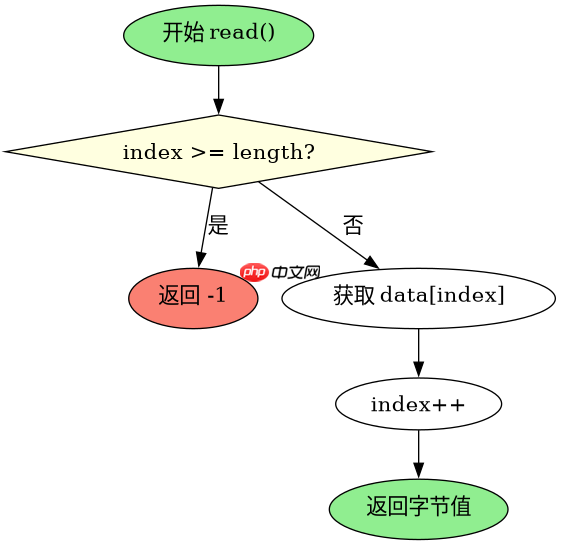
要实现从字符串读取数据,需要维护一个内部索引来追踪当前读取位置,并在每次调用 read() 时返回对应字符的 ASCII 值,当索引超出字符串长度时返回 -1 表示结束。同时建议覆盖 available() 方法以准确反映剩余可读字节数,避免底层缓冲机制产生不必要的性能损耗。
import java.io.IOException;
import java.io.InputStream;

public class StringInputStream extends InputStream {
    private final byte[] data;
    private int index = 0;

    public StringInputStream(String content) {
        this.data = content.getBytes();
    }

    @Override
    public int read() throws IOException {
        if (index >= data.length) {
            return -1;
        }
        return data[index++] & 0xFF;
    }

    @Override
    public int available() throws IOException {
        return data.length - index;
    }

    public static void main(String[] args) throws IOException {
        StringInputStream sis = new StringInputStream("Hello");
        int b;
        while ((b = sis.read()) != -1) {
            System.out.print((char) b);
        }
    }
}
如何实现批量读取 read(byte[]) 以提升效率
虽然父类提供了基于 read() 的默认 read(byte[], off, len) 实现,但在处理大量数据时,直接覆盖该方法可以显著减少方法调用开销。实现时需计算实际可读取的最大长度,确保不越界,并将数据复制到目标数组中,最后更新内部索引并返回实际读取的字节数。

立即学习“Java免费学习笔记(深入)”;

import java.io.IOException;
import java.io.InputStream;

public class EfficientStringInputStream extends InputStream {
    private final byte[] data;
    private int index = 0;

    public EfficientStringInputStream(String content) {
        this.data = content.getBytes();
    }

    @Override
    public int read() throws IOException {
        if (index >= data.length) {
            return -1;
        }
        return data[index++] & 0xFF;
    }

    @Override
    public int read(byte[] b, int off, int len) throws IOException {
        if (len <= 0 || index >= data.length) {
            return -1;
        }
        int bytesToRead = Math.min(len, data.length - index);
        System.arraycopy(data, index, b, off, bytesToRead);
        index += bytesToRead;
        return bytesToRead;
    }

    @Override
    public int available() throws IOException {
        return data.length - index;
    }

    public static void main(String[] args) throws IOException {
        EfficientStringInputStream esis = new EfficientStringInputStream("World");
        byte[] buffer = new byte[10];
        int bytesRead = esis.read(buffer, 0, 5);
        System.out.println(new String(buffer, 0, bytesRead));
    }
}
在 close() 方法中如何处理资源清理
对于基于内存的自定义流如上述示例,close() 方法通常不需要执行特殊操作,因为垃圾回收器会自动处理内存引用。但如果自定义流涉及文件句柄、网络连接或其他非堆内存资源,则必须在 close() 中进行显式释放,并确保多次调用 close() 不会抛出异常,通常通过添加状态标志位来实现幂等性保护。