本文实例为大家分享了mvc+jquery.ajax异步实现增删改查和分页的具体代码,供大家参考,具体内容如下
1、Model层代码
using System;
using System.Data;
using System.Configuration;
using System.Linq;
using System.Web;
using System.Web.Security;
using System.Web.UI;
using System.Web.UI.HtmlControls;
using System.Web.UI.WebControls;
using System.Web.UI.WebControls.WebParts;
using System.Xml.Linq;
using System.Collections.Generic;
using MvcExamples;
using System.Web.Mvc;

namespace MvcExamples.Web.Models
{
 public class StudentModels
 {
  /// <summary>
  /// 获取学生信息列表
  /// </summary>
  public List<MvcExamples.Model.Student> StudentList { get; set; }
  /// <summary>
  /// 获取教工信息列表
  /// </summary>
  public List<MvcExamples.Model.Teacher> TeacherList { get; set; }
  /// <summary>
  /// 获取学生信息列表(分页)
  /// </summary>
  public PagedList<MvcExamples.Model.Student> GetStudentList { get; set; }
 }
}
2、View层代码
<%@ Page Title="" Language="C#" MasterPageFile="~/Views/Shared/Site.Master" Inherits="System.Web.Mvc.ViewPage<MvcExamples.Web.Models.StudentModels>" %>
<asp:Content ID="Content1" ContentPlaceHolderID="TitleContent" runat="server">
Index
</asp:Content>
<asp:Content ID="Content3" ContentPlaceHolderID="HeadContent" runat="server">
<script src="http://www.cnblogs.com/Scripts/jquery-1.4.2.min.js" type="text/javascript"></script>
<script src="http://www.cnblogs.com/Scripts/My97DatePicker/WdatePicker.js" type="text/javascript"></script>
<script src="http://www.cnblogs.com/Scripts/windwUi/jquery-ui-1.8.1.min.js" type="text/javascript"></script>
<link href="http://www.cnblogs.com/Scripts/windwUi/jquery-ui-1.8.1.custom.css" rel="stylesheet" type="text/css" />
<script type="text/javascript">
$(function(){
//添加学生信息
$('#a_add').click(function(){
$('#window').dialog({
title: "添加学生信息",
width: 300,
height: 200,
modal: true,
buttons: {
"取消": function() {
$(this).dialog("close"); //当点击取消按钮时,关闭窗口
},
"添加": function() {
//当点击添加按钮时,获取各参数的值
var sno=$('#sno').val();
var sname=$('#sname').val();
var ssex=$('#ssex').val();
var sbirsthday=$('#sbirthday').val();
var sclass=$('#sclass').val();
$.ajax({
type:'post',
url:'/Student/AddStudent',//路径为添加方法
data:'no='+sno+'&name='+sname+'&sex='+ssex+'&birsthday='+sbirsthday+'&sclass='+sclass,//参数的个数和名字要和方法的名字保持一致
success:function(json)//返回的是Json类型的
{
$('#window').dialog("close");
//判断是否成功
if(json.result=="true")
{
$('#btn_close').click();
alert('恭喜你,修改成功!');
}else{
alert('抱歉,修改失败!');
}
}
});
}
}
});
})
//删除学生信息
$('.a_delete').click(function(){
//确认是否删除
if(confirm("是否删除此条信息?"))
{
$.ajax({
type:'post',
url:'/Student/DeleteStudent',
data:'no='+$(this).attr("sno"),//获取当前对象的属性(自定义属性)sno的值,用自定义属性保存相应需要的数据
sucess:function(json)
{
if(json.result=="true")
{
alert("恭喜你,已成功删除!");
}else
{
alert("抱歉,删除失败!");
}
}
})
}
})
//修改学生信息
$('.a_update').click(function(){
var student=$(this);
$("#sno").attr("value",student.attr("sno"));
$("#sname").attr("value",student.attr("sname"));
$("#ssex").attr("value",student.attr("ssex"));
$("#sbirthday").attr("value",student.attr("sbirthday"));
$("#sclass").attr("value",student.attr("sclass"));
$('#window').dialog({
title: "修改学生信息",
width: 300,
height: 200,
modal: true,
buttons: {
"取消": function() {
$(this).dialog("close");
},
"修改": function() {
var sno=$('#sno').val();
var sname=$('#sname').val();
var ssex=$('#ssex').val();
var sbirsthday=$('#sbirthday').val();
var sclass=$('#sclass').val();
$.ajax({
type:'post',
url:'/Student/UpdateStudent',
data:'no='+sno+'&name='+sname+'&sex='+ssex+'&birsthday='+sbirsthday+'&sclass='+sclass,
success:function(json)
{
$('#window').dialog("close");
if(json.result=="true")
{
$('#btn_close').click();
alert('恭喜你,修改成功!');
}else{
alert('抱歉,修改失败!');
}
}
});
}
}
});
});
})
</script>
</asp:Content>
<asp:Content ID="Content2" ContentPlaceHolderID="MainContent" runat="server">
<h2>
MVC 演示</h2>
<table>
<thead>
<tr>
<td>
学生表
</td>
</tr>
<tr>
<td>
学号
</td>
<td>
姓名
</td>
<td>
性别
</td>
<td>
生日
</td>
<td>
班级
</td>
<td>
操作
</td>
</tr>
</thead>
<tbody>
<%foreach (MvcExamples.Model.Student student in Model.GetStudentList)
{%>
<tr>
<td>
<%=student.sno %>
</td>
<td>
<%=student.sname %>
</td>
<td>
<%=student.ssex %>
</td>
<td>
<%=student.sbirthday %>
</td>
<td>
<%=student.sclass %>
</td>
<td>
<a href="javascript:void(0);" class="a_update" sno="<%=student.sno %>" sname="<%=student.sname %>" ssex="<%=student.ssex %>"
sbirthday="<%=student.sbirthday %>" sclass="<%=student.sclass %>">修改</a>
 
<a href="javascript:void(0);" class="a_delete" sno="<%=student.sno %>">删除</a>
</td>
</tr>
<% } %>
</tbody>
<tfoot>
<tr>
<td>
全选
</td>
<td colspan="5" style="text-align: right;">
<a href="javascript:void(0);" id="a_add">添加</a>
</td>
</tr>
</tfoot>
</table>
<%=Html.MikePager(Model.GetStudentList)%>
<br />
<table>
<thead>
<tr>
<td>
学生表
</td>
</tr>
<tr>
<td>
学号
</td>
<td>
姓名
</td>
<td>
性别
</td>
<td>
生日
</td>
<td>
班级
</td>
</tr>
</thead>
<tbody>
<%foreach (MvcExamples.Model.Student student in Model.StudentList)
{%>
<tr>
<td>
<%=student.sno %>
</td>
<td>
<%=student.sname %>
</td>
<td>
<%=student.ssex %>
</td>
<td>
<%=student.sbirthday %>
</td>
<td>
<%=student.sclass %>
</td>
</tr>
<% } %>
</tbody>
</table>
<br />
<table>
<thead>
<tr>
<td>
老师表
</td>
</tr>
<tr>
<td>
编号
</td>
<td>
姓名
</td>
<td>
性别
</td>
<td>
生日
</td>
<td>
职称
</td>
<td>
所在部门
</td>
</tr>
</thead>
<tbody>
<%foreach (MvcExamples.Model.Teacher teacher in Model.TeacherList)
{%>
<tr>
<td>
<%=teacher.tno%>
</td>
<td>
<%=teacher.tname%>
</td>
<td>
<%=teacher.tsex%>
</td>
<td>
<%=teacher.tbirthday%>
</td>
<td>
<%=teacher.prof%>
</td>
<td>
<%=teacher.depart%>
</td>
</tr>
<% } %>
</tbody>
</table>
<div id="window" style="display:none;">
<input type="hidden" id="sno" name="sno" value="" />
姓名:<input type="text" id="sname" name="sname" /><br />
性别:<input type="text" id="ssex" name="ssex" /><br />
生日:<input type="text" id="sbirthday" name="sbirthday" onClick = "WdatePicker()" /><br />
班级:<input type="text" id="sclass" name="sclass" /><br />
</div>
</asp:Content>
3、Controller层代码
using System;
using System.Collections.Generic;
using System.Linq;
using System.Web;
using System.Web.Mvc;
using System.Web.Mvc.Ajax;
namespace MvcExamples.Web.Controllers
{
public class StudentController : Controller
{
//
// GET: /Student/
MvcExamples.BLL.Student _Student = new MvcExamples.BLL.Student();
MvcExamples.BLL.Teacher _Teacher = new MvcExamples.BLL.Teacher();
/// <summary>
/// 演示
/// </summary>
/// <param name="pi"></param>
/// <param name="sclass"></param>
/// <returns></returns>
public ActionResult Index(int? pi, string sclass)
{
int PageIndex = pi ?? 1;
int PageSize = 5;
string sClass = sclass == null ? "95031" : sclass;
MvcExamples.Web.Models.StudentModels _StudentModels = new MvcExamples.Web.Models.StudentModels();
_StudentModels.StudentList = _Student.GetModelList("sclass=" + sClass);
_StudentModels.TeacherList = _Teacher.GetModelList("tsex='男'");
_StudentModels.GetStudentList = new PagedList<MvcExamples.Model.Student>(_Student.GetModelList("sclass=" + sClass).AsQueryable(), PageIndex, PageSize);
return View(_StudentModels);//返回一个Model
}
/// <summary>
/// 修改学生信息
/// </summary>
/// <param name="no"></param>
/// <param name="name"></param>
/// <param name="sex"></param>
/// <param name="birsthday"></param>
/// <param name="sclass"></param>
/// <returns></returns>
public ActionResult UpdateStudent(string no, string name, string sex, string birsthday, string sclass)
{
MvcExamples.Model.Student _student = new MvcExamples.Model.Student();
_student.sno = no;
_student.sname = name;
_student.ssex = sex;
_student.sbirthday = Convert.ToDateTime(birsthday);
_student.sclass = sclass;
_Student.Update(_student);
JsonResult json = new JsonResult();
json.Data = new
{
result = "true"
};
return json;
}
/// <summary>
/// 删除学生信息
/// </summary>
/// <param name="no"></param>
/// <returns></returns>
public ActionResult DeleteStudent(string no)
{
bool IsDelete= _Student.Delete(no);
JsonResult json = new JsonResult();
return json;
if (IsDelete)
{
json.Data = new
{
result = "true"
};
}
else
{
json.Data = new
{
result ="false"
};
}
return json;
}
/// <summary>
/// 添加学生信息
/// </summary>
/// <param name="no"></param>
/// <param name="name"></param>
/// <param name="sex"></param>
/// <param name="birsthday"></param>
/// <param name="sclass"></param>
/// <returns></returns>
public ActionResult AddStudent(string no, string name, string sex, string birsthday, string sclass)
{
MvcExamples.Model.Student _student = new MvcExamples.Model.Student();
_student.sno = no;
_student.sname = name;
_student.ssex = sex;
_student.sbirthday = Convert.ToDateTime(birsthday);
_student.sclass = sclass;
_Student.Add(_student);
JsonResult json = new JsonResult();
json.Data = new
{
result = "true"
};
return json;
}
/// <summary>
/// 提供弹出窗口的数据
/// </summary>
/// <param name="id"></param>
/// <returns></returns>
public ActionResult WindowData(int id)
{
JsonResult json = new JsonResult();
//这里给json数据(这里只是演示,下面数据是模拟的)
json.Data = new
{
name = "张三",
sex = "男"
};
return json;
}
}
}
4、两个分页辅助类PagedList和MikePagerHtmlExtensions
PagedList辅助类
using System;
using System.Data;
using System.Configuration;
using System.Linq;
using System.Web;
using System.Web.Security;
using System.Web.UI;
using System.Web.UI.HtmlControls;
using System.Web.UI.WebControls;
using System.Web.UI.WebControls.WebParts;
using System.Xml.Linq;
using System.Collections.Generic;
using System.Collections.Specialized;
namespace System.Web.Mvc
{
public interface IPagedList
{
int TotalPage //总页数
{
get;
}
int TotalCount
{
get;
set;
}
int PageIndex
{
get;
set;
}
int PageSize
{
get;
set;
}
bool IsPreviousPage
{
get;
}
bool IsNextPage
{
get;
}
}
public class PagedList<T> : List<T>, IPagedList
{
public PagedList(IQueryable<T> source, int? index, int? pageSize)
{
if (index == null) { index = 1; }
if (pageSize == null) { pageSize = 10; }
this.TotalCount = source.Count();
this.PageSize = pageSize.Value;
this.PageIndex = index.Value;
this.AddRange(source.Skip((index.Value - 1) * pageSize.Value).Take(pageSize.Value));
}
public int TotalPage
{
get { return (int)System.Math.Ceiling((double)TotalCount / PageSize); }
}
public int TotalCount
{
get;
set;
}
/// <summary>
///
/// </summary>
public int PageIndex
{
get;
set;
}
public int PageSize
{
get;
set;
}
public bool IsPreviousPage
{
get
{
return (PageIndex > 1);
}
}
public bool IsNextPage
{
get
{
return ((PageIndex) * PageSize) < TotalCount;
}
}
}
public static class Pagination
{
public static PagedList<T> ToPagedList<T>(this IOrderedQueryable<T> source, int? index, int? pageSize)
{
return new PagedList<T>(source, index, pageSize);
}
public static PagedList<T> ToPagedList<T>(this IOrderedQueryable<T> source, int? index)
{
return new PagedList<T>(source, index, 10);
}
public static PagedList<T> ToPagedList<T>(this IQueryable<T> source, int? index, int? pageSize)
{
return new PagedList<T>(source, index, pageSize);
}
public static PagedList<T> ToPagedList<T>(this IQueryable<T> source, int? index)
{
return new PagedList<T>(source, index, 10);
}
}
}
MikePagerHtmlExtensions辅助类
using System;
using System.Data;
using System.Configuration;
using System.Linq;
using System.Web;
using System.Web.Security;
using System.Web.UI;
using System.Web.UI.HtmlControls;
using System.Web.UI.WebControls;
using System.Web.UI.WebControls.WebParts;
using System.Xml.Linq;
using System.Web.Mvc;
using System.Web.Routing;
using System.Text;
namespace System.Web.Mvc
{
public static class MikePagerHtmlExtensions
{
#region MikePager 分页控件
public static string MikePager<T>(this HtmlHelper html, PagedList<T> data)
{
string actioinName = html.ViewContext.RouteData.GetRequiredString("action");
return MikePager<T>(html, data, actioinName);
}
public static string MikePager<T>(this HtmlHelper html, PagedList<T> data, object values)
{
string actioinName = html.ViewContext.RouteData.GetRequiredString("action");
return MikePager<T>(html, data, actioinName, values);
}
public static string MikePager<T>(this HtmlHelper html, PagedList<T> data, string action)
{
return MikePager<T>(html, data, action, null);
}
public static string MikePager<T>(this HtmlHelper html, PagedList<T> data, string action, object values)
{
string controllerName = html.ViewContext.RouteData.GetRequiredString("controller");
return MikePager<T>(html, data, action, controllerName, values);
}
public static string MikePager<T>(this HtmlHelper html, PagedList<T> data, string action, string controller, object values)
{
return MikePager<T>(html, data, action, controller, new RouteValueDictionary(values));
}
public static string MikePager<T>(this HtmlHelper html, PagedList<T> data, RouteValueDictionary values)
{
string actioinName = html.ViewContext.RouteData.GetRequiredString("action");
return MikePager<T>(html, data, actioinName, values);
}
public static string MikePager<T>(this HtmlHelper html, PagedList<T> data, string action, RouteValueDictionary values)
{
string controllerName = html.ViewContext.RouteData.GetRequiredString("controller");
return MikePager<T>(html, data, action, controllerName, values);
}
public static string MikePager<T>(this HtmlHelper html, PagedList<T> data, string action, string controller, RouteValueDictionary valuedic)
{
int start = (data.PageIndex - 5) >= 1 ? (data.PageIndex - 5) : 1;
int end = (data.TotalPage - start) > 9 ? start + 9 : data.TotalPage;
RouteValueDictionary vs = valuedic == null ? new RouteValueDictionary() : valuedic;
var builder = new StringBuilder();
builder.AppendFormat("<div class=\"mike_mvc_pager\">");
if (data.IsPreviousPage)
{
vs["pi"] = 1;
builder.Append(Html.LinkExtensions.ActionLink(html, "首页", action, controller, vs, null));
builder.Append(" ");
vs["pi"] = data.PageIndex - 1;
builder.Append(Html.LinkExtensions.ActionLink(html, "上一页", action, controller, vs, null));
builder.Append(" ");
}
for (int i = start; i <= end; i++) //前后各显示5个数字页码
{
vs["pi"] = i;
if (i == data.PageIndex)
{
builder.Append("<font class='thispagethis'>" + i.ToString() + "</font> ");
}
else
{
builder.Append(" ");
builder.Append(Html.LinkExtensions.ActionLink(html, i.ToString(), action, controller, vs, null));
}
}
if (data.IsNextPage)
{
builder.Append(" ");
vs["pi"] = data.PageIndex + 1;
builder.Append(Html.LinkExtensions.ActionLink(html, "下一页", action, controller, vs, null));
builder.Append(" ");
vs["pi"] = data.TotalPage;
builder.Append(Html.LinkExtensions.ActionLink(html, "末页", action, controller, vs, null));
}
builder.Append(" 每页" + data.PageSize + "条/共" + data.TotalCount + "条 第" + data.PageIndex + "页/共" + data.TotalPage + "页 </div>");
return builder.ToString();
}
#endregion
}
}
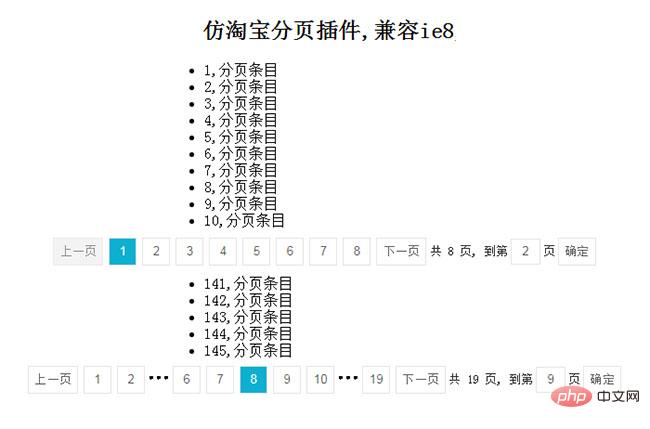
效果图:


5、源码下砸:jQuery.Ajax异步实现增删改查和分页
以上就是本文的全部内容,希望对大家的学习有所帮助。