junit 5 不支持直接在测试方法参数上通过注解注入临时目录,因为 `@tempdir` 是 junit jupiter 的扩展机制,仅支持字段注入或方法参数注入(需配合 `@extendwith` 或类级别声明),但无法像 mockito 那样随意在任意参数位置使用。正确做法是将 `@tempdir` 标注在测试类的字段上,或在测试方法的参数列表中直接声明 `tempdir` 类型的参数(junit 5.3+ 支持)。若需动态创建临时目录并传入其他逻辑,应使用 `files.createtempdirectory()` 并在 `@aftereach` 中清理,或通过 `@tempdir` 字段获取路径后手动传递给被测方法。
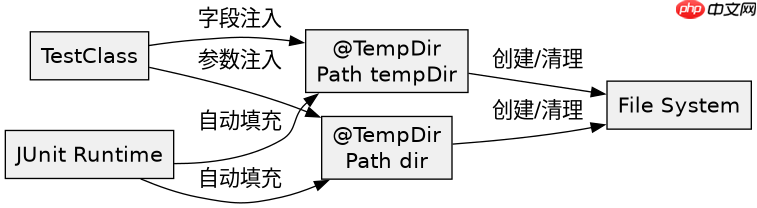
为什么不能在普通方法参数上随意注入 @TempDir?
因为 `@TempDir` 不是 Spring 或 Guice 那样的依赖注入容器管理的 Bean,而是 JUnit 扩展框架提供的特殊资源管理器。它只能在测试类字段或测试方法参数中被识别,且必须由 JUnit 运行时自动填充。如果尝试在非测试方法、非 JUnit 管理的方法参数上使用,会抛出 `ParameterResolutionException`。例如,在一个普通 Java 方法中写 `void test(@TempDir Path dir)` 是无效的,因为该方法不在 JUnit 执行上下文中。
import org.junit.jupiter.api.Test;
import org.junit.jupiter.api.io.TempDir;
import java.nio.file.Path;

public class TempDirExample {
    @TempDir
    Path tempDir;

    @Test
    void testUsingFieldInjection() throws Exception {
        Path file = tempDir.resolve("test.txt");
        java.nio.file.Files.writeString(file, "hello");
        System.out.println(java.nio.file.Files.readString(file));
    }

    @Test
    void testUsingMethodParameter(Path tempDir) throws Exception {
        Path file = tempDir.resolve("test2.txt");
        java.nio.file.Files.writeString(file, "world");
        System.out.println(java.nio.file.Files.readString(file));
    }
}
上述代码展示了两种合法用法:字段注入和方法参数注入。两者均由 JUnit 自动管理生命周期,无需手动删除。注意方法参数注入要求参数类型为 `Path` 或 `File`,且必须位于测试方法签名中。若写成 `void test(String arg, @TempDir Path dir)`,JUnit 仍能解析 `dir`,但 `arg` 若无对应解析器则会失败。因此,所有参数都必须能被 JUnit 的参数解析器处理。

JUnit 5.13.4 可用于旧项目兼容性排查;5.13 系列引入参数化测试类并改进测试发现诊断。该分支已不受支持,不建议用于生产项目;对应的 Platform 独立运行包为 1.13.4。
如何在不使用 @TempDir 时手动管理临时目录?
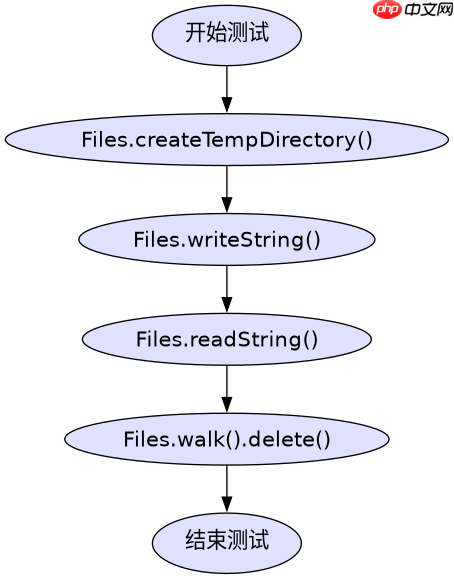
当需要更精细控制或兼容旧版 JUnit 4 时,可手动调用 `Files.createTempDirectory()` 并在 `@AfterEach` 中递归删除。这种方式不依赖 JUnit 扩展,适用于任何测试框架。示例中先创建目录,写入文件,读取验证,最后清理。需注意异常情况下也应确保清理,推荐使用 `try-with-resources` 或 `finally` 块。此方式虽繁琐,但无版本限制,且行为完全可控。

import org.junit.jupiter.api.AfterEach;
import org.junit.jupiter.api.Test;
import java.nio.file.Files;
import java.nio.file.Path;
import java.io.IOException;

public class ManualTempDirTest {
    private Path tempDir;

    @Test
    void testManualCreation() throws IOException {
        tempDir = Files.createTempDirectory("manual-");
        Path file = tempDir.resolve("data.txt");
        Files.writeString(file, "manual content");
        System.out.println(Files.readString(file));
    }

    @AfterEach
    void cleanup() throws IOException {
        if (tempDir != null && Files.exists(tempDir)) {
            Files.walk(tempDir)
                 .sorted((a, b) -> b.compareTo(a))
                 .forEach(p -> {
                     try { Files.delete(p); } catch (IOException e) { e.printStackTrace(); }
                 });
        }
    }
}
该实现确保每次测试后目录被彻底清除,避免污染后续测试。虽然代码量增加,但避免了 JUnit 版本依赖。对于简单场景,推荐优先使用 `@TempDir`;对于复杂清理逻辑或跨框架兼容,手动管理更可靠。两种方式的输出均为控制台打印的文件内容,证明读写成功。
当 @TempDir 注入的路径包含中文文件名时会发生什么?
JUnit 5 的 `@TempDir` 返回的是 `java.nio.file.Path` 对象,其底层文件系统支持 UTF-8 编码,因此中文文件名完全合法。例如,在 `@TempDir` 目录下创建名为“测试.txt”的文件,写入中文内容,再读取,均不会报错。操作系统和 JVM 共同决定路径兼容性,现代 Windows、macOS 和 Linux 均支持 Unicode 路径。唯一风险是某些老旧工具链或第三方库可能假设 ASCII 路径,导致意外行为。但在纯 JUnit + NIO 环境下,中文路径无任何特殊处理需求。